Activity
Mon
Wed
Fri
Sun
Sep
Oct
Nov
Dec
Jan
Feb
Mar
Apr
May
Jun
Jul
Aug
What is this?
Less
More
Owned by Allen
Build ridiculously useful AI for your life, work, and business — live, every week, with people who love this stuff. Watch less. Build more.
Memberships
AI Online Educators & Coaches
3.3k members • Free
AI Bits and Pieces
832 members • Free
Claude Code Profit Room
385 members • $77/month
The Success Club
15.6k members • Free
Skoolers
161.5k members • Free
AI Automation Society Plus
3.9k members • $129/month
AI Automation Society
434k members • Free
The AI Advantage
127.4k members • Free
Easy Machine AI
3.2k members • Free
3 contributions to AI Bits and Pieces

🔥
7d •
ChatGPT Work v. Claude Cowork: Which Should You Choose?
In Part 1 and Part 2, we used 🐠 Dory and 🖖Spock to explain the difference between Chat and (Co)work. That leads to the next logical question: 🤔 Okay, but which Spock do I use—ChatGPT’s Work or Claude’s Cowork? Personally, I use and like both. The honest answer is that ChatGPT Work and Claude Cowork are built around the same core idea: Give the AI a goal, provide the right context, and let it complete the work. Both can research information, analyze files, create documents, build spreadsheets and presentations, use connected tools, and work through assignments involving several steps. The meaningful difference is where each one feels most at home. Claude Cowork: Best When Your Work Lives in Files and Folders Claude Cowork is especially comfortable when your work lives in files and folders. You can connect a folder on your computer and ask Claude to: - Read and compare several files - Edit or create documents - Rename and reorganize files - Build spreadsheets and presentations - Research missing information - Deliver the finished materials for your review It can work directly with the material inside that folder rather than requiring you to open each file, copy the information into a conversation, and direct every step. Claude Cowork is no longer limited to the desktop. Cowork sessions can also run remotely and be accessed through web and mobile as availability rolls out (more on that later). However, its ability to work with selected local folders remains one of its most recognizable strengths. Claude can also use connectors and plugins: A Claude plugin can package skills, connectors, and sub-agents into a reusable workflow. When a direct connector or tool is not available, Claude can use your computer by navigating applications, clicking, and typing. ⚠️ Note: Claude Cowork requires a Pro level subscription. ChatGPT Work: Best When Your Work Lives Across Connected Apps ChatGPT Work is especially comfortable when your work is spread across connected business tools.


3 likes • 7d
The new voice in ChatGPT/Codex is revolutionary. Full access to my files and running my AIOS on a voice that reponds fast and naturally. It's the breakout moment in my opinion and it's going to take a week or two for everyone to realize it. Touching your keyboard is.a thing of the past
2 likes • 4d
@Michael Wacht It's on Work and Codex I believe. I am having a blast with it. It feels so good working with it now that it can actually use it's tools and work with your local files and getting it hooked up to my AIOS. Feels like the future. I am now running with a Codex voice agent on a mic on a side computer that pretty much functions as the personal assistant role I can just talk to whenever I think of something for them to do like work in my email or spreadsheets or scheduling things, time tracking, just anything really. Ordering lunch. ;-)
🔥
Jun 25 •
📬 AI Controls My Inbox: 🧪 Experiment
For the past several months, I’ve been using ChatGPT and Claude to help manage my inboxes. They’ve been reading emails, sorting intent, identifying what matters, and surfacing what needs attention. But up until now, I’ve always check the work of AI—reviewing everything alongside them and verifying decisions daily. That will change for the next 30 days. 🧪 The Experiment Starting today, I’m running a 30-day controlled experiment: - ChatGPT and Claude will be the "first systems to review my inbox" - AI will handle all first-pass triage, prioritization, and escalation - I will only respond to emails that are flagged by AI - I will only open my email every 72 hours (3 days) - I will rely on AI summaries and alerts between reviews - ChatGPT scheduling and Claude coworking workflows will run in parallel This is not convenience automation. It’s a controlled delegation test under time delay. 📬 Important Context My email is not siloed. It is a shared channel for both personal and business communication. That includes: - Clients and prospects - Financial and operational items - Personal messages and family logistics - Newsletters, system alerts, and vendor communication This is a real mixed-context inbox, not a filtered business queue. That matters, because context switching is where prioritization either succeeds or fails. 🎯 The Goal I want to understand one thing clearly. What happens when AI becomes the first decision layer in a real-world inbox with delayed human access? Not just summarization. Not just filtering. But actual prioritization that must hold for 72-hour cycles. Specifically: - What AI consistently gets right - Where urgency is misclassified or delayed too long - How well personal vs business context is separated - What gets buried that should not be - How trust behaves when human correction is delayed 🚧 The Guardrails This is not full autonomy. There is still a safety system in place: - Human review every 72 hours - Explicit escalation rules for VIP, financial, and time-sensitive messages - Dual-system validation (ChatGPT + Claude) - No irreversible actions without review - I am still responding to emails, that is not being delegated
2 likes • Jun 25
I imagine your results will vary wildly depending on the model and effort you set up. Will you be changing models or are you sticking with a particular one for the full test? Finding out which is the cheapest, consistant, and efficient model would be AMAZING take aways if you get to that.
🔥
Jun 23 •
📦 Out of The Box in 30: ChatGPT Scheduled Tasks
Welcome to the Out of The Box Series, where I test how far curiosity and AI can take you in 30, 60, or 90 minutes using today’s best no-code and low-code tools. No setup. No training. Just pure exploration, right out of the box. 🎬 This Episode: ChatGPT Scheduled Tasks ChatGPT now has a Scheduled feature, and I wanted to see how practical it really is for everyday work. Not a complex automation build. Not a workflow platform. Not a technical setup. Just simple reminders, recurring tasks, research requests, and monitoring activities created in plain English. The result? ✅ ChatGPT finally makes basic automation feel easy enough for everyday use. 🧪 The Challenge Can ChatGPT help you create useful scheduled tasks and reminders without code, workflow builders, triggers, or integrations? That was the test. ⏱️ The 2-Minute Playbook (Literally) 1. Open ChatGPT 2. Select Scheduled from the menu 3. Describe what you want ChatGPT to do and when 4. Set the timing 5. Save Each scheduled task runs automatically and places the result in your “Recent” chats for review. 📋 Example Scheduled Tasks “Every morning at 8:00 AM, send me a summary of the top AI business news.” “Remind me every weekday at 7:30 AM to write my AI Bits & Pieces post.” “Every Friday at 4:00 PM, remind me to review my sales pipeline.” “Watch for new AI strategy jobs paying over X dollars and notify me when one appears.” 💡 Bits & Pieces Pro Tips Start simple. Do not try to build a full automation system on day one. Start with one useful reminder or recurring task. Be specific. Instead of saying, send me news. Try, “Every morning at 8:00 AM, send me the top 5 AI business news stories with one sentence on why each matters.” Use it for things you already forget or tend to procrastinate. Sales follow-ups. Weekly reviews. Content reminders. Market updates.Research checks. That is where Scheduled becomes useful fast. ✅ Out of The Box Takeaway Awesome feature with one catch. You are limited to five scheduled tasks or reminders. 😣
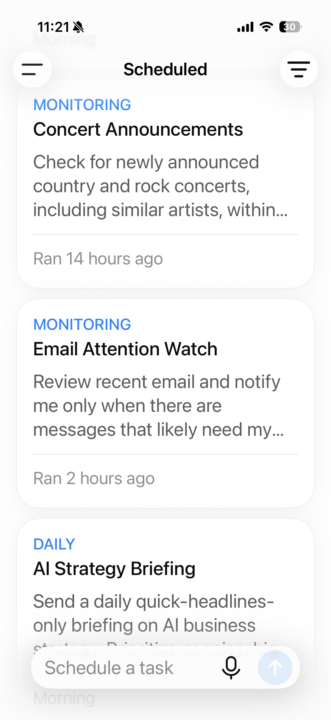
1 like • Jun 23
Wondering if ChatGPT may use less tokens since it's not hooked to as much as your codex might be. That may be a use case for token efficiency perhaps???
1 like • Jun 23
@Michael Wacht I just did a little research and it looks like OPENAI is in the process of merging ChatGPT and Codex into a single App so I suspect in a few months it won't matter which one you are using.
1-3 of 3
@allen-flores-5639
30 years in IT and tech. AI had me CHARGING out of semi-retirement. It's everything I've been waiting for my entire life.
Active 22h ago
Joined Jun 21, 2026
Arizona
Powered by