Activity
Mon
Wed
Fri
Sun
Aug
Sep
Oct
Nov
Dec
Jan
Feb
Mar
Apr
May
Jun
What is this?
Less
More
Owned by Aisha
Grow, connect & pivot with purpose through faith, business & parenting. Learn, build & thrive with education, accountability & inspiration. 💛
Memberships
Plug & Play Challenge
622 members • Free
Sanctuary ✝️
4 members • Free
Kingdom Bookkeeping
624 members • Free
The Virtual Bookkeeping Series
84.6k members • Free
AI Cash Skool
1.9k members • $5/month
$10K Challenge
6.6k members • Free
School Of Invisible Income
1k members • Free
All Things Autism
138 members • $4/month
GovconOS
14k members • Free
2 contributions to Hire a VA

May 9 •
Claude Design + Canva = OH MY!!! 💜
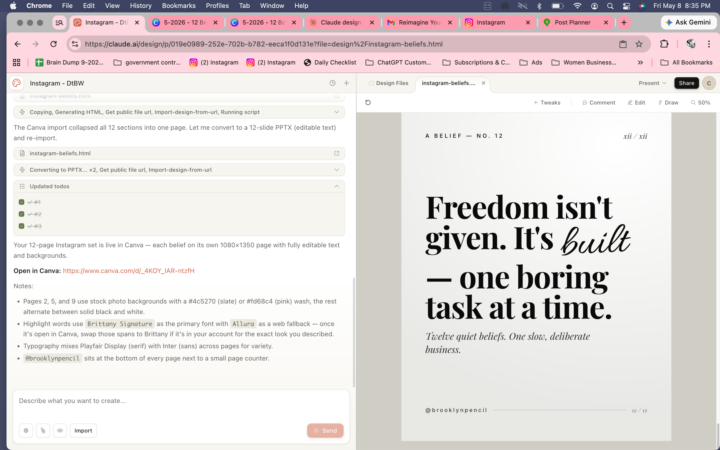
I am so dang excited about this! Do any of you use Claude Design? Or in this way? Threads is my space. But I need to start showing up on Instagram too. And while I love Canva, I am Canva'd out after all the work I do in it daily for clients. I was watching a YouTube video earlier and learned that Claude can create graphics and send them directly to Canva in a format you can actually edit. I spent 2 hours figuring this out. Now it's my new favorite hack and I can finally commit to create quote graphics for my Insta with no excuses. I created 12 simple branded quote graphics for my account. Before you try it, do these two things first. They're EXTREMELY IMPORTANT. 1. Connect Claude to Canva. Go to claude.ai → profile → Settings → Connectors → find Canva → hit Connect. You only do this once. 2.🚨🚨🚨WARNING🚨🚨🚨 Write your prompt in regular Claude chat first. Claude Design uses separate token limits and requires very specific prompting. Before you open Claude Design, ask Claude chat to help you build your prompt. Give it the text for your graphics, your color hex codes, font style, size, how many graphics, and your Instagram handle for the bottom. The more specific your prompt, the fewer back and forth messages you burn through. Then follow these steps: Step 1 — Open Claude Design. Go to claude.ai/design and start a new project. It's completely separate from your regular Claude chat. Step 2 — Paste your prompt and let it build. Claude generates everything on the canvas on the right. Use your arrow keys to flip through and review each page. Step 3 — Request editable files (don't skip this). When you're happy with the designs, type this exactly: "Re-export to Canva as a PPTX with editable text layers." 🚨🚨🚨 If you skip this step your graphics come into Canva as flat images you cannot edit. 🚨🚨🚨 Step 4 — Click the Canva link. Claude gives you a link that says Open in Canva. Click it. Your file opens with all pages ready to edit.
Poll
5 members have voted

1 like • May 9
I have used Claude to build websites, code and software
1 like • May 9
@Chastity Cortijo I have only built it. I haven’t decided where to host it yet. The software of a client that needs a potential client that needs Credit Repair. I actually used to run a Credit Repair business so I wanna create a partnership in a software Contata leverage that connection so we shall see but once I figure out where I’m going to host it, I will share the website with you.

Nov '25 •
How to Find Clients: Your last client yes?
When you look back at your last client win… What actually made them say yes? Let's compare notes as a group. Your experince may help a newer service provider
2 likes • Nov '25
I fill in their thought gaps so that can build what’s important while demonstrating I can support what they need off their plate.
1-2 of 2

@aisha-brooks-8103
I am Aisha I am a Virtual assistant, author speaker and coach.
Active 14h ago
Joined Nov 14, 2025
ISTP