Activity
Mon
Wed
Fri
Sun
Jan
Feb
Mar
Apr
May
Jun
Jul
Aug
Sep
Oct
Nov
Dec
What is this?
Less
More
Memberships
iPhone Cinematics
2.5k members • Free
Make $1k-$10k in 30 days
10.3k members • Free
Content Scalers
708 members • Free
N8nLab
3.9k members • Free
Content Scalers (Free)
2.2k members • Free
Web Agency Mastery Community
3.7k members • Free
Free Content Agency Sauce
1.9k members • Free
Editors Club
3.6k members • Free
Editor Accelerator
3.4k members • Free
14 contributions to Make $1k-$10k in 30 days

2d •
Adobe Premiere/After Effects vs Davinci Resolve Studio 20
Experts what is best for beginner video editor as well as for the future work between these two applications, Adobe Premiere Pro with the After Effects versus Davinci Resolve Studio (which has editing, colour grading and fusion for motion effects). So experts would like to know which one is the best one. I found Davinci Resolve Studio 20 to be a good option as many youtubers are switching to it as it doesn't crash that often like Adobe's Premiere also it has all editing, color grading, audio editing and motion graphics/effects all in one application.
0 likes • 2d
@M. Ahmad i've used both but i liked Davinci More as it is stable and has almost all things video editor needs in one app not to jump in multiple apps such as adobe suite.
1 like • 2d
@M. Ahmad It's a very valid point for clients requirements...that's the only reason that is pushing me towards Adobe Suite which i hate a lot. Thanks for your great suggestion.

5d •
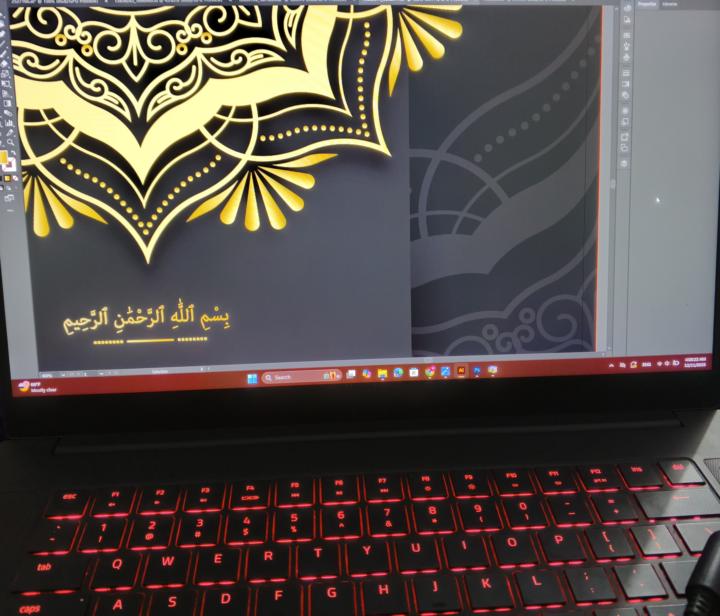
Guess What am I doing?
Hehe, Hello! Ladies and Gentlemen Designing my Sister's Wedding Card on Adobe Illustrator huff feeling too much tired But enjoying the process Alhamdulilah I was thinking to make it royal blue and gold Which color should I choose? Huff too much confusion is :')
1 like • 4d
looks nice will it be printed or only digitally shared

4d •
Problem!!!
There's a course "Learn Arabic Easily" in classroom, me us course ki videos Nahi dhek pa raha. Kyoki me India se hun and vo videos india me banned ho gayi he all Pakistani videos. So how can I watch them?.
1 like • 4d
you can use opera browser and use vpn or use any vpn which works in your country.

8d •
Freelancing videos not opening
AssalamoAlaikum! Start freelancing videos in the classroom are not working on my mobile. Whenever I click no video appear.
1 like • 8d
It's working perfectly fine on iPhone app. Maybe issues are on your app or on your phone. Restart your phone maybe it starts working.
8d •
Productivity Tip: Free Speech to Text App
Writing in a journal every day and typing it all on a keyboard can feel like a big task. I was searching for a solution to this problem. Tool named "Wispr Flow" was suggested by lot of pros online. It was good, but it costs money. Instead, I found a really great one that’s free. It’s called Handy, and the name fits. it’s very handy to use. Everything runs on your own computer and works offline. All you have to do is press a shortcut key by default it's "Ctrl + Spacebar" in any text area you want to type in. Whether you're writing an email, a Word file, a comment on YouTube, or even this post which is written using "Handy App" just press the shortcut key and it starts working for you. It’s a real time saver. You make fewer mistakes as you write, so you only need to quickly fix a few small errors when you’re done. It’s been perfect for me as it's free. Those who want to try here is the link: https://handy.computer/
1-10 of 14