Activity
Mon
Wed
Fri
Sun
Mar
Apr
May
Jun
Jul
Aug
Sep
Oct
Nov
Dec
Jan
Feb
What is this?
Less
More
Memberships
Ep - reMarkable Tablet Support
606 members • Free
3 contributions to Ep - reMarkable Tablet Support

19d •
REMARKABLE PRO: PURCHASE ADVICE
Hi, I'm thinking of changing my RM2 for an RM PRO I like that it's a little bigger :-) I have a question that makes me think calmly about the purchase. * In some videos it seemed to me that when turning the page on the RM pro the page makes an annoying flicker. I've noticed the same thing when using color. I don't know if it's as annoying as it seems in the videos. I'm hypersensitive to lights and I'm worried about buying it, and then being overwhelmed. * Is the feel of the pen on the tablet similar to the RM2? or does it sound like an IPAD (glass)? I wouldn't like that at all.. I've come to consider buying a BOOX, since I could use ONENOTE, but I really like how Rermarkable adapts to my work and I'm not at all sure that the change would be positive in this regard. Thanks for the advice :-)
0 likes • 19d
I've never considered SuperNote; in fact, I always think of Remarkable and Boox :-) It's not that I need anything special from Android; although using OneNote (without lag) is a plus for me. My main interest lies in what I've already mentioned: *That the refresh rate doesn't worsen my hypersensitivity. *That the tablet's feel is as pleasant as the Remarkable 2's. *During my workday, I send many documents to the Remarkable, edit them, and then transfer them back to my computer. With the Remarkable desktop application, it's very, very simple and fast, and I don't want to lose that. I don't know if with any other brand it would work or not, since I haven't used another e-ink tablet. I do know a Boox user, and from observing her occasionally, it seemed to me that this workflow wouldn't be as comfortable as it is now.
0 likes • 19d
I'm going to take a look on SUPERNOTE Thanks for answering :-)
Jan 2 •
no notebooks backup
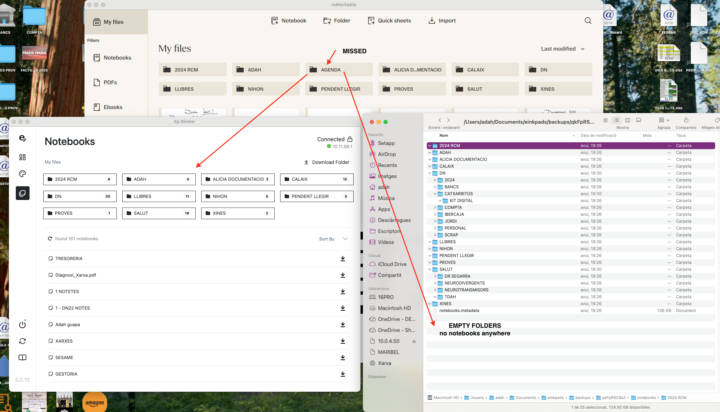
Hello, I've asked for help for these issue to suport withs any answer. I need help! I've been having this problem for far too long and I urgently need a solution. I'm using a Remarkable 2 and Binder 5.0.10 (I've used previous versions). I think I've had this problem since Binder 4... The notebooks aren't saving on my computer running OSX 15.6.1. All the folders are saving except for one called "AGENDA" where I keep my EPCALSYNC calendars. BUT: There's nothing inside the folders, not even in the root directory :-( Please help me! Thank you and best regards. Happy 2026! Adah
0 likes • Jan 7
Hi, Jason, thanks for answering. Everything works perfectly on my Remarkable 2. The problem is that Binder isn't creating copies of my notebooks on my MacBook. It only creates the files, including the subfiles, except for "AGENDA," which it doesn't create. The problem is that the files are empty... In the Binder application, as the screenshot shows, the directories are visible (except for AGENDA!) and the notebooks are listed, but despite clicking on "download folder," they never download. It does seem like the notebooks are being generated, though, since I see movement... :-( After the download attempt finishes, I click "Open download folder," but nothing happens; they're not there. I hope you can help me. Thank you. Adah
0 likes • 19d
In my remarkable everything works correctly. There are notebooks, and or pdfs inside all the folders. Folders that only have pdfs also have the same problem as those that have notebooks. The first problem is that BINDER only synchronizes the folder and subfolders, if they exist. IT DOES NOT SYNCHRONIZE ANY NOTEBOOK, neither those in the folders, nor the notebooks inside the subfolders, nor even those in the root… The second problem is that the AGENDA folder is not created. My calendars made with “CALSYNC” are saved in this folder. As you can see in the screenshot in BINDER, everything seems to synchronize correctly. A message of agreement appears and the folders and notebooks are “seen”, (except for “AGENDA”), but on my computer it only transfers the folders (except for “AGENDA”). There is nothing inside.

Nov '25 •
WiFi
How does wifi work, I have it setup in settings, I have it unplugged from my computer and it says Calsync is disconnected, I put test on my outlook calendar and it has not updated my planner. SHouldnt it?
0 likes • Nov '25
Hello, how do I know what my wifi address is? I can't go and look for it on the router every time...
1-3 of 3

Active 5d ago
Joined Nov 24, 2025
Powered by