Activity
Mon
Wed
Fri
Sun
Aug
Sep
Oct
Nov
Dec
Jan
Feb
Mar
Apr
May
Jun
What is this?
Less
More
Memberships
AI Money Lab
84.5k members • Free
AI Automation Growth Hub
3.7k members • Free
Learn Automation and AI
979 members • Free
AI Automation Society
417.4k members • Free
Voice AI Bootcamp 🎙️🤖
9.2k members • Free
AI Automation (A-Z)
162.3k members • Free
LeaX
1.7k members • Free
Chase AI Community
69.9k members • Free
5 contributions to AI Automation Society

2h •
HELP TO REGISTER TO META DEVELOPER ACCOUNT
HELP TO REGISTER TO META DEVELOPER ACCOUNT Hey i am having trouble to get register meta developer account it shows i am not active in this device so i can register for safety reasons but i am using this laptop for 3 yrs . can any one help mesort off this issue i have been trying this for a week now
0 likes • 2h
i am not in level 3 so i cant dm u
0 likes • 2h
thanks for ur experience

3h •
I used Claude Code to ship my first Chrome extension. No experience. 5 days.
I build WordPress plugins. I had never touched a Chrome extension before this and I'm not going to pretend I understood the stack going in. My browser had gotten bad enough that I had to do something. 300 open tabs, bookmarks I saved and never opened again, tab groups that made sense for a few days and then turned into a pile I stopped trusting. All I wanted was named sections to drop links into and find later. Simple idea. Nothing did it well enough so I built it myself. Claude Code. Five days. Live on the Chrome Web Store. The build wasn't what was hard. My own list of ideas was. I kept wanting to add more every time something worked. I cut probably 70% of what I originally planned and the version that shipped is cleaner because of it. The stuff I cut is sitting in a list I'm calling the roadmap. One thing I'd tell anyone starting out with Claude Code: stop describing what you want it to build and start describing what you want the user to feel. The output is different. Not a little different. A lot different. The extension is called Tabisto. It replaces your new tab with a visual dashboard where you build named sections and drop links in. Separate workspaces, notes, saved tab sessions. Free, no account needed. If you're curious what came out of it. What did your first Claude Code build look like? Did you plan the whole thing upfront or figure it out as you went?
1 like • 2h
THanks bro
1 like • 2h
ya sure

3h •
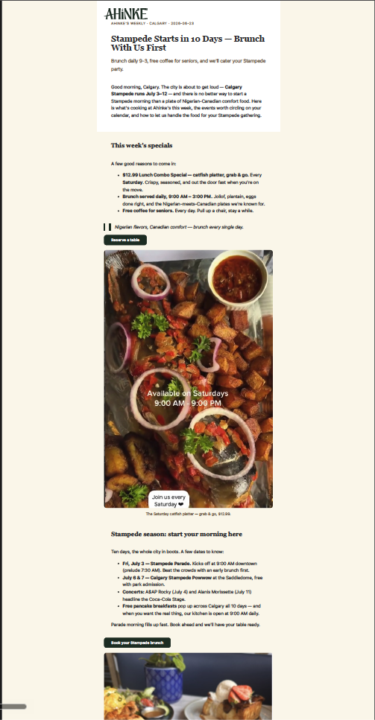
Day 1 Newsletter
The build took longer than I thought but it was well worth it. I built this for our restaurant so it adds real value to us on a weekly basis. One thing I still need to do is create a library of photos so they are easily included moving forward. I placed the folder in OneDrive so she has access and can grab it and publish it on her own now when it does the weekly run. #AISChallenge
0 likes • 3h
Nice use case—building something that solves a real business problem is always more valuable than a demo project. One idea: if you're creating a photo library anyway, you could also tag images by category (menu item, event, staff, seasonal, etc.) so the newsletter can pull relevant photos automatically in the future.

5h •
me(open to work: project based or contract based)
Hi guys, hope you’re doing well. I’m a Full-Stack AI Engineer. Building is what I do best. I help founders build fast, ship MVPs, and scale intelligent products. I’ve delivered real products for agencies and founders and enjoy taking things from 0 → 1, then scaling them further. My work: https://harshsoni.work Building in public on X: https://x.com/harshsoni_hs LinkedIn: https://www.linkedin.com/in/harshsoni-hs/
0 likes • 3h
You've worked with both founders and agencies. In your experience, what's the biggest mistake founders make when building their first AI MVP?

21h •
‼️Automated customer bot‼️
I've built an AI chat receptionist, handles customer messages, answers questions, books appointments, the whole thing. Works great on my end. But here's where I'm stuck: when it comes to actually connecting it to a real client's WhatsApp or Instagram account, how does that handoff work in practice? Do you ask them to share API keys? Log into their account for them? Set everything up while they watch? I can't imagine telling a local business owner "send me your Meta Business credentials" and expecting that to go smoothly. How are you guys handling this? Is there a clean way to onboard a client without it turning into a security nightmare or a trust issue?
1 like • 3h
- The client signs up on your platform. - They click "Connect WhatsApp/Instagram." - They are redirected to Meta's official login page. - They log in to their own Meta account. - Meta asks them to approve your app's permissions. - After approval, Meta securely connects their account to your platform. - Your AI can now send and receive messages without ever seeing the client's password.
1-5 of 5

@aadesh-ms-8936
Hi, I’m Aadesh — founder of LifestyleAI.
Active 1m ago
Joined Aug 28, 2025
Powered by