Activity
Mon
Wed
Fri
Sun
Aug
Sep
Oct
Nov
Dec
Jan
Feb
Mar
Apr
May
Jun
What is this?
Less
More
Memberships
Future Faceless Millionaires
7.2k members • Free
Ai Skills Forge
109 members • Free
Chase AI Community
69.9k members • Free
Easy Machine AI
2.7k members • Free
W.R.O.T.A. Trening Biznesu
312 members • Free
AI Automation Society
417.2k members • Free
11 contributions to AI Automation Society

16d •
❓How are you actually wiring AI into Obsidian — and is Obsidian even the interface anymore?
I keep seeing wildly different setups people call their "AI OS," and most fall into one of three camps: 1. Plugin-native — everything happens inside Obsidian itself (Smart Connections, Text Generator, Copilot for Obsidian). The vault and the AI live in the same window. 2. Agent-on-vault — Obsidian is just the storage layer (plain markdown on disk), while the real brain runs outside it — Claude Code in a terminal, a VS Code workspace, a script or n8n workflow reading/writing those files. Obsidian becomes a passive viewer, or disappears entirely. 3. Custom interface — people building their own front-end (web app, CLI, whatever) on top of the vault structure, keeping the markdown but ditching Obsidian as the UI altogether. Which camp are you actually in, and why? Is Obsidian still your interface, or just your database now? What's the weak point in your current setup — sync, context window, latency, something breaking when the vault gets big? Drop your real stack below (plugins, tools, how the pieces talk to each other) — let's compare actual setups, not just opinions.
1 like • 16d
@Deangelo Satcher when you hit like for someone’s reply, someone will like yours
1 like • 16d
Likes = points

16d •
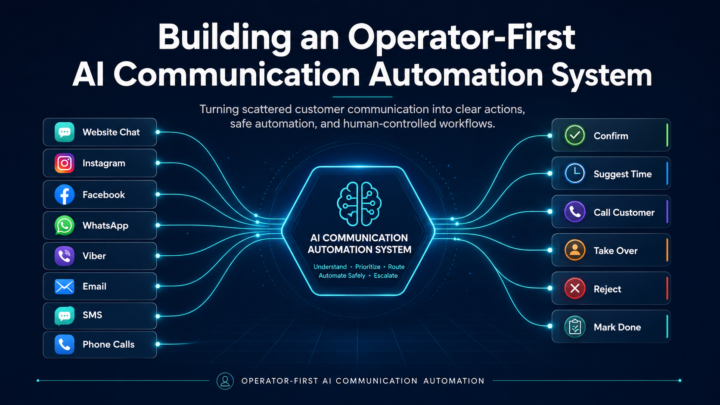
✔️ I’m Not Building a Chatbot. I’m Building a Communication Control System.
I’m currently building an automation system that started with a very simple problem: Small business owners are drowning in messages. One customer writes on Instagram. Another sends a WhatsApp message.Someone else calls.A few people use the website form.Then there are emails, missed calls, Viber messages, Facebook messages… And the owner is expected to answer everything, remember everything, follow up with everyone, and still run the actual business. That is where most automation projects go wrong. People try to build “an AI chatbot” first. But after working through the system, I realized the real goal is not to replace the business owner. The real goal is to remove communication chaos. So the system I’m building is not a classic CRM. It is more like an invisible communication layer between the customer and the business. The customer can come from any channel: Instagram, Website Chat, WhatsApp, Facebook, Viber, email, SMS or phone. The system takes that message and turns it into something structured: Is this a booking request?Is it a price question? Is it a complaint? Is it urgent? Is the knowledge missing? Does the owner need to approve something? Should a human take over? Instead of giving the AI full freedom, I built the system around control. There is a Business Brain that contains the real information about the business: services, prices, working hours, FAQs, booking rules, payment rules, cancellation rules, forbidden topics and escalation triggers. Then there is a Rules Engine. That part decides what the system is allowed to do. Can it answer automatically?Does the owner need to approve?Should this become a request?Should this become an exception?Is this topic too sensitive for automation? That changed the way I look at AI automation. The value is not in making AI answer everything. The value is in making the system know when not to answer. For the business owner, the interface must stay simple. The owner should not open a complicated dashboard. They should only see clear action cards:
1 like • 16d
sounds great. Are you going to build 'alternative" crm or tool integrated with existing crm's?

16d •
AI-Powered Social Media Workflow
Interesting workflow I came across for automating parts of the social media content process with AI. The idea is simple: connect your tools, centralize your workflow and let AI handle repetitive tasks like organizing content, drafting captions and preparing posts while you stay in control of the final review. Curious to see how these AI-powered content workflows evolve over the next year. What parts of your content process would you automate?

1 like • 16d
Thanks for sharing- looks cool for publishing.

29d •
How I Sent 60,000 Cold Emails in April & Made 6 Figures (All Automated)
Hey Automation community! 👋 This took me 2 hours to put together. If you're looking for a proven way to get clients AT SCALE and actually make money for your AI automation agency, then this is for you. I run an AI agency that basically made no money because I had a hard time finding new clients. I tried cold email starting in November and it quickly become one of our most profitable acquisition channels. I knew NOTHING about cold outreach when I started. I learned A LOT along the way (including plenty of expensive mistakes), so here’s everything I wish I had known from day one. If you don't know what cold email marketing is, it's when you send out thousands of emails to potential leads you haven't spoken to before. The goal is for them to book a consult with you where you'll then close on a deal. If you do it badly, it will look like spam and nobody will respond. Do it where you target relevant people ready to buy and offer a lot of VALUE, and you will generate sales. Part 1: Technical Setup Domain Strategy - Buy dedicated domains just for email campaigns — never ever use your main company domain. - Set up DNS records immediately: SPF, DKIM, and DMARC. - Use Google Workspace or Microsoft 365 for better deliverability (roughly $4–6 per account per month). Email Account Setup - Create 1–4 email accounts per domain. - Start slow: 10 emails per account per day, then increase volume by ~10% each day. - Max once warmed up: ~25 emails per account per day. - Example: 4 domains × 3 accounts × 25 emails = 300 emails/day to begin with. IMPORTANT: Always warm up accounts for at least 14 days before ramping up. Extra tips that help a lot: - Add real profile photos and complete the accounts. - Older domains tend to perform better when you can get them. - Set up a custom tracking domain for accurate open/click data. Choosing Your Sending Platform You can do it manually with the technical setup above but it's way easier to buy an email account that's already configured and ready to go. I ran high-volume campaigns using Instantly.ai because it has good deliverability, analytics, and tons of guides on it since it's used by many agencies to get clients. It’s not perfect but probably one of the best for cold email right now. But honestly, your lead list and outreach message matter more.
1 like • 16d
thanks for sharing us this impressive konwledge
0 likes • 16d
@Jason Bean no, but I have some experience in technical aspects of enerprenuership, including setting mail accounts, domains, ect
16d •
Claude models comparison (in practice)
Question for Claude users - how would you describe, in your own words, the difference between Sonnet and Opus? Did you get a chance to try Fable? Unfortunately I didn't manage to, and I'm also curious how it differed (in practice) from the other models.
2 likes • 16d
@Pascal Berlik “Opus handles the planning and architecture, then Sonnet takes over for the actual execution” - well summarised
1-10 of 11
Active 11d ago
Joined Jan 28, 2025
Powered by