Activity
Mon
Wed
Fri
Sun
Jul
Aug
Sep
Oct
Nov
Dec
Jan
Feb
Mar
Apr
May
What is this?
Less
More
Memberships
Claude FR
1.1k members • Free
Claude Code Architects
1.3k members • Free
AI Automation Network
1.8k members • Free
(n8n) RoboJewel AI Automation
1.3k members • Free
SaaS Titans
1.5k members • Free
HighLevel Blueprint
1.4k members • Free
Automation Station
3.3k members • Free
Automatable Free
13.5k members • Free
HighLevel Growth Hub
1k members • Free
10 contributions to AI Automation Society

💎
⭐
Oct '24 •
Welcome! Introduce yourself + share a career goal you have 🎉
Let's get to know each other! Comment below sharing where you are in the world, a career goal you have, and something you like to do for fun. 😊

0 likes • just now
@Frank van Bokhorst Just asking. Nice to talk to you.
0 likes • just now
@Christian Rivadeneira Thanks
1h •
👋 Hi everyone!
Excited to be here, connect with like-minded people and learn from the community. Looking forward to contributing and growing together.
0
0

20h •
My first 3 Days Project
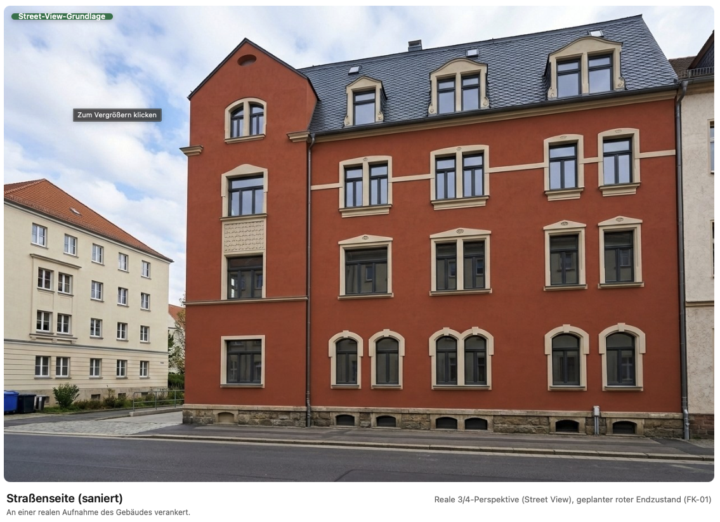
AI Agent for Real Estate Visualization from Construction Plans I’m building a tool that automatically generates photorealistic visualizations of a new build or renovation from architectural plans and the construction specification — including a finished, clickable web exposé. The goal is to show the completed property based purely on planning documents before the first brick is laid. What it can do: - 📐 Plan Analysis: Reads PDF plans and the construction specification, then creates a verified “project dossier” as the single source of truth — areas, rooms per floor, apartment layout, materials, existing structure vs. new build. Areas are extracted deterministically from the plans, not guessed by the AI. - 🛰️ Geodata Accuracy: For existing buildings, it automatically retrieves Street View via Google Maps for the real façade, plus satellite imagery for the roof and surroundings. This helps match the actual building instead of inventing a generic lookalike. - 🖼️ Three Visualization Categories: Exterior views, interior views, and 3D floor plans for each apartment. - 📊 Accurate Floor Plans: 2D and 3D floor plans are rendered from the same deterministically extracted wall mask, ensuring they are perfectly aligned and true to scale. Pure image AI cannot reliably do this. - 🌐 Web Exposé: The final output is a finished, clickable exposé containing all views. Architecture: Built around the WAT principle — Workflows, Agents, Tools. The AI only handles orchestration and decision-making, while the actual execution is done through deterministic Python scripts. This keeps accuracy high, because every step left to the AI multiplies the potential error. Tech Stack: Claude Code as the agent, Gemini 3 Pro Image (Nano Banana Pro) for image generation, PyMuPDF for plan/PDF extraction, the Google Maps API for geodata, and Python + Pillow for deterministic geometry. Key lesson so far: Image AI can produce impressive individual images, but it cannot guarantee consistent geometry across multiple viewpoints. That’s why I extract hard geometric truth from the plans and provide it to the AI as a reference, instead of letting it interpret everything freely. True, freely rotatable 3D has intentionally been postponed — for now, the exposé is image-based.
1 like • 3h
Impressive project. Combining deterministic geometry with AI generation is exactly how you achieve reliable real-world results.
1 like • 3h
@Lucas Winter You are welcome! Looking forward to seeing how the project evolves.

🔥
14d •
Claude automation for beginners
Been experimenting with Claude for automation lately — wanted to share what actually works for beginners. Most people overcomplicate this. Here's what I've learned: The only stack you need to start: → Claude = the brain (tells you what to do with the data) → claude code = the hands (actually does the action) First automation worth building: New form submission → Claude writes a personalised response using their answers → Auto-sent as email Takes 30 minutes to set up. Saves hours every week. What actually makes you better at this: → Give Claude more context, not less — it performs like the quality of your brief → Build one working thing before starting the next → The mistake everyone makes: automating something they don't fully understand manually first To go from beginner to expert: → Month 1: Prompting deeply + one simple workflow → Month 2–3: Chaining prompts, connecting APIs → Month 4+: Full agents, multi-step logic, real client work Took me a while to figure out the right order. Sharing so someone here skips the confusion. 📢Here's 1 to 2 points which even begginers should notice and do not do blindly?? Let's see if you can catch which points they're?? Happy to answer questions if anyone's building something specific ??
0 likes • 3h
Two key rules: verify AI outputs and never grant unnecessary system permissions.

3h •
One piece of the AI OS that most people skip: the capture layer.🤖(Telegram bot)
Here's mine. I have a Telegram bot running on my phone. Any time I see something worth saving — a video from Youtube, an idea on social media, a thought mid-walk — I just forward it there. Takes 2 seconds. How it works: 1. Create a bot via @BotFather on Telegram — takes 2 minutes, gives you an API token 2. Write a small poller script (Node or Python) that calls getUpdates on the Telegram API every few seconds 3. Script writes every incoming message to a local file (inbox.jsonl) 4. Claude Code reads that file every morning as part of the daily brief skill 5. Actionable items land in Obsidian — as tasks, project notes, or ideas tied to active projects — and the inbox resets. Clean slate every day. No cloud service. No third-party app. Just a script running in the background on your machine. The insight: an AI OS is only as good as what you feed it. Most people spend weeks building the automation layer but never solve the input problem — so the system runs on stale context. The bot fixed that. Now wherever I am — away from my desk, walking, traveling — I can capture thoughts, interesting finds, and ideas on the go. Nothing gets lost. Curious how others are solving this — how are you feeding live context into your AI OS?
1 like • 3h
Smart setup. The capture layer is often overlooked but it's what makes an AI OS truly useful.
1-10 of 10

@zeeshan-akhtar-7757
I run an AI agency focused on helping small businesses scale and grow faster using automation and AI.
Online now
Joined Nov 28, 2025
Powered by