Activity
Mon
Wed
Fri
Sun
Nov
Dec
Jan
Feb
Mar
Apr
May
Jun
Jul
Aug
Sep
Oct
What is this?
Less
More
AI Without The Hype
69
Free
3 contributions to AI Without The Hype

May 14 •
Which AI platform should I use at home?
I have used ChatGPT at home (free version) and Microsoft copilot at work. (With limited access) I want to play about with systems more, do I upgrade to ChatGPT plus? What’s everyone else using?

1 like • May 14
Hi Nicola! It really depends on what you want to do with them; is there anything specific you’re looking to do, or is it just for general use? Personally, for day to day things, I use ChatGPT and Claude.

Apr 24 •
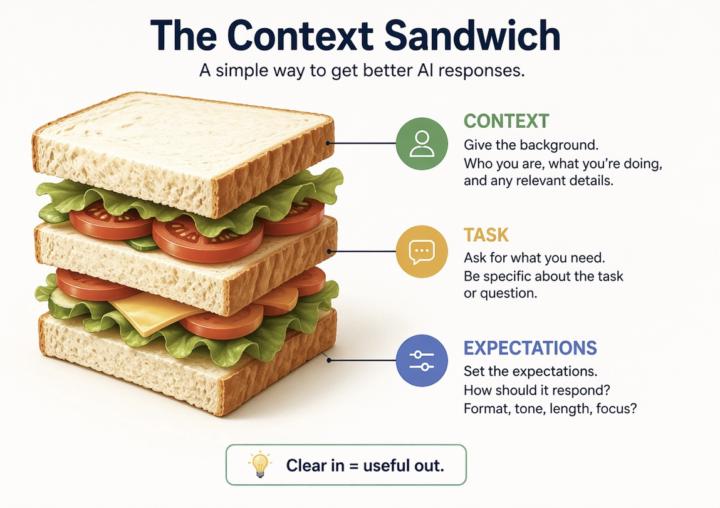
The Context Sandwhich
✨Quick tip that will make a big difference in the quality of the responses you will get from AI. Most people use AI like this: “Summarise this” “Write this” “Help with this” The answer you will get is usually… fine! Fine… but not that useful, because you’re missing is context. 🗣️Context (first) —> (then) Ask —> (make sure you) Shape the response ‼️This means, you need to tell AI: - What you are doing - What you need - How you want it back Think of it like briefing a colleague. If you’re vague, you will get something vague back. If you’re clear, the tools become much more useful. Example: “I’m preparing for a meeting with X as a [your role]. From this document, what are the key points I need to understand? Focus on decisions, risks and anything I’d need to act on. Keep it brief.” Try it out and let us know in the comment what changed for you!
3 likes • Apr 25
This is a great way to frame it — the “context sandwich” is exactly how you get from okay outputs to actually useful ones. One small addition that makes a big difference in practice: - include a reference point for quality. For example: - “Summarise this like a 3-bullet exec update” - “Write this in the style of a short Slack message” - “Explain this as if I’m new to the topic” AI is very good at matching patterns, but only if you show it what “good” looks like. So a simple upgrade to the sandwich: Context → Ask → Shape → + Example or benchmark That extra nudge often saves a lot of back-and-forth. Hope that helps!
Apr 12 •
The 4 parts of a good Copilot prompt
Happy 50+ members!!! 🎉🎉🎉 Huge thank you to all of you early founding members! it’s been great seeing you join, explore, comment and share🙏 I know quite a few of you are using Copilot, so here’s a quick bonus tip when you’re writing prompts: 💡Always include: 1. A GOAL: What are you trying to get out of it? 2. The CONTEXT: What are you working on / why does it matter? 3. The SOURCES: Where should it look? (e.g. emails, Teams chats, documents, websites) 4. Your EXPECTATIONS: How should it respond? ➡️Quick Example: Goal: generate 3–5 bullet points Context: preparing for a meeting with Manager X to update them on work progress Sources: focus on emails and Teams chats since June (if you want me to show you how to access your emails/chats, comment on this post!) Expectations: use simple language so I can get up to speed quickly It sounds simple, but it makes a big difference. 👇Let me know if you want more of these! And if you know someone who would find these tips useful, 🗣️ invite them over!
4 likes • Apr 14
Love this — super clear framework 👏 One thing I see people struggle with a lot is what NOT to do when prompting. A few common mistakes I see: - Being too vague (“summarise this” with no context) - Skipping the audience (“make it better” — for who?) - No constraints (length/tone/format means you get unpredictable results) - Asking for too much in one prompt (better to break it into steps) - Not iterating (first output is rarely the best one) The way I think about prompts is: treat them like giving instructions to a new team member — the clearer you are, the better the outcome.
3 likes • Apr 25
@Rachel Dbeis Indeed! The core structure (goal, context, sources, expectations) works across pretty much all LLMs because it mirrors how humans give good instructions. That part is universal. Where it does differ is in how models interpret nuance: - Some models are more sensitive to structure and formatting (like Copilot, especially when tied into specific tools or data sources) - Others handle ambiguity better and “fill in the gaps” more confidently - Role-based prompts can vary quite a bit depending on how strongly the model leans into personas vs instructions In practice, I’ve found the biggest difference isn’t the model — it’s how explicit you are. Clear constraints, examples, and iteration tend to outperform model-specific “tricks.” So instead of changing the whole structure, I usually keep the same foundation and just tweak emphasis depending on the tool.
1-3 of 3

@bassam-farran-6459
Machine Learning PhD with experience in applications to healthcare, Formula 1, and telecoms
Active 86d ago
Joined Mar 23, 2026