Activity
Mon
Wed
Fri
Sun
Jun
Jul
Aug
Sep
Oct
Nov
Dec
Jan
Feb
Mar
Apr
What is this?
Less
More
Owned by Matthew
Practical AI training for work and life. Hands-on lessons with Claude, ChatGPT, and automation tools. Built for people ready to use AI.
Memberships
Claude Code Kickstart
535 members • Free
Skoolers
192.1k members • Free
AI Automation Society
353.1k members • Free
AI Bits and Pieces
709 members • Free
AI Automation Society Plus
3.6k members • $99/month
108 contributions to AI for Life

🔥
1d •
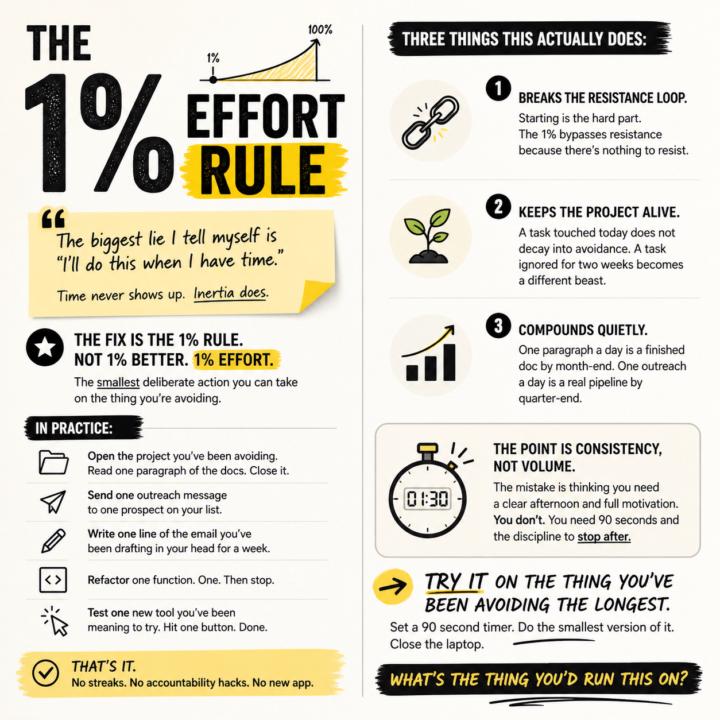
The 1% effort rule.
The biggest lie I tell myself is "I'll do this when I have time." Time never shows up. Inertia does. The fix is the 1% rule. Not 1% better. 1% effort. The smallest deliberate action you can take on the thing you're avoiding. In practice: - Open the project you've been avoiding. Read one paragraph of the docs. Close it. - Send one outreach message to one prospect on your list. - Write one line of the email you've been drafting in your head for a week. - Refactor one function. One. Then stop. - Test one new tool you've been meaning to try. Hit one button. Done. That's it. No streaks. No accountability hacks. No new app. Three things this actually does: 1. Breaks the resistance loop. Starting is the hard part. The 1% bypasses resistance because there's nothing to resist. 2. Keeps the project alive. A task touched today does not decay into avoidance. A task ignored for two weeks becomes a different beast. 3. Compounds quietly. One paragraph a day is a finished doc by month-end. One outreach a day is a real pipeline by quarter-end. The point is consistency, not volume. The mistake is thinking you need a clear afternoon and full motivation. You don't. You need 90 seconds and the discipline to stop after. Try it on the thing you've been avoiding the longest. Set a 90 second timer. Do the smallest version of it. Close the laptop. What's the thing you'd run this on?
3
0
🔥
3d •
News: Anthropic confirms three bugs degraded Claude Code [Fixed]
Anthropic on Wednesday published a detailed post-mortem acknowledging that three separate product-layer changes caused weeks of quality degradation in Claude Code, its flagship AI coding tool, vindicating developers who had spent weeks insisting the product had gotten worse. The company traced the issues to a reasoning effort downgrade, a caching bug that wiped session memory on every turn, and an overly aggressive system prompt designed to curb verbosity. All three changes were shipped independently between early March and mid-April, but their overlap in time created what appeared to users as broad, inconsistent performance decay. The first change landed on March 4, when Anthropic lowered Claude Code's default reasoning effort from high to medium to reduce latency. The company's internal evaluations suggested the trade-off would yield only "slightly lower intelligence," but users noticed immediately. Anthropic reverted the change on April 7, calling it "the wrong tradeoff" in the post-mortem. The second issue was a caching bug introduced on March 26. An optimization intended to clear old reasoning blocks once upon session resume instead triggered on every turn, effectively erasing Claude's working memory for the remainder of any affected session. The bug also caused faster-than-expected usage limit depletion, as each request became a cache miss. Anthropic acknowledged the bug "made it past multiple human and automated code reviews, as well as unit tests, end-to-end tests, automated verification, and dogfooding." It was fixed on April 10. The third regression arrived on April 16, when Anthropic added a system prompt instructing Claude to keep responses between tool calls to 25 words or fewer — a response to the chattiness of the newly launched Opus 4.7 model. Internal testing later showed the instruction caused a roughly 3% drop on coding evaluations. It was reverted on April 20. Compensation and New Controls As remediation, Anthropic is resetting usage limits for all subscribers and rolling out several process changes: broader internal dogfooding on public builds, enhanced per-model evaluation suites, stricter system prompt auditing, soak periods for any change that could affect intelligence, and gradual rollouts. The company also launched a dedicated @ClaudeDevs account on X to provide more transparency around product decisions.
Poll
5 members have voted
![News: Anthropic confirms three bugs degraded Claude Code [Fixed]](https://assets.skool.com/f/f1f8713c199d4c3b994a02e649d607de/1c58b6e963594b2fb4b028a9a6d98ccce4f823d66aa34523bc920ccef9675b72-md.png)
🔥
1 like • 3d
@Diane McCracken good! Looking forward to hearing about it.
🔥
1 like • 1d
@R S Roger, you already have it. It's called Chat. Claude Chat is where I go first for planning and figuring out how to approach things. Here's a recent example. I used Chat to plan some infrastructure I'm working on. It came back with ten questions. So I prompted it: "Create three different personas who are experts in this field. Have them debate the questions and land on the best answer based on my tool stack." That gave me a planning structure I could trust. Then I take that into Claude Code, and I build.
🔥
5d •
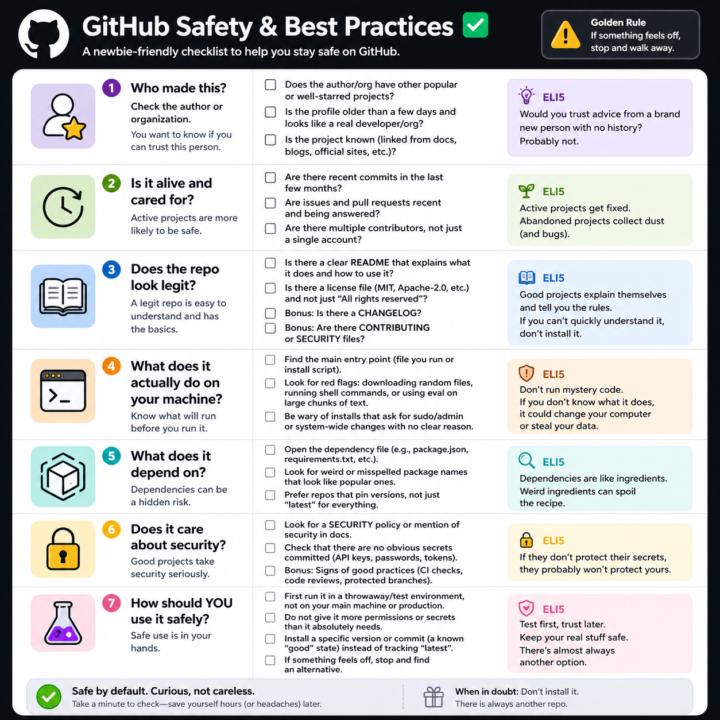
GitHub Safety and Best Practices Checklist
Here’s a simple, newbie‑friendly safety checklist you can run through every time you look at a GitHub repo. ## 1. Who made this? - Does the author or org have other popular or well‑starred projects? - Is the profile older than a few days and look like a real developer/org? - Does the project feel “known” (linked from docs, blogs, official sites, etc.)? If it’s a totally new account with one flashy repo, be extra careful. ## 2. Is it alive and cared for? - Are there recent commits in the last few months? - Are there recent issues and pull requests being answered? - Do you see multiple contributors, not just a single throwaway account? Abandoned projects aren’t always bad, but they age poorly from a security angle. ## 3. Does the repo look legit? - There is a clear README that explains what it does and how to use it. - There is a license file (MIT, Apache‑2.0, etc.), not just “All rights reserved”. - Optional but nice: CHANGELOG, CONTRIBUTING, SECURITY files. If you can’t quickly understand what it does, don’t install it. ## 4. What does it actually do on your machine? - Find the main entry point (the file you run, or the install script). - Look for obvious red flags: downloading random files, running shell commands, or calling `eval` on big chunks of text. - Be wary of “install” steps that ask for sudo/admin or system‑wide changes with no clear reason. If you don’t understand the install steps, don’t run them yet. ## 5. What does it depend on? - Open the dependency file (like `package.json` for Node, `requirements.txt` for Python). - Scan for weird or misspelled package names that look like popular ones. - Prefer repos that pin versions (not just “latest everything forever”). If the dependency list looks messy or huge for a simple tool, treat it carefully. ## 6. Does it care about security? - Look for signs of security features: security policy, mention of security in docs, or badges for scans/CI. - Check that there are no obvious secrets committed (API keys, passwords in plain text).
🔥
1 like • 3d
@R S Good question. Yes, it absolutely happens. There are documented cases of malicious code making it into popular GitHub repos and package managers. Think compromised maintainer accounts, typosquatted package names that look almost identical to the real thing, hidden code inside obfuscated files, and supply chain attacks where a trusted dependency gets weaponized. The xz utils backdoor in 2024 was a big one and almost made it into mainline Linux. So the honest answer is no, GitHub repos are not automatically trustworthy. GitHub hosts the code. Verification of that code is on you. Here's how I filter for safety in practice: Run it somewhere it cannot hurt you first. A VM, a Docker container, a throwaway machine. Watch what it does before letting it near your real environment. Read the install script before you run it. If it asks for sudo or system-wide access, ask why. Most simple tools have no business needing that. Pin the version. Pick a specific release or commit hash that you tested, rather than tracking "latest" on something that could update under you with no warning. Check the dependency tree. If a small tool pulls in 200 packages from random authors, that is a much bigger attack surface. Fewer dependencies, smaller risk. Use the free scanning tools. GitHub's Dependabot flags known vulnerabilities automatically. npm audit and pip-audit do similar checks. They miss some things and they catch the obvious ones. Trust the boring stuff. Repos with lots of contributors, long history, real users, and visible security practices are safer bets than a brand new account with one flashy project. Bottom line: assume nothing, verify everything, and isolate first runs. The tools to protect yourself are free. The discipline to use them is the real cost.
🔥
1 like • 2d
@R S Yes sir! Drop a note if you have any other questions. 👊🏻
🔥
2d •
The $2,000/Week DM That Almost Looked Real
I want to walk you through something that landed in my LinkedIn DMs this week, because if you are early in this journey and hungry for strategic opportunities, you are exactly who this kind of message is built to catch. Here is the pitch, almost word for word: "Hi Matthew. I am looking for a Tech rep to help my friend. Part time, PM-level, only handle client video meetings. I excel at development, but need communication support with clients. Will be good extra income in your spare time (5 hours/week, $1,000-$2,000/week)." Twenty-three minutes later, a follow-up: "Are you open to collaboration?" Sender profile: Principal AI Engineer at a real, well-known consulting firm. Based in a small US town. Clean photo. Plausible bio. The kind of profile that, if you are excited and busy, you might just reply to. I almost did. Then I ran the OSINT pass. --- WHY THIS PITCH IS A SCAM The math gives it away first. $1,000 to $2,000 per week for 5 hours of video calls is $200 to $400 per hour. Real fractional PM work tops out around $150 per hour. Anyone offering 2x to 4x market rate for less work is not buying your skill. They are buying your name and your silence. Then the structural tells: 1. "Help my friend." Real hiring says "we are hiring" or "my company needs." Friend language is distance language. It lets the proposer disappear when questions get sharp. 2. The role is structurally a front. "I am great at development but need someone for the client calls" is not how real dev shops work. Engineers who hate sales hire account managers with KPIs and deliverables, not a vague "tech rep" who only shows up on Zoom. 3. Geography contradicts the request. Profile says small US town. If he is genuinely US-based, why does he need a US-based proxy to handle US-style client calls? The location claim and the request contradict each other. 4. Zero public footprint. A real Principal AI Engineer working in RAG and agentic systems almost always has GitHub commits, a Medium post, a conference talk, a LinkedIn article, something. This profile had nothing. The bio read as boilerplate, possibly AI-generated.

🔥
0 likes • 2d
I have no desire to interact with or taunt these criminals/foreign adversaries. But I have to admit I was really tempted to say, "Sure, I'll accept payment in the form of Longhorn Steakhouse gift cards from Target lets start with four $500 gift cards, read me off the numbers and the pin so I can verify." 🤣
🔥
4d •
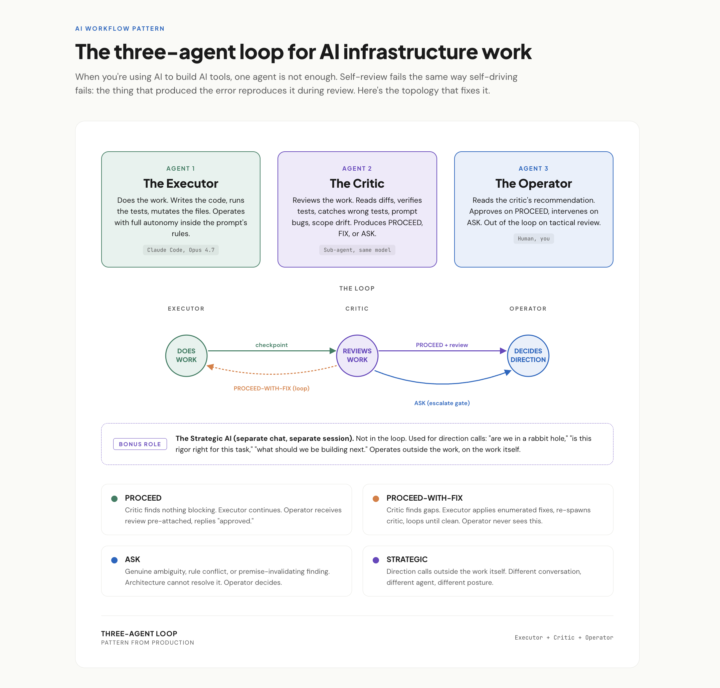
Claude Code Pro User Workflow
* Confidential. Use, Do not share.* Thank you! Pattern from a real session this week. When you're using AI to build AI tools, one agent is not enough. Self-review fails the same way self-driving fails: the thing that produced the error reproduces it during review. The fix is three roles, not two: The Executor does the work. Full autonomy inside clear rules. Stops only when it genuinely can't decide. The Critic reviews the work. Same model, different posture: read, verify, find what's wrong, recommend PROCEED, FIX, or ASK. The Operator (you) reads the critic's recommendation, not the raw work. Approves on PROCEED. Intervenes on ASK. Out of the loop on tactical review. Bonus fourth role I didn't have a name for until this week: a Strategic AI in a separate chat, used for direction calls outside the work. "Are we in a rabbit hole." "Is this rigor right." Operates on the work itself, not in it. The unlock isn't capability. It's posture. Same model, three system prompts, three different jobs.
🔥
1 like • 4d
@Diane McCracken 👊🏻
🔥
1 like • 3d
@Michael Wacht Thank you sir!
1-10 of 108

🔥
@matthew-sutherland-4604
AI Automation Architect @ ByteFlowAI | Host of AI for Life (Claude.ai, CoWork, Claude Code for Mac). Execution first.
Active 51m ago
Joined Feb 18, 2026
Mid-West, United States