Activity
Mon
Wed
Fri
Sun
Jun
Jul
Aug
Sep
Oct
Nov
Dec
Jan
Feb
Mar
Apr
May
What is this?
Less
More
Memberships
Clief Notes
26.7k members • Free
34 contributions to Clief Notes

11h •
Using the folder system to build Elementor pages in WordPress
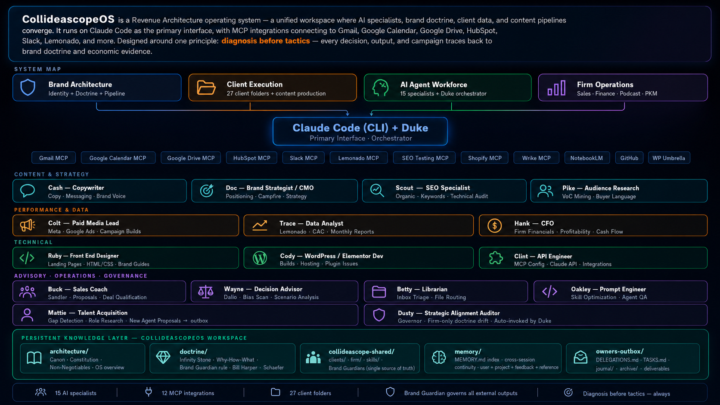
Here's how we build new pages for client's now. Takes about 25% less time. First: an interview. We get the client on a call, follow a structured intake, get everything we need. Claude ingests the transcript and maps the requirements — buyer, intent, conversion action, messaging priorities. That's the foundation. Then Cash, our copywriter agent, writes the copy. Then Ruby, our front-end designer, takes the copy and the client's identity system and builds a clean HTML/CSS mockup. We hand it to the client. They give us feedback. We collect assets — photos, logos, screenshots. Then Cody. Cody has access to the Elementor JSON templates our human designer originally built for this client's site. He reads the approved HTML. He generates a new JSON file in the same structure — same design system, same component logic, same brand patterns. We import that JSON into Elementor. The page is 90% built. The humans still do the review. The humans built the original templates. The humans ran the interview. But the production time? It collapsed. Jake's folder system didn't replace the agency. It restructured where the human work actually lives.
2 likes • 9h
@Andrew Carter works great.
0 likes • 8h
@Ruben Aguirre let me know how it goes.
1d •
The Folder System Became My Agency
Twenty-four days ago I posted about Jake's folder system video. This is what happened next. Same foundation — markdown files, orchestration prompts, clear roles. I just kept building. Fifteen named specialists. Each one with a soul file, guardrails, and a playbook. Duke orchestrates. Cash writes. Trace pulls the data. Hank runs the financials. Clint handles the MCP integrations. Behind each one is either a human counterpart doing the real work alongside them — or a role I can't afford to hire yet. Katie who's been with me for 18 years, now has her own orchestrator running the same system. Twenty-seven client folders. Twelve live MCP integrations. One shared repo. The folder system isn't replacing my agency. It becoming my agency. Jake gave me the unlock. This is how it's going.
1 like • 11h
@Shirsho Guha just shared another post how we build the wordpress pages.
1 like • 9h
@Ruben Aguirre I just started this last week. I'm not sure if this is the right way, I asked the discord but didn't get a response so I went ahead anyway. I have two workspaces in my VSCode, both are open and my claude.md file knows how they related. We planned out the project together, Duke and I. First figuring out which folders we wanted to share with the team and which ones we would keep private. Then we set up the new workspace, move our shared files over and set up a new repo in github. Then we built a starter claude.md and personal folder structure for my teammate. She loaded that up in VSCode, I connected her repo and my shared repo. Then taught her what to do with her new workspace. Now we're sharing agents, skills, and client folders and both connected to all the same MCPs. We pull in marketing data and can write back to tools like Hubspot, Slack, and Wrike. I've got 2 more team members I'll be connecting in soon. They are not as tech savvy so for now I have them in claude desktop in shared projects and I've added some of the most common agents like Cash our copywriting agent there for them to use. Then they just get basic client context, they are not yet writing back to the system, they are mostly read only for now. Soon.

2d •
I just showed what I was building and it opened a door
At work we have strict rules around AI and for a long time I thought it would never be possible to get access to tools like Claude. In my personal life I've been using AI for a while now mainly to help me build Power Automate flows. I'm not technical but I know what I want and I've built a lot in SharePoint that helps me do my job. A few months ago I hit a wall. I kept having to explain to AI who I was and what I wanted every single time. I was done with it. Online there was so much going on that it felt like I was missing everything. Then a video from Jake showed up on Instagram. I scrolled past it twice. The third time I watched it. It was about the folder structure he used. I could see what he was building but I had no idea if it would actually work for me. After one week the results were way better than I expected. And it keeps getting better. Back to work. I wanted to find out what AI options were actually available within our company. So I showed my work to a few people. Turns out the company has a dedicated AI team already working with Claude. I didn't even know that. They told me I was further ahead than most people and that they loved seeing that I had picked up the folder structure the way I did. That is what convinced them. Only a few people in our entire organization have access to that environment. And now I'm one of them. Really happy about this 🚀🏆
1 like • 15h
Awesome story. Love hearing these kinds of journey. Best of luck!

11d •
Mini-Series Part 2: The "Token Crash" & The Keyboard Epiphany
In Part 1, I was riding high. I had Chrome, Edge, and Firefox all running simultaneously, tripling my speed on a massive D365 rebilling project. I felt like I’d cracked the code to being "efficiently lazy." Link: Mini-Series Part 1: The "Manual Hell" Rebill Project · Clief Notes But the victory was short-lived. I was driving the car at 100mph, but I didn't realize how much fuel I was burning. The Crash: 3 Hours to Zero The next morning, I fired up all cylinders. It was beautiful—until it wasn't. In under 3 hours, I burned through my entire token allotment. I was dead in the water with a 1.5-hour wait until my limits reset. With the clock ticking and sales reps still needing updates, I had to go back to doing it manually. And that’s when the "Aha!" moment happened. The "Tab" Breakthrough While I was clicking and typing manually to pass the time, I realized something: I wasn't really using the mouse. I was mostly hitting Tab and Shift-Tab to navigate the D365 fields. I asked Claude: "Can Playwright just 'Tab' through the browser instead of searching for elements and taking screenshots for every move?" Claude’s answer: YES. My jaw dropped. From "Visual Driving" to "Macro Speed" The old workflow relied on Claude "seeing" the screen via screenshots to make sure it was in the right spot. It was accurate, but heavy. I had Claude rewrite the interior workflow to a deterministic loop: 1. The Setup: I open the URL, set the filters, and select the first row. 2. The Loop: * Tab to Invoice → Enter. 3. Repeat. I added small buffers (100ms between tabs, 4s for page loads) to ensure D365 could keep up. See the video for how the flow runs in real life! The Result: 90% Savings & 10x Efficiency I asked Claude to evaluate the two methods. The numbers were staggering: Old "Visual" Flow: - Tool Calls: ~500 calls per 50 orders - Token Usage: 100% (High Burn) - Logic: Screenshot-dependent (Slow)
1 like • 15h
The the thought process and execution here. Diagnose the problem, plan out a solution, then implement. Excellent execution after you came up with the idea. Nice work.
25d •
Eight months of infrastructure. Two weeks to simplify it.
Eight months ago, I started building what I thought orchestration required — N8N, Postgres, LibreChat, consulting and hosting fees. Tens of thousands of dollars. That was the right bet at the time. Nobody I saw was doing this with Claude yet. Three or four months ago, the game changed. And I didn't know it until I stumbled onto Jake's content on YouTube. Two weeks after watching "Stop Building AI Agents. Use This Folder System Instead", I have a working MCP. Client demo-ready. The whole system I was killing myself over? Markdown files and orchestration prompts. That's it. I want to give credit where it's due. Jake put something out that reoriented how I thought about AI. The investment wasn't wasted — it built the foundation. But Jake and this community pointed me toward what was actually possible now. If you're still building the complex version because you think you have to — it's worth a second look.
0 likes • 19h
@Tony Bushong you won't regret it.
1 like • 19h
@Tristan Bolle still build agents, just in a different way. They can live inside a single project. And when they have all the context there for them you're going to be unstoppable.
1-10 of 34
Active 8h ago
Joined Apr 2, 2026
INTP
Michigan
Powered by