Activity
Mon
Wed
Fri
Sun
Aug
Sep
Oct
Nov
Dec
Jan
Feb
Mar
Apr
May
Jun
Jul
What is this?
Less
More
Memberships
CRM Connector
155 members • Free
HighLevel House
1.2k members • $124/m
One Call Close
235 members • $97/month
Freedom Academy
612 members • Free
HighLevel Huddle w/ Clay
2.6k members • Free
The Review Harvesters
575 members • Free
HighLevel Quest
14.5k members • Free
GoHighLevel w/ Robb Bailey
13.2k members • Free
39 contributions to CRM Connector

5d •
Help triggering a manual Sync
Hi guys. My automatic sync is not syncing and need help triggering a manual sync. I cant see the option of Manage Connection in the Agency view dashboard. So how can I trigger this sync so the contact data comes through? Its lapsed since 3 weeks. Thanks, @Twan Roelofsen for sharing the detail by email but I cant find that setting on the agency view. I need a screenshot or a pathway to the setting you mention. Thanks! Lorraine

0 likes • 4d
@Lorraine T. Ehhh, can you send that video to GoHighLevel. Once you install it in your agency view the sync will work. This is not made by us, so contacting support is the way to go.
1 like • 3d
@Lorraine T. We can schedule a new meeting next week and add an additional free trial as well. Regarding the video you sent, this appears to be an issue on the GHL side. You should be able to install our app at both the agency level and the corresponding sub-accounts. Once that has been done, your integration will become active.

7d •
Temporary issue with CRM Connector (no action needed)
Hey everyone, Quick heads-up: after a small app update (we literally only changed a tagline on our app description) this week, something went wrong on GoHighLevel's side and some existing CRM Connector connections were unexpectedly disconnected. We've temporarily taken the app offline while we fix it. What this means for you: ✅ Most of you are not affected — your syncs should be running normally unless you opened the app in the last few hours. 🚫 Please don't uninstall or reinstall the app. We're working on a fix that restores everything automatically, and reinstalling now can make things worse. We're in direct contact with the HighLevel team to get this resolved, and our goal is to restore all connections without you having to lift a finger. We'll post an update here the moment it's fixed. Thanks for your patience 🙏
0 likes • 7d
@Ryan Fullarton Right now, performing a reinstallation will resolve the issue. However, the main problem is that we did not expect a minor change to the description in our Marketplace app to affect the credentials of agencies that had already installed our app. Additionally, we did not receive an approval email, so we were unaware that the change had been approved until we started receiving a large number of error notifications stating that the "location-specific token is not valid." This happened because agencies can authenticate location access, but the existing tokens became invalid. We are hoping that the GoHighLevel Marketplace team can trigger a process on their side that allows all agencies that have installed our app to generate new tokens, which can then be refreshed on our end. We went through this process a couple of weeks ago and would strongly prefer not to repeat it, especially since such a minor change should never impact existing credentials in this way. We will keep everyone updated via email and through this community.
0 likes • 7d
WIP

16d •
Is CRM Connector getting updated or something
It does not appear to be coming up inside of GHL at all for me and another member? Is this a GHL issue or a CRM Connector issue?
0 likes • 16d
Yes, there was an update. Its back live.

Jun 2 •
CRM Questions
Hello, I’m onboarding my first client and just have a few question About what to select, add or not add on while connecting customers CRM with CRM connector. I’m only doing Google reviews, reviews Reactivation and SEO. I attached images for all my questions. 1. Tags and custom fields tab: do I need to add any custom fields or are the custom fields provided enough? 2.Filter configuration tab: (import contacts from housecall pro): Do I ONLY select, “contacts with completed jobs,” right? I don’t want to select “contacts identified as leads,”correct?” 3.Filter configuration tab: (import Calendar events from housecall Pro) I’m assuming we don’t worry about calendar events, right? 4.Filter configuration tab: (import transactions from housecall pro) which filters do we want to select for importing transactions from housecall pro?
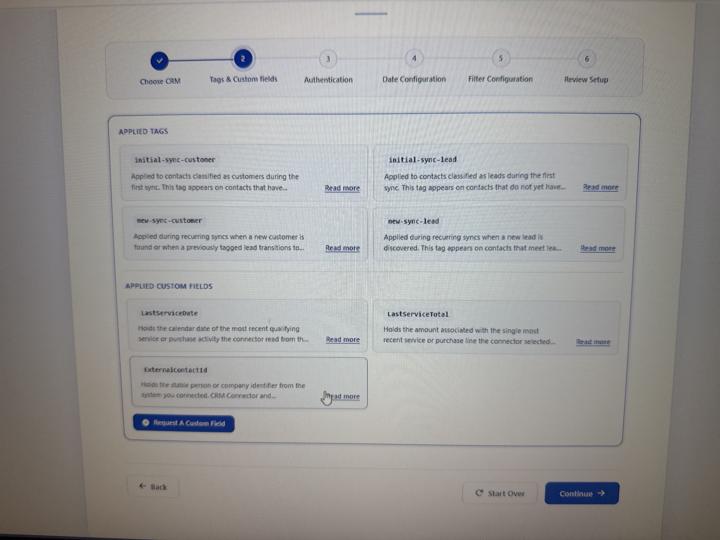
1 like • Jun 2
Hi Enrique, I send u a message in the skool community of Clay
May 28 •
CRM connector help
I added CRM connector on clients sub account, but it doesn't let me choose my clients CRM. all the CRMS are light grey and i am unable to select. any ideas what im doing wrong?
1 like • May 30
Have you tried opening it through mobile or a different browser? Which one are you using right now?
0 likes • Jun 1
@Enrique Silva Does it work now?
1-10 of 39

Active 2d ago
Joined Nov 27, 2025
Netherlands