Activity
Mon
Wed
Fri
Sun
Jun
Jul
Aug
Sep
Oct
Nov
Dec
Jan
Feb
Mar
Apr
May
What is this?
Less
More
Memberships
AI Automation Society Plus
3.6k members • $99/month
AI for Life
28 members • $297
AI Marketing Factory
53 members • Free
AEO - Get Recommended by AI
1.7k members • Free
WavyWorld
48.6k members • Free
Free Skool Course
67.8k members • Free
VIP Academy
193 members • Free
Fruitarianism
409 members • Free
Synthesizer: Free Skool Growth
42k members • Free
29 contributions to AI for Life

3d •
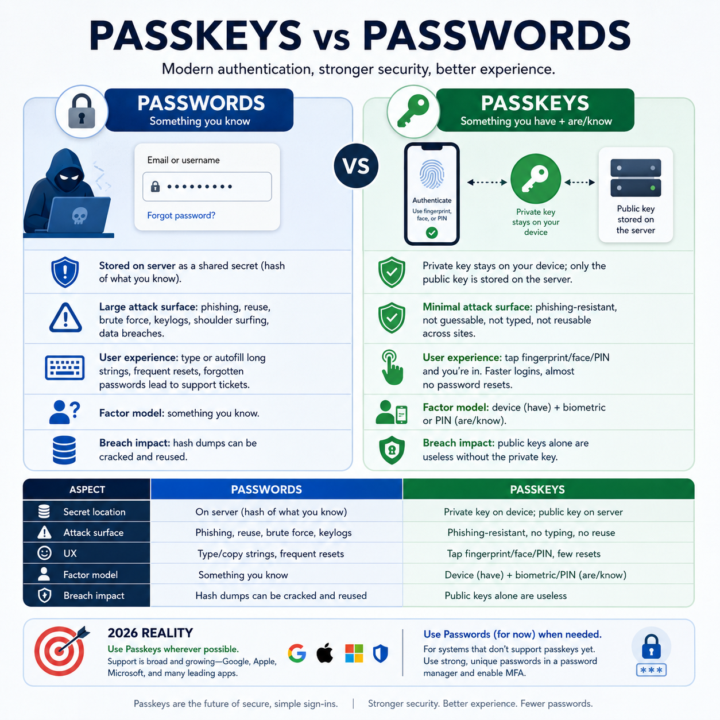
Passkeys vs passwords
• A password is like a secret word you type that a website remembers; if someone tricks you into telling it to them, they can pretend to be you. • A passkey is more like a special key stored on your phone or computer that never leaves your device; the website only sees proof that your real key unlocked the door. • Bad guys can steal or guess passwords using fake emails, keyloggers, or leaked databases, but they cannot copy your passkey because it stays locked inside your device. • With passkeys, you usually just tap your fingerprint, look at your camera, or enter a short PIN, so it’s both easier and safer than remembering long, messy passwords. • Until every site uses passkeys, you still need strong, unique passwords in a manager plus MFA, but the goal is to move toward passkeys and stop using passwords over time.

2 likes • 3d
@Matthew Sutherland super useful thanks! Any password manager that you feel like you would recommend? :)
2 likes • 2d
@Matthew Sutherland Love it, thanks! I will use your referral 🙏🏻❤️
8d •
YouTube press monitor
A friend asked me to help him automate something his team does manually every morning: scraping YouTube for new videos from European automotive press channels (EN/DE/IT/FR/ES), watching them, and producing a daily readable report. Pure plumbing problem with one interesting analytical core. Here's what I'm building. Goal Daily cron job → discover new videos from a channel allowlist → transcribe → analyze → human-readable report in inbox by 7am. Stack: - Discovery: yt-dlp (CLI, more reliable than YouTube Data API for our needs but we still need API for some metadata) - Transcription: cascading strategy - YouTube transcripts first (free, instant when available), then faster-whisper large-v3 locally as fallback. Whisper API only if local becomes a bottleneck. - Analysis: 2-stage Claude API calls. Stage 1 extracts structured facts per video (entities, claims, sentiment) into JSON. Stage 2 synthesizes the day's batch into a narrative report. - State: Google Sheets (videos_log, daily_runs, etc.) - chosen over SQLite because the friend wants visibility into the pipeline without me building a UI. - Storage: Google Drive for reports. - Language/tooling: Python, uv (not pip/Poetry), Typer for CLI, dataclasses with type hints for row schemas. - Deploy: Hetzner VPS, cron-triggered. - Dev workflow: Claude Code with GSD framework (discuss → plan → execute → verify → ship per phase). Key decisions I'm second-guessing: 1. Google Sheets as state store. Solves visibility for free, but feels janky. SQLite would be cleaner but requires a separate dashboard. Anyone done this and regretted it? 2. Two-call analysis (extract → synthesize) vs single-call. I think separation gives me debuggability and lets me regenerate reports without re-processing videos. But it's 2x API cost. Worth it? 3. OAuth Desktop app + 7-day refresh token in Testing mode. Works for unattended cron because the job runs daily. But if I publish it (single user, no real "users"), do I unlock anything I actually need? 4. Cascading transcription strategy. YT transcripts → faster-whisper → API. Sound or am I over-engineering for a low-volume MVP?
1 like • 6d
@Matthew Sutherland you are literally a lighthouse!:) thank you!!
1 like • 5d
@Matthew Sutherland super Matt, out of curiosity: this amazing summary for the pricing was built spontaneously or did you build a skill or a dedicated agent for doing this kind of work? :) I am asking so I can also learn in the future to produce something similar ❤️
10d •
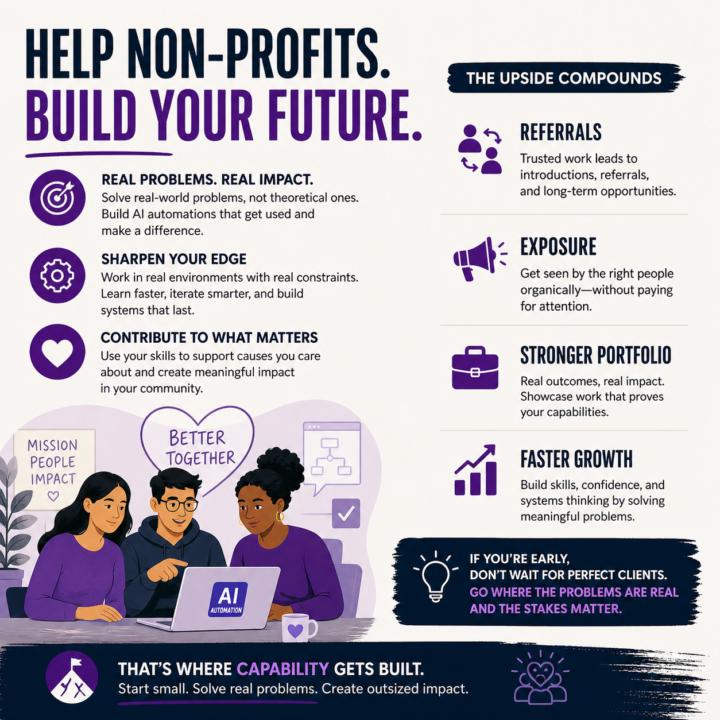
Build your skills: Non-Profits
Helping non-profits is one of the smartest ways to start in AI automation. You get real-world problems to solve, not theoretical ones. You sharpen your execution, build systems that actually get used, and learn what breaks outside of controlled environments. At the same time, you’re contributing to something that matters. The upside compounds: - Stronger portfolio with real outcomes - Referrals from trusted networks - Exposure without paid acquisition - Faster skill development under real constraints If you’re early, don’t wait for perfect clients. Go where the problems are real and the stakes matter. That’s where capability gets built.
0 likes • 9d
@Matthew Sutherland Just found in AIS after I saw this post :) thanks for reposting it here, it will be beneficial 🙏
1 like • 9d
@Matthew Sutherland very soon back to Germany and I will appear again in those lovely calls :) thanks my friend 🫂
24d •
Claude Code just shipped /ultrareview. Here is the practitioner breakdown.
Anthropic dropped a new slash command called /ultrareview in Claude Code v2.1.111, and it quietly changes how I review my own code before I ship it. Here is what it does, when to use it, when to hold back, and the catch most people are glossing over. What it actually is /ultrareview runs a full code review in the cloud using parallel reviewer agents while you keep working locally. - Type /ultrareview with no arguments. It reviews your current branch. - Type /ultrareview 123. It pulls PR #123 from GitHub and reviews that. By default it fires up 5 reviewer agents in parallel. Configurable up to 20. Each agent independently scans your diff for real bugs, and the command only surfaces a finding after it has been reproduced and verified. No "you might want to use const" noise. No lint-style nagging. Verified findings only. When to pull the trigger Spend a run when the cost of a missed bug is real: - Payment code - Auth changes - Database migrations - Large refactors touching many files - Any pre-merge review on a business-critical branch Do not burn a run on a one-line typo fix. The value lives in wide, high-stakes diffs where a human reviewer would take an hour and still miss something. The catch Users are reporting three free runs total on Pro and Max plans. Not three per month. Three, period. After that it meters against your plan. Treat them like good steakhouse reservations. You do not book one to show up and order a side salad. How I am using it 1. Finish a feature branch. 2. Run my own tests locally. 3. Fire /ultrareview before I open the PR. 4. Read the findings. Fix what matters. Push. 5. Only then ask a human to review. It does not replace a human reviewer. It does catch the things your eyes stopped seeing three hours ago. Try it Update Claude Code to 2.1.113 or later. Inside a git repo with real changes, type /ultrareview. Watch the fleet spin up. Come back in a few minutes. Feel free to share your initial result in the comments. I’m curious to see what it revealed about the code you deemed clean.

1 like • 22d
Ciao super-Matt! Thanks for this tip!!:) If you had to compare this function against the gsd:review-code and superpowers:requestinng-code-review, how would you evaluate and rate them?
1 like • 22d
@Matthew Sutherland Thanks, I will use that wisely:) 🙏🏻🔥
29d •
Mercury Bank Account
@Matthew Sutherland I spotted this great hints from you! :) And I read that you recommended to hire a registered agent. What did you mean by that? I thought it could be a great opportunity for discussion:) Do you also know if this bank account is available to non-US citizens?🙏
1 like • 29d
@Matthew Sutherland thanks Matt 🙏🏻 all clear.
1-10 of 29

@antonio-capunzo-8515
Process Engineer.
Optimizing systems and winning time back.
Active 3h ago
Joined Mar 8, 2026
INFJ
Frankfurt