
Write something

May 3 •
🎙️ Claude + Higgsfield MCP Workflow
In this walkthrough, you’ll see how Claude MCP seamlessly connects with Higgsfield MCP to unlock true end-to-end AI creation. From generating content to editing and shipping—everything happens in a single flow. We break down: - The exact setup inside Claude - How the MCP connector actually works - How tools like OpenClaw and Hermes plug into the same endpoint All of it powers:→ AI video generation→ AI content creation→ Scalable “vibe marketing” workflows This isn’t theory—this is agentic AI in action.A real faceless-channel system built on automation, speed, and creative leverage.
9
0
Feb 22 •
Create UGC & AI Influencer Videos That Make Money
New Lesson Released: Create UGC & AI Influencer Videos That Make Money The new video is now live! 👉 Free access: Workflow, Kling, Veo 3, and Sora 2: Click here In this lesson, you’ll learn how to build professional UGC videos and your own AI influencer using simple workflows — the same style businesses are using right now to promote products and generate affiliate income. Here’s what you’ll learn inside this video: • Turn product images into high-quality UGC videos • Create one-shot and multi-shot product videos • Animate images using Veo 3, Kling, or other models • Combine multiple scenes into a full professional video • Add background audio automatically • Build your own reusable AI influencer for unlimited content These workflows can be used for: Amazon Affiliate TikTok Shop Shopify UGC creator platforms And this is just the beginning. In the upcoming lessons, we’ll show you how to automate everything and generate videos in batch — so you can scale your content and production 1000x faster.
Mar 16 •
Turn Telegram Into Your OpenClaw AI Assistant (Read & Query Google Sheets)
Hey everyone! A brand new lesson has just been released inside the course. In the previous videos, we learned how to access top-tier LLM Agentic APIs like Claude Opus 4.6, OpenAI Codex, Gemini 3 Pro, and Qwen 3.5 Plus at scale through our Agentic Community. We also explored the OpenClaw architecture so you understand how agents, tools, and memory work together. Now in this new video, we go one step further and build a real practical workflow. In this lesson, you will learn how to connect OpenClaw to Telegram so you can control your AI agent directly from your phone. Once connected, you can send tasks to your agent from anywhere and have it run automation for you. Inside the video we cover: • How to create a Telegram bot with BotFather • How to connect the bot to OpenClaw during onboarding • How to secure the bot using your Telegram account ID • How to run OpenClaw tasks directly from your phone • How to use the Web Fetch tool to read a Google Sheets link • How OpenClaw downloads and converts spreadsheet data into CSV • How to chat with table data like a database using your AI agent • How the OpenClaw workspace and configuration files work • And an introduction to Skills, the modular extensions that give OpenClaw new capabilities Once this setup is done, your Telegram becomes a portable AI command center where you can control OpenClaw and run real business tasks anytime. ⚡ Important: If you want to access top-tier LLM Agentic APIs like Claude Opus, GPT Codex, Gemini, Qwen and more at scale, you can join our Agentic Community here: 👉 Join the Agentic Community: https://www.skool.com/agentic-builders-circle-7680/about Members get access to powerful LLM APIs integrated with OpenClaw, allowing you to build AI agents, automation systems, and real business workflows without worrying about API setup. ⏳ Join now while the price is still low. The membership price will increase soon, so early members lock in the current rate.
4
0

Mar 9 •
🚨 Updates This Week for Z2L Premium + Agentic AI Community
Hey everyone, I’ve been seeing many of you using LLM agentic workflows heavily, especially with Claude Opus 4.6. Just to give you some real numbers behind the scenes (see the attached photo): 👉 In just one day, based on the official API pricing, the usage we observed would cost around ~$250 on our end. This is exactly why we always say that when running top-tier LLM models, especially inside agentic systems, it’s very easy to spend thousands of dollars per month if you’re running tasks continuously. And that’s also why we’re trying to absorb as much of that cost as possible for the community, so you can freely test, build, and experiment with powerful AI models without worrying about massive API bills. Our goal is simple: 👉 Give builders access to powerful AI tools so you can actually build systems, automation, and real businesses. ⚙️ New Tutorials Coming This Week This week we’re releasing several new tutorials and workflows across both Z2L Premium and the Agentic AI Community. 🛍 Batch UGC Generation + Ecommerce Scraping (Z2L Premium) We’ll show a powerful workflow designed for UGC and affiliate ecommerce businesses. The idea is simple but extremely powerful: 1️⃣ Enter an ecommerce product URL 2️⃣ The system will automatically scrape product data 3️⃣ Generate UGC images 4️⃣ Generate UGC videos 5️⃣ Ready to use for affiliate marketing / Shopify / dropshipping This allows you to build a UGC content pipeline automatically from product URLs, which can be used for: • Shopify stores • Dropshipping • TikTok product marketing • Affiliate content systems 🤖 Agentic AI for Business Automation (Agentic Community) We’ll also release tutorials on using AI agents to help run your business tasks. You’ll learn how to build agents that can: • Read and respond to emails • Send emails automatically • Chat with Google Sheets / Docs • Organize business information • Control workflows using AI agents • Data Scraping (Scraping is a key building block for many AI automation businesses.)

Mar 7 •
🚀 Use Top-Tier LLM Agentic APIs in OpenClaw: Claude Opus 4.6 , GPT-5.3 Codex, Qwen 3.5 Plus, Kimi 2.5, and MiniMax
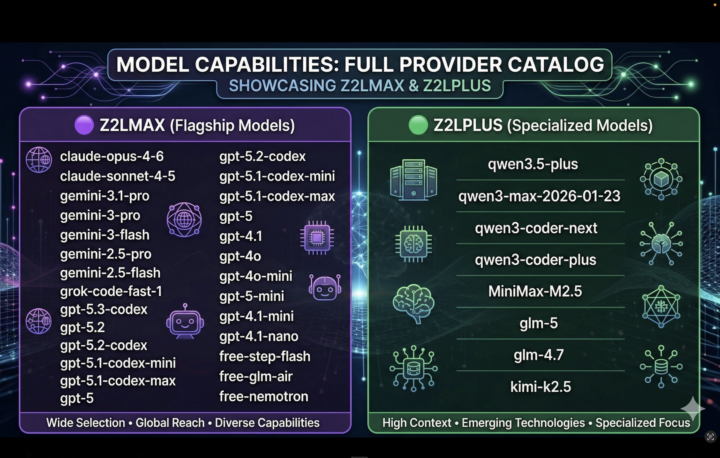
A brand new lecture has just been released inside the course. In this lesson, you’ll learn how to integrate top-tier LLM Agentic APIs directly into OpenClaw, allowing your AI agents to run powerful workflows like research, automation, data extraction, coding tasks, and more. We walk through the complete setup step-by-step, including: ✅ Connecting the Zero2Launch LLM API inside OpenClaw ✅ Configuring multiple LLM providers ✅ Setting primary and fallback models for agents ✅ Switching models dynamically while working with your agent ✅ Using the same API inside n8n with OpenAI-compatible nodes Inside this setup, you’ll be able to use powerful models like: • Claude Opus 4.6 • GPT-5.3 Codex • Qwen 3.5 Plus • Kimi 2.5 • MiniMax This gives your agents access to some of the most capable reasoning and automation models available today, all inside one unified workflow. 🎁 Free Access for Z2L Premium Members: If you are already a Z2L Premium member, you can join the Agentic Community for free. This allows you to access the community, discussions, and learning resources without paying for the Agentic membership. However, if later you decide that you want to use the paid LLM Agentic API, simply: 1. Leave the Agentic Community 2. Rejoin again using the paid membership option Once you join as a paid member, you’ll receive your Zero2Launch API key and can start using the LLM Agentic APIs immediately. 💰 Early Member Price (Limited Time) Agentic Community link: Click here Right now, the LLM Agentic API access is only $19 for new paid members. However, the price will increase to $39 next week due to the high cost of the top-tier API. So if you want to lock in the lower price and start building powerful agent workflows with top-tier LLMs, now is the best time to join. 🔥 Go watch the new lecture and start building multi-model AI agents inside OpenClaw. This is where the real power of agentic systems begins.
5
0
1-30 of 64
powered by

skool.com/zero2launch-ai-automation-5951
We simplify advanced AI automation. "Explain like I'm five" - this is the place.
Suggested communities
Powered by