
Write something

4d •
Coding Agent Platforms for Local Business Work (Oct 2026)
Quick practical comparison for anyone building or selling AI agent systems (especially with Hermes, OpenClaw, or coding agents) for local businesses. Cloudroom Multi-harness (Claude Code, Codex, Pi, Hermes, etc.), open-source Rust core, use your own model subscriptions (no markup). Free limited cloud agents + self-host option. Early-stage but strong on flexibility. Orgo Full persistent cloud computer per agent. Works with almost any agent. Good isolation model when you’re running agents for multiple clients. OpenHands Fully open-source, strong self-hosting, model-agnostic. Highest control, more ops work if you self-host. Official platforms (Cursor Cloud, Claude Code Cloud, Codex Cloud, Devin) More polished and lower friction, but higher lock-in. Better if you stay inside one ecosystem. Recommendation for this community: Orgo for client isolation + Cloudroom or OpenHands for the agent work. Self-host the open-source options when you want control over data and cost. What are you currently using to run agents for clients or internal systems? Drop your stack below. Image
0
0

Mar 28 •
The TopofMind AI Builders Command Pack - 59 Commands, Zero Fluff
I Just dropped the updated Command Pack for the community. 59 copy-paste commands for OpenClaw; organized by department, reviewed for quality, and built specifically for how we actually use these agents (solo operators, freelancers, and builders). What's in it: - Section 1: Outreach & Pitching > Lead qualifying, cold outreach, objection handling, follow-ups - Section 2: Marketing > Content repurposing, SEO briefs, email sequences, landing pages - Section 3: Solo Operator Tools > Morning briefs, meeting notes, invoicing, expense tracking, tool audits - Section 4: Danger Mode > Advanced agent configs, SOUL.md editing, cron jobs, sub-agent delegation - Section 5: OpenClaw Builder Commands > Installation fixes, token cost tracking, memory debugging, VPS backups, security scanning, local LLM setup, and more Section 5 was built directly from questions and pain points posted in this community. If you've asked about installation failures, token burn, memory issues, browser service problems, or ClawHub security; there's a command for it now. Here's a sample of what included: - (Custom Skill Builder, Channel Setup Wizard, MEMORY.md Guide, Prompt Injection Defense Checker, ommunity Post Drafter - Every command scored and reviewed against Google's EEAT quality framework. - How to use it: 1. Download the PDF (attached below) 2. Find the command you need 3. Copy it into your OpenClaw chat (Telegram, Discord, TUI) 4. Replace the [brackets] with your info 5. Hit send That's it. What I need from you: If you use a command and it doesn't work the way you'd expect, tell me. If there's a question you keep running into that should be a command; drop it in the comments. This pack is a living doc and Section 5 will keep growing based on what you all actually need.
Apr 9 •
Paperclip
Hello! What’s up everybody! I am wondering if anyone has started using paperclip!? Any chance you have any tips or feedback on it, I trust this community more than I trust YouTube! 🤣 Hoping to get some info on it and if it is useful or just a waste of tokens!! Thank you

Mar 26 •
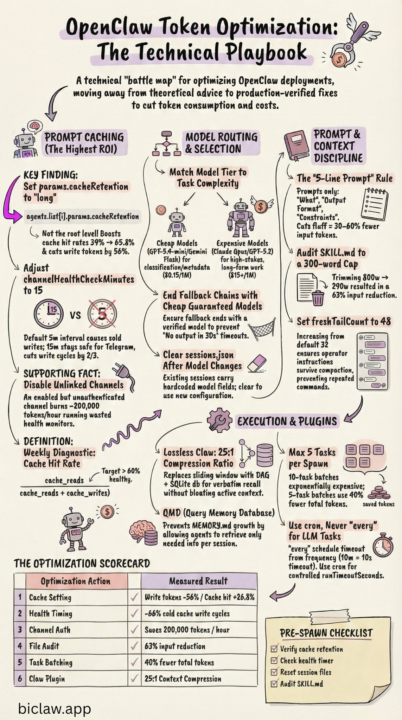
How OpenClaw Stays Sharp Without Burning Tokens
https://www.biclaw.app/blog/openclaw-token-optimization A technical playbook: real failures, exact fixes, measured results. Every technique here encodes a real incident. The failure mode, the config change, the measured outcome. No theory — only what worked in production. (Found this quite interesting)
Mar 5 •
OpenClaw: A Deep Dive (translated)
**Architecture, File Structure, and Practical Scenarios** ## Introduction: OpenClaw as a Living Organism OpenClaw is not just a program -- it is a distributed system organized like a living organism. If you picture its anatomy: - **Gateway** -- the heart and nervous system that pumps data and coordinates every process - **Agent** -- the brain that thinks and makes decisions - **Tools** -- the hands that carry out actions - **Workspace** -- long-term memory and personal space - **Sessions** -- short-term conversational memory - **Nodes** -- additional limbs (camera, screen, microphone) This document breaks down the internals of each organ down to the file and config level, shows how they interact, and illustrates everything with practical examples. --- ## Part 1: Gateway -- The Heart of the System ### 1.1 What Is Gateway and Why Does It Exist? Gateway is a long-lived daemon process that: - Maintains persistent connections to channels (Telegram, WhatsApp, Discord, Slack) - Routes incoming messages to the correct agents - Stores session state (conversation history) - Exposes an API (HTTP/WebSocket) for UI and external integrations - Runs periodic tasks (cron, heartbeat) - Manages connected nodes (devices) **Human analogy:** Gateway is the cardiovascular system + nervous system. It pumps events (like blood) between channels and agents and transmits signals (like nerve impulses) from sensory organs (channels) to the brain (agent) and back. ### 1.2 Gateway File Structure All Gateway data lives in `~/.openclaw/`: **`~/.openclaw/config.json`** -- the main Gateway config: - Authentication settings (`gateway.auth.token`/`password`) - WebSocket API port (default 18789) - Channel configs (`telegram.token`, `whatsapp.credentials`, etc.) - Security settings for exec (sandbox, approvals) - Browser tool configs (profiles, executable path) **`~/.openclaw/agents/<agentId>/`** -- per-agent data: - `sessions/sessions.json` -- metadata for all sessions (who, when, channel, status)
1-12 of 12
skool.com/topofmindai
Formerly OpenClawBuilders. Practical AI systems with Hermes, OpenClaw, Grokbot, GoHighLevel & automation that keep your business top of mind.
Powered by