
Write something

Feb 6 •
Fully AI Album
I thought I'd try and experiment and I created 10x instrumental tracks on Suno and uploaded them directly onto SoundOn and used their native AI cover generator to generate the album artwork. The album has been approved so got x10 more tracks for the playlists on the way. Also got a new Tom Burton track out for the playlists on Sunday.
Sep '25 •
Collab with Suno
I created this track today with Suno and me jamming on top.https://soundcloud.com/burton-tom/arbee-dub-2🎸🎸🎤🎹
Sep '25 •
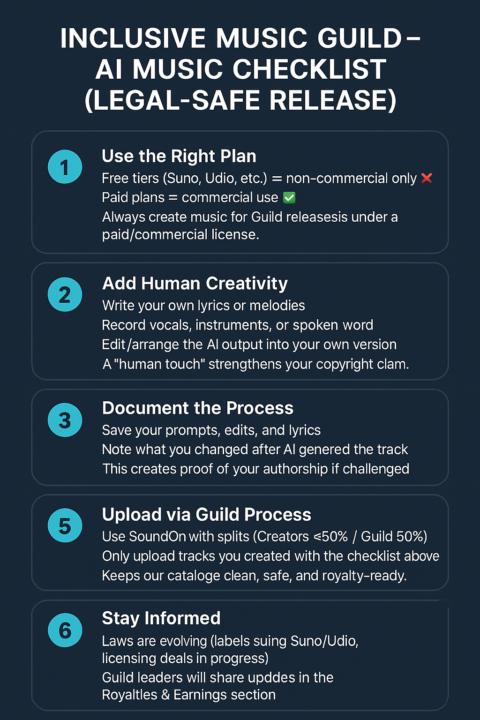
🎶 Easy Checklist: Using AI Music Generators
✅ 1. Pick Your Tool - Beginner: Suno, Udio, Boomy, BandLab SongStarter - Advanced: Stable Audio, AIVA, MusicGen ✅ 2. Choose What You Want to Make - Full song (lyrics + music) - Beat or backing track - Melody/idea starter ✅ 3. Write Your PromptKeep it short and clear: - Style/genre (hip-hop, rock, ambient) - Mood (happy, dark, dreamy) - Instruments (guitar, synths, piano)👉 Example: “Chill lo-fi hip-hop beat with vinyl crackle, relaxed and dreamy.” ✅ 4. Add Human Touch - Edit lyrics or write your own - Record vocals, guitar, or spoken word - Rearrange or extend the AI track 👉 Makes the song yours and protects your rights. ✅ 5. Save Your Work - Download the track - Save your prompt + any edits👉 This proves you created it if needed later. ✅ 6. Check Rights - Free plans = usually non-commercial ❌ - Paid plans = usually commercial use allowed ✅👉 If you want to upload and earn royalties, use a paid plan. ✅ 7. Share With the Guild - Post your track in Playlists & Streams - Upload via SoundOn with splits (Creators ≤50% / Guild 50%) ✨ Remember:AI is a tool, not the artist. Your creativity makes the track unique and safe to release.
1
0
1-3 of 3
powered by
skool.com/the-inclusive-music-guild-7887
Stream, share, and earn! A guild where disabled musicians & friends make music and split royalties together.
Suggested communities
Powered by