
Write something
Pinned

Jun 26 •
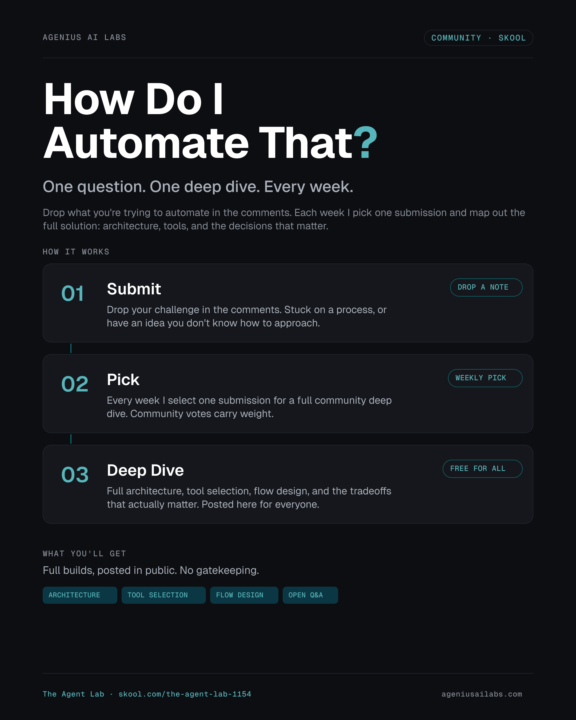
How do I Automate That?
Drop your answer in the comments. Tell me one thing you're trying to automate right now. It could be: - Something repetitive that's eating your time - A process you've started building but got stuck on - An idea you don't know how to approach yet Every Sunday I'll pick one submission and do a full deep dive: architecture, tool selection, flow design, and the decisions that actually matter. I'll post it here so everyone benefits. Drop yours below. — Mike
Pinned
Jun 13 •
What is n8n? The 30,000-foot overview before you build
If you keep seeing n8n everywhere and want the plain-English version of what it actually is, start here. No setup required, this one is the big picture. n8n is a visual agent-orchestration platform. You build a workflow node by node and you can actually see what is happening, instead of handing everything to a black-box agent. It is no-code / low-code, it self-hosts, and it has built-in integrations for just about every app and AI model out there. I started my automation journey on it three years ago, and most of my workflows still run on it today. The reason it is worth learning comes down to two things: control and cost. - Control: you are not locked to one vendor. You can run the same job through Claude, OpenAI, or a local model and keep whichever does it best. - Cost: the only part that costs money is the AI node itself. The code, the databases, and the API calls are free, instead of paying a cloud agent to burn expensive output tokens on every request. In the video I walk through three real workflows I run (an email assistant that drafts replies, a product-photo generator, and a LinkedIn job scraper), then build a simple one from scratch so you can see how little it takes to get started. How to start: - n8n cloud is about $20/month and a fine place to begin. - But if you have a reasonably modern computer, especially an Apple Silicon Mac, self-host it free on Docker. That is what I recommend. - Want a head start? Grab the free starter kit (local n8n in Docker) This is the foundation. The hands-on builds (the Google setup, the email assistant, and more) branch off from here. Watch the overview above, then tell us in the comments: what is the first thing you want to automate? Welcome to The Agent Lab. Let's build.
2
0
Pinned
Jun 13 •
👋 Welcome to The Agent Lab. Start here.
Glad you're here! This is a room for people who want to actually build with AI agents, not just watch demos. Whether you wired up your first workflow last week or you've got agents running in production, you belong here. Let's kick it off. Drop an intro in the comments and tell us: 1. Who you are and what you do. 2. How long you've been playing with AI (be honest: "since last Tuesday" is a totally valid answer) 3. What you're trying to build, or what brought you here. 4. One thing you're stuck on right now (someone here has probably solved it) A few things to know: - New stuff drops regularly: workflow templates, build teardowns, and the engineering behind real deployments - No question is too basic. The people who ask are the people who build - No gatekeeping, no fluff. Share what works, ask what doesn't The fastest way to get value here is to engage. Comment on intros, jump into threads, post what you're building. See you in there. — Mike

15d •
Overwatch:
A full infrastructure topology platform covering roughly 90 nodes — Proxmox hosts, k3s nodes, VMs, LXC containers, Docker services, managed switches, all of it — auto-discovered every 60 seconds from eleven different sources without me touching a thing. It figures out the relationships on its own. Which app uses which database. Which service pulls secrets from Infisical. Which pods run on which k3s node. Which apps authenticate through Authentik. Which nodes mount NFS storage from Zhongli. No manual config. It just knows. Click any node and it pulls up status, metrics, and live logs straight from Loki. Pod logs, systemd journals, all of it right there without opening another tool. The click-to-focus mode is the part that makes me happy. Click Nextcloud and it yanks every real dependency out of the graph and rings them around it with typed directional edges — database, storage, secrets, SSO, what node it runs on. You can see exactly what it needs to survive and what breaks if any of those things go away. When something goes wrong, Overwatch suppresses downstream noise. If a host goes down and takes five services with it, you get one alert for the host, not six alerts for the symptoms. It knows the difference. The n8n workflow embeds a unique key in every ticket subject tied to the specific node and metric that fired. Before creating anything it searches existing tickets and compares — if one already exists it reopens it instead of creating a new one. There's a four-path event router handling alerts, suppressed alerts, resolved alerts, and discovery health events separately. A flood guard per node and metric. A two-hour reopen grace window. Orphan handling for suppressed alerts with nothing upstream. When a real alert fires, a lightweight AI router picks one of seven domain specialists — network, Proxmox, Kubernetes, storage, database, security, or incident. That specialist gets the sanitized alert plus live SSH diagnostics from the affected system, and responds with structured evidence-backed JSON that gets posted back as a triage note. If the situation goes stale it re-triages automatically.
0
0

Jul 14 •
Thought I'd share what I've been working on.
Triple-Threat Orchestration System I got tired of AI tools that just do things. Build something, deploy something, write something — and then I find out three steps later that it made a bad assumption in step one that affects everything downstream. Triple-Threat is how I push back on that. It's a structured, gated workflow where three different AI systems each have a specific job, nothing moves forward without passing a gate, and I approve every gate before anything gets built. The coordinator is Hermes — an AI agent with a built-in learning loop that maintains state, enforces the stage sequence, and keeps everyone on task. I don't use it as a general assistant. It runs the workflow. Claude Code does the design and architecture work. Codex handles implementation review and builds the actual runbook. Antigravity (I call it agy) does an independent review of everything Claude Code decided — I make them disagree with each other on purpose, then I decide who's right. Any restart, configuration change, DNS update, secret rotation, or infrastructure action still requires my approval.

1-11 of 11
powered by
skool.com/the-agent-lab-1154
Learn agentic AI by building real systems. For people starting out and seasoned builders sharing workflows, templates, and ideas.
Suggested communities
Powered by