
Write something

Mar 25 •
built a google flow & google whisk automation script
came across a lot of chrome extensions that charge you monthly fees to automate/batch feed prompts into google flow and google whisk so i decided to create my own script that will pull all the prompts and inputs from a csv file on my computer and have the script interact with google flow and google whisk when i need a large library of graphics for whatever project and or reason. this script saves me at least 50$ a month (100$+ if I used other AI based services) but more importantly at least 8 hours per week in graphic design and rendering.

Mar 6 •
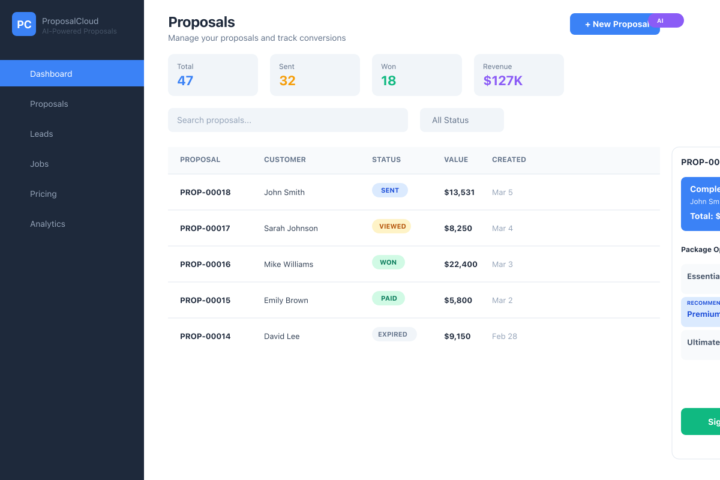
Build This: “Local Competitor Watchtower” (AI + Fullstack + Automation)
If you want a high-value app to build with OpenClaw / vibe coding, this one is strong: A Local Competitor Watchtower for home-service businesses that: - Tracks competitor Google reviews, ratings, and service pages by city - Detects changes (new offers, bad reviews, price language shifts) - Summarizes what changed with AI - Auto-generates action items:“Post this reply template”“Update this service page section”“Launch this local offer this week” This is an app owners will pay for monthly because it gives direct, usable growth actions. Copy/paste this prompt into OpenClaw: ACT AS: Senior Full-Stack Engineer + AI Product Architect PROJECT: Local Competitor Watchtower SaaS GOAL: Build a fullstack app where a home-service business can monitor competitors in a city/ZIP and get AI-generated weekly strategy actions based on: 1) review changes 2) website/service page content changes 3) offer/pricing language shifts STACK: - Next.js 14+ App Router - TypeScript - Tailwind + shadcn/ui - PostgreSQL + Prisma - Redis (queues/cache) - BullMQ worker - OpenAI API (analysis + recommendations) - Auth: NextAuth - Deploy target: Vercel (web) + Render (worker) - Optional APIs: SerpAPI / DataForSEO / custom scraper adapters CORE FEATURES: 1) Onboarding - User enters: business name, industries, target cities/ZIPs - User adds competitor list (name + domain + GBP link if available) - Save monitoring preferences (daily/weekly) 2) Competitor Data Collection - Scheduled jobs fetch: - latest rating + review count - new recent reviews and review text - service pages / offer pages content snapshots - Save normalized snapshots with timestamp 3) Change Detection Engine - Detect: - rating movement - review sentiment spikes - content diffs (headline, CTA, service copy, guarantee language) - offer changes (“free estimate”, “same-day”, financing terms) - Compute a change score (0-100) 4) AI Insight Generator - Given prior + current snapshots, output strict JSON: - key_changes[] - threat_level (low/med/high) - opportunities[] - recommended_actions[] (max 5) - suggested_campaign_ideas[] (max 3) - Recommendations must be concrete and local-market aware 5) Dashboard - Cards: - “Top competitor change this week” - “Review trend by competitor” - “Best opportunity to act on now” - Table of competitors with filters (city, industry, threat level) - Detail view for each competitor: - timeline - content diff - AI action plan 6) Action Center - Convert recommendation into: - CRM task - draft email - draft social post - draft local service page section - Mark action as done / snooze / assign 7) Notifications - Email digest weekly - Optional Slack webhook - Alert when threat_level=high DATABASE SCHEMA (Prisma models): - User - Organization - Competitor - MonitoredLocation - Snapshot - ReviewRecord - ContentSnapshot - ChangeEvent - InsightReport - ActionItem - NotificationPreference - JobRun Include key fields: - Competitor: name, domain, gbpUrl, industry, city, state - Snapshot: competitorId, capturedAt, sourceType, rawJson - ChangeEvent: competitorId, detectedAt, changeType, severity, summary - InsightReport: competitorId, periodStart, periodEnd, model, insightJson - ActionItem: orgId, competitorId, title, description, status, dueDate API ROUTES: - POST /api/competitors - GET /api/competitors - GET /api/competitors/:id - POST /api/monitor/run - GET /api/insights?competitorId=&range= - POST /api/actions - PATCH /api/actions/:id - POST /api/webhooks/slack-test WORKER JOBS: - collect-competitor-data - detect-changes - generate-insights - send-digest IMPLEMENTATION REQUIREMENTS: - Strong TypeScript typing end-to-end - Zod validation for all API payloads - RLS-style org scoping on all queries - Retry logic for failed fetches (3 attempts) - Idempotency keys for job runs - Proper loading/empty/error UI states - Unit tests for: - change detection - insight JSON parser - action-item creation flow UI PAGES: - /dashboard/watchtower - /dashboard/watchtower/competitors - /dashboard/watchtower/competitors/[id] - /dashboard/watchtower/actions - /dashboard/watchtower/settings DELIVERABLE: Generate: 1) Prisma schema additions 2) API route handlers 3) BullMQ worker processors 4) OpenAI prompt templates + parser 5) Dashboard React components 6) Seed script with demo competitors 7) README with local setup + env vars ENV VARS: - DATABASE_URL - REDIS_URL - NEXTAUTH_SECRET - NEXTAUTH_URL - OPENAI_API_KEY - SERP_API_KEY (optional) - SLACK_WEBHOOK_URL (optional)
Apr 14 •
auto apply to jobs ai automation
built a chrome extension that applies to vacancies and tries to convert HR and decision makers at companies into offering me a position or becoming my AI automation client. using openrouter, free llms, my resume which gets modified per each job post so to better match key role, responsibilities and requirements.
0
0

Mar 31 •
Anyone else here struggling more with setup than actually using OpenClaw?
I've been testing it and honestly… the idea is powerful, but: – setup takes time – agents break sometimes – you spend more time fixing than executing I recently found a simpler way where everything is already: ✔ hosted ✔ agents pre-built ✔ tools connected So you can actually focus on using it (outreach, content, automation…) If anyone wants, I can share what I'm using 👍
1
0
Mar 30 •
old email contact refresher automation
if you are like me your inbox is full of people with whom you lost contact and if done right those people can be followed up with to become your friends and or customers. i build an ai powered automation that will follow up with those old contacts with the power of LLM automation. script identifies emails based on the tag assigned to them, reads each email message to understand the context and the goal attached to each email tag and response to the email in that context. email is then automatically sent or left as draft for human to review. this is a great way for me to automate and follow up with people that i lost touch with. tech stack: openrouter, free llms models, thunderbird extension (coded with help of claude). cost?: 20-40 hours of my time.
0
0
1-18 of 18
powered by
skool.com/profitable-openclaw-skills-1049
Sharing deployment ready prompts for profitable web apps, Saas products, and chrome extensions. Just paste in OpenClaw / Vibe Coder to start a build!
Suggested communities
Powered by