

Jun 25 •
💡 Figma Config 2026 Recap
Config 2026 was less about UI design and more about general design practice. Figma is moving away from the idea of “AI replaces the designer” and toward something much more practical: AI as a creative layer inside the current design workflow. At some point, I thought that Figma was trying to build a simple version of the Adobe toolkit for creatives. The most useful 4 Figma updates for product designers: 1️⃣ Figma Motion: Create expressive animations with timelines and reusable systems. 2️⃣ Shaders: Generate rich visual effects, image fills, mesh gradients, and material-like styles. 3️⃣ Generative Plugins: Prompt Figma AI to build custom plugins tailored to your workflow. 4️⃣ Code Layers: Build and preview coded UI directly on the Figma canvas. You can see how all features except Code layers work in the attached video 📕Complete Figma Config 2026 recap: https://medium.com/ux-planet/figma-config-2026-recap-1852ccf5e1d1?sk=a8ee5ee6d115102b6b95ab777aa6bfe8


8h •
3 checks I run before I ship any screen
Simple checks that catch most design problems: 1. Blur test: blur your layout (or squint). Can you still tell what matters most? If not, fix the hierarchy before anything else. 2. 60-30-10 color: 60% neutral, 30% secondary, 10% accent. Keep the accent for actions so buttons stand out. 3. Contrast: body text needs at least 4.5:1 (WCAG AA). Light grey on white usually fails. Figma plugins like Stark check it in seconds. What's your go-to check? I'm always looking to add one 👇
0
0
Jun 18 •
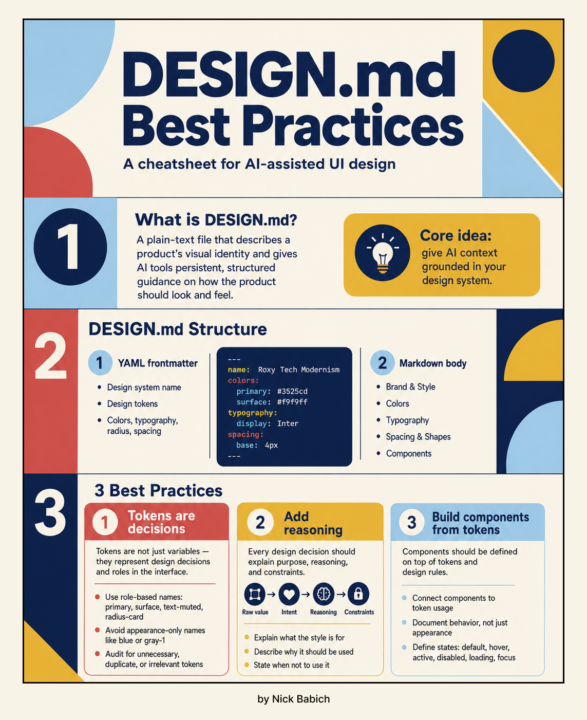
DESIGN[.]md Best Practices
DESIGN[.]mdis quickly becoming one of the most useful files for AI-assisted UI design because it help AI understand your design system well enough to create UI that actually feels like your product. A good DESIGN[.]md usually includes your design tokens, brand style, color rules, typography, spacing, and component guidance. 3 best practices for creating a strong DESIGN[.]md: 1. Treat tokens as decisions: A token is not just a variable. It defines the role something plays in the interface. 2. Add reasoning. Don’t just say what a style is. Explain why it exists, when to use it, and when not to use it. This helps AI make better design decisions. 3. Build components on top of tokens. Components should reference your tokens and design rules. Complete guide to DESIGN[.]md: https://medium.com/ux-planet/design-md-best-practices-c00325e8b23a?sk=6e97ad8d6c6fc014f45bb7db864a554b
Sep '25 •
Welcome! Introduce yourself + share a pic of your workspace 🎉
Let's get to know each other! Comment below sharing where you are in the world, a photo of your workspace, and something you like to do for fun. 😊

27d •
Proposal for a Long-Term AI Business Partnership
I am reaching out to propose a "long-term business partnership focused on the rapidly growing AI industry", with the goal of creating sustainable business opportunities and increasing our mutual profits. As artificial intelligence continues to transform industries worldwide, I believe this is an excellent time for us to collaborate, combine our strengths, and take advantage of emerging opportunities. My idea is to work together on AI-related platforms that I have worked such as [AfterQuery,handshake] My main objectives would be to: - "Build a long-term partnership" based on trust, transparency, and mutual respect. - "Combine our skills, experience, and resources" to achieve results that would be difficult to accomplish individually. - "Explore new AI platforms and projects" to diversify our income sources and expand our business. -"Grow together financially and professionally", with a shared commitment to long-term success. This can be done by individuals who have obtained a master's or bachelor's degree upon graduating from university. I'm a AI Engineer so I have enough experience here. If we believe each other and cooperate well,we can increase our mutual profits. I look forward to hearing your thoughts and hopefully building a successful long-term partnership together. Best regards, Genki
0
0
1-30 of 37
powered by
skool.com/product-design-7868
A great place to learn how to build digital products—from initial idea exploration and UI design to product testing and market release.
Suggested communities
Powered by