
Write something
Feb 25 •
Map Your AI Difficulty Axes and Build a Smarter Workflow
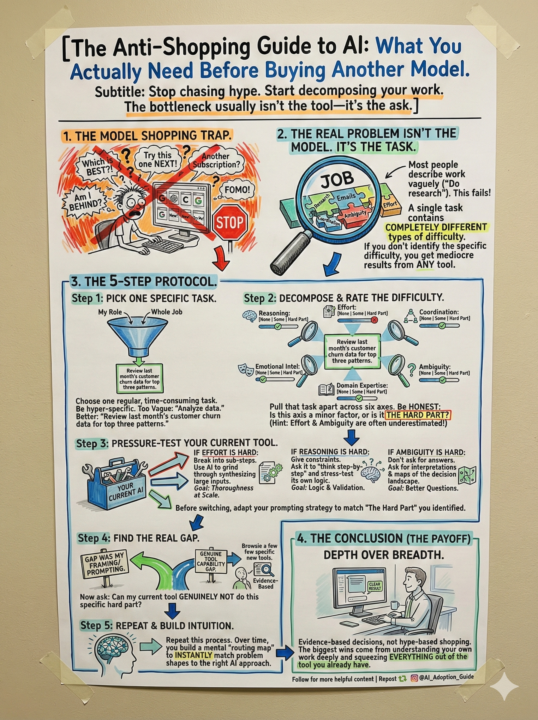
I spent 20 years optimizing factory floors. The lesson that applies to AI? Stop buying new machines when you haven't mastered the ones you have. 🏭 Every week someone asks me: "Tony, should I switch to Gemini? Is Claude better than ChatGPT? What about the new OpenAI model?" Every week my answer is the same. Wrong question. I've seen this pattern before. New equipment arrives on the factory floor. Half the team wants to jump straight to it before they've understood the process it's meant to serve. The result? Expensive kit running at 30% efficiency while the real bottleneck — the process — stays broken. 🔧 AI is doing the same thing to businesses right now. The models are genuinely different. Some reason harder. Some grind effort tasks at scale. Some handle ambiguity better than others. That differentiation is real and it matters. But here's what I know from working with SMEs on AI adoption: The bottleneck is almost never the model. It's the ask. 🎯 Most people describe their work to an AI the same way they'd describe it on a CV. Vague. High-level. Task-based. Then they get mediocre output and blame the tool. The fix isn't a new subscription. It's decomposing what you're actually asking. One board presentation isn't one problem. It's a reasoning problem, an effort problem, a coordination problem, and an ambiguity problem — all stitched together. Each one needs a different approach. Throw them all at one prompt and you get slop. From any model. I've been building something inside Practical AI Academy to fix exactly this. 👇 A complete Prompt Kit that walks you through three things: ✅ How to decompose the difficulty types inside your real work ✅ How to pressure-test whether your current tool is actually the bottleneck ✅ How to evaluate AI output — not just generate it Here's the truth nobody selling you an AI subscription wants to say: Most people are sitting on top of a tool that can already do 80% of what they need. They just haven't asked it the right way yet. 💡
Jan 19 •
The Adversarial Prompt Set: Stop AI From Making You Confidently Wrong
This is the full prompt set I use to stop AI from telling me what I want to hear. Why This Exists AI is trained to be helpful. Helpful often means agreeable. Agreeable often means dangerous. I have watched smart people build detailed, fluent, confident conclusions with AI. And still solve the wrong problem. The output looked right. The reasoning felt solid. The AI confirmed everything. Nobody caught the gap until it was too late. This prompt set exists to create friction before commitment. What Is Included Each prompt is designed for a specific checkpoint in your workflow: 🔹 Pre-Work Grounding Establish what you actually know vs what you assume before AI touches the problem. 🔹 Boundary and Expertise Checks Force the AI to declare the limits of its knowledge and flag where it is guessing. 🔹 Disconfirmation Passes Ask the AI to argue against its own output. Find the weak points before someone else does. 🔹 Consensus and Reality Checks Test whether the conclusion aligns with domain consensus or departs from it. And why. 🔹 Confidence Calibration Make the AI rate its own certainty and explain what would change its answer. 🔹 Final Commit Gates Last chance friction before you act on the output. How To Use This Do not use all of them every time. That defeats the purpose. Pick the checkpoints that match your risk level: - Low stakes → Boundary check + one disconfirmation pass - Medium stakes → Add confidence calibration - High stakes → Full sequence The goal is not perfection. The goal is catching the subtle wrong before it costs you. The Prompts 👇 Everything is below. Copy them. Adapt them. Use them. If you find gaps or improve them, post in the comments. This is a living resource. https://www.notion.so/The-Adversarial-Self-Check-Framework-2edcb245a8e680f781b3d9ad3b205a27?source=copy_link Remember: The most dangerous moment is when AI feels helpful, fluent, and affirming. That is when you slow down.
1
0
Jan 6 •
Claude Code for Your Week
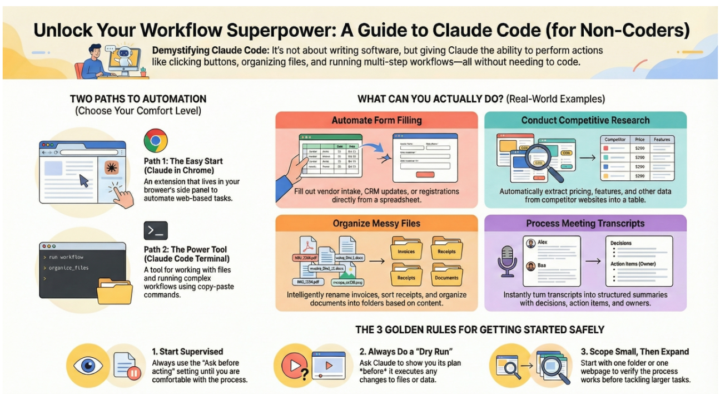
The Name Is Lying To You "Claude Code" sounds like developer-only territory. It isn't. What Anthropic actually shipped: an agent that automates the boring stuff. Forms. File sorting. Competitive research. The papercuts that eat 3–5 hours from your week. Three things you can do RIGHT NOW (no coding required): 1. Vendor intake forms Stop copy-pasting data into forms. Claude Code fills them while you watch. One row at a time, verified before submit. Time saved: 30 mins per week per person 2. Messy Downloads folder Tell it: "Rename these PDFs by date and vendor." It reads the contents, extracts the info, renames everything correctly. Time saved: 1 hour (one-time) 3. Competitor pricing Visit 10 sites. Extract pricing, features, limits. Standardize into a single CSV. What took you 2 hours takes 10 minutes. Time saved: 1.5 hours per research cycle The ONE pattern that makes this work: The Dry Run. Before Claude touches ANYTHING, tell it: "Show me your plan. Do NOT execute." You review. You approve. THEN it executes. This catches mistakes before they happen. It's the difference between experimenting and actually shipping. Who's doing this already? Three of my clients are running Claude Code on vendor intake, expense categorization, and market research. Combined: 12–15 hours reclaimed per week across three teams. Not theoretical. Actually happening. Want to try it? Reply in this thread with ONE task you do repeatedly that makes you think "I wish this was automated." I'll walk you through: - How to set it up (5 minutes) - The exact prompt to use - How to verify it worked Pick something low-stakes. You're learning the mental model, not betting the business. Pick something that happens weekly. That's where the leverage compounds. This week's challenge: Identify one "papercut" task you do repeatedly. Comment below. We'll automate it together. The goal isn't perfection. It's proof that delegation actually works. Then you scale it. 💪
1
0
Dec '25 •
AI Parenting Guide
🧠 Your Child Is Already Using AI. Here's How to Guide Them Well. The AI Parenting Guide is your practical companion for raising children who use AI wisely, think critically, and stay connected to real relationships. Built by someone with 20+ years of operations experience—not Silicon Valley hype. No PhD required. Just honest conversations about how these systems actually work, and what your child actually needs. WHAT YOU'LL GET ✅ Understand how ChatGPT actually works — We explain pattern-matching, confidence problems, and engagement traps in plain English. You'll finally know what's happening when your child asks AI for advice. ✅ Age-appropriate conversation starters — From 6-year-olds to 18-year-olds. Real language, real scenarios, real boundaries that stick because kids helped create them. ✅ Practical frameworks, not fear — Five boundary protocols that actually work (Show Your Work, Human First, Citation Needed). Five emergency protocols for when things get serious. Five protective skills to teach together. ✅ Know when to worry—and when not to — Yellow flags vs. red flags. What's developmentally normal vs. what needs intervention. How to address the actual problem, not just the symptom. QUICK FACTS 📖 13 Parts covering everything from "How AI Actually Works" to "Emergency Protocols" 🎯 Practical, not preachy — Built on real manufacturing operations thinking: systems work when people understand them ⏱️ Start in 10 minutes — Read the overview or dive into specific sections your child's age needs most 📱 Mobile-friendly — Reference guides, conversation starters, warning signs you can check anytime HOW IT WORKS 1. Start with understanding — Learn what your child's actually interacting with (it's not what you think) 2. Have real conversations — Use frameworks that build trust, not fear 3. Set boundaries together — Rules that stick because they make sense 4. Build protective skills — Reality-checking, emotional regulation, cognitive independence Your child is worth the effort. Start today—understand AI, build trust, raise resilient kids.
1
0
Nov '25 •
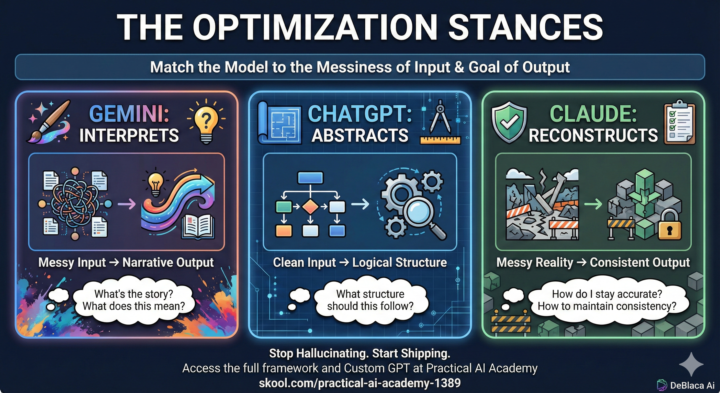
🧠 The "Best" LLM Doesn't Exist. (But the Right One Does.)
I see the same debate happen every day: "Is Claude better than ChatGPT? Is Gemini catching up?" Here is the truth: There is no universal "best" model. There is only the right model for your specific Optimization Target. If you are trying to use ChatGPT for a task that requires "creative messiness," you are going to struggle. If you use Claude for "blue sky" brainstorming, you’ll hit a wall of conservatism. I’ve put together a Universal LLM Selection Framework (attached below 📄) to help you stop guessing and start shipping. The Core Concept: The 3 Stances According to the framework, each model has a distinct "personality" or optimization stance: 1. Gemini Interprets 🎨 · Ask it: "What's the story here? · Use for: Massive messy data, finding unexpected angles, and narrative polish. 2. Claude Reconstructs 🛠️ · Ask it: "How do I stay accurate? · Use for: Iterative refinement, operational consistency, and "client-proof" implementation. 3. ChatGPT Abstracts 📐 · Ask it: "What structure should this follow? · Use for: Deep logical reasoning, system architecture, and clean, well-defined problems. How to use this: The attached guide breaks down 8 specific task categories—from Education & Training to Technical Systems—and tells you exactly which model to use (and which trade-offs to accept). It also covers Multi-Model Workflows. For complex work, you often need to sequence them. - Example: Use Gemini to find the creative angle → ChatGPT to build the logical architecture → Claude to write the reliable implementation . 🤖 The Shortcut: Custom GPT I know memorizing a matrix can be a pain, so I built a Custom GPT trained on this exact framework. You simply tell it what task you are working on, and it will analyze your input context (clean vs. messy) and tell you exactly which model (or sequence) to use. 👉 Click here to use the LLM Selection Guide GPT: https://chatgpt.com/g/g-69296c5e53488191aa85a72d0a3aa1eb-llm-model-selection-guide
1
0
1-13 of 13
powered by
skool.com/practical-ai-academy-1389
Welcome to The AI Practice — a learning hub for people and businesses who want to work smarter with AI.
Suggested communities
Powered by