
26d • General discussion
How Messages Travel Through the Mesh
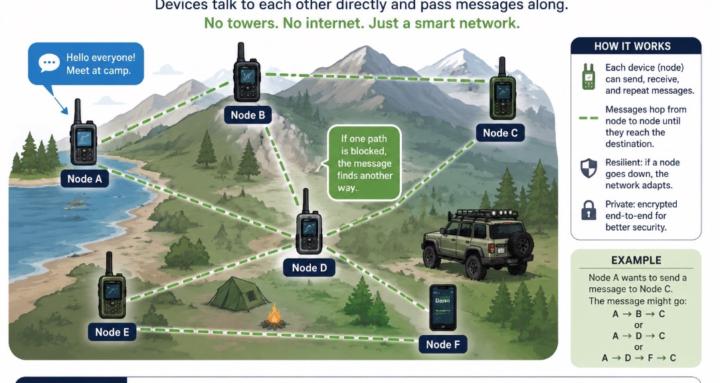
Part One explained what mesh networking is: devices talk directly, messages hop between nodes, and no cell towers or internet are required.
Part Two should answer the next question beginners naturally have:
“What actually happens after I press Send?”
Cover these points:
• Client nodes are the devices people carry and use.
• Router/repeater nodes help pass messages farther.
• A message may travel through several nodes before reaching its destination.
• Hops are the number of relays used along the way.
• The system chooses a route automatically; users normally do not select the path.
• A message can fail because of distance, terrain, metal buildings, poor antenna placement, incompatible settings, or too few nodes.
• More nodes do not always mean better performance—badly configured repeaters can create unnecessary traffic.
• Meshtastic and MeshCore devices must be using the same firmware ecosystem to communicate.
A simple Pantera example would make it clear:
Eric sends a message from his T-Deck inside Pantera.
Pantera’s roof node hears it and relays it.
Another node near the campground passes it onward.
Diane’s handheld receives the message farther down the trail.
A strong title would be:
Mesh Part Two: How Your Message Finds Its Way
And the closing line could be:
You press Send once. The mesh figures out the journey.
I’d save channels, encryption, public versus private messaging, and mesh etiquette for Part Three.
0
0 comments
How Messages Travel Through the Mesh
Suggested communities
Powered by