

Oct '25 •
SAP — My “Previously Used” T-Codes
SAP always displays the last 15 T-Codes you’ve used. Here’s what shows up in my list (minus the duplicates) and a quick summary of what they do and why I use them in day-to-day logistics: VL09 – Cancel Goods Issue - Reverse a GI when something’s shipped or confirmed in error. MB52 – Display Warehouse Stock - Quick check of stock levels by plant/location ZDOTC_DBR – Delivery Report - Returns order details, Billed, Picked, Delivery Created etc. VL06I – List of Inbound Deliveries - Track inbound receipts and GR statuses. VL02N – Change Outbound Delivery - Make corrections or updates before posting goods issue. SQ01 – SAP Query - Custom reports, make friends with IT! This is a powerful T-Code. ZP2P_3PLDEL – 3PL Delivery Creation - Generates outbound deliveries for 3PL fulfilment. Shows all Open orders in SAP. MB51 – Material Document List - Trace all material movements for stock reconciliation. VA03 – Display Sales Order - View customer orders and delivery status details. ZUOTC_OOR – Open Order / Out-of-Region Report - Tracks unfulfilled or misrouted orders. (Orders pending OBD) SE16 – Data Browser - Access raw table data for quick checks or troubleshooting. SE16N – Enhanced Data Browser - Advanced table viewer — better filtering, layouts, and exports. Your “Previously Used” list actually says a lot about your workflow... Mine pretty much sums up a day juggling between order accuracy, delivery creation, and stock reconciliation. What’s on your “Previously Used” list and which T-Code do you rely on most?
0
0
Oct '25 •
Preparing for Q4: Volumes, Capacity & The Waterfall
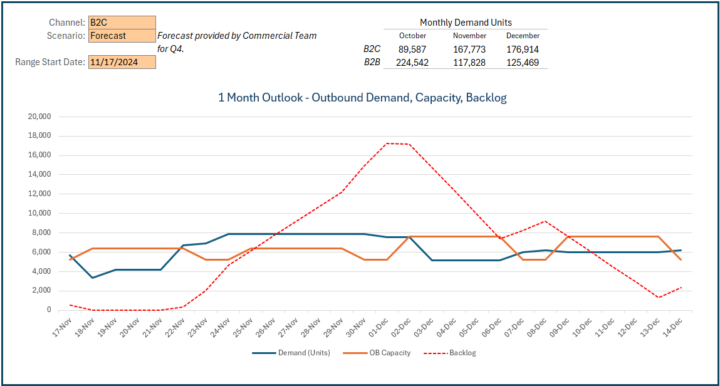
It’s critical to understand the volumes and capacities you’ll be dealing with through Q4. Your 3PL can only plan effectively if you’re giving them up-to-date data and in doing so, you’re also gauging whether they’re truly the right partner moving forward. Ask yourself: - Can they pull additional levers when demand spikes? - Can they add shifts or re-engineer processes to unlock capacity and hit sales targets? The Waterfall Method One tool I rely on heading into peak is The Waterfall. It starts with: - Forecasted Demand (Sales Team Data) - Forecasted Output (3PL Data) This baseline instantly highlights whether a backlog risk exists. As you move through the days and weeks, layer in the Actual Demand and Actual Output to see how reality compares to plan. This ongoing view helps you course-correct early, before the backlog snowballs. Reading the Signals If the backlog trend starts climbing, it’s time to activate levers: weekend shifts, PM shifts, overtime, or temporary resources. Keep in mind: - If your 3PL is failing SLAs, they should absorb the cost. - But if your volumes exceed forecast or contract, you may need to share the load. Open Discussion - How do you approach Q4? - What reports or dashboards do you rely on most? - And what levers do you pull when forecast blows past plan?
1-2 of 2
powered by
skool.com/logisticslibrary-8421
From DC floor to corporate boardroom. I teach real-world logistics, bridging warehouse hustle with strategy to help you master supply chains
Suggested communities
Powered by