
Write something

Jul 11 •
🚀 Today's Spine Learning Challenge
Watch this tutorial and try recreating the effect yourself. 🎥 https://youtu.be/GfeY8t1JVAc?si=Hk-Q8pj7hWuMBG6s 📌 Challenge: ✔ Pause the video. ✔ Recreate the animation. ✔ Share your result in the comments. The best submission will be featured on our page! Who's taking the challenge? 👇 #SpineChallenge #Spine2D #AnimationChallenge #GameArt #GameDev #SpineQuestAcademy
Jul 3 •
What you need to know
A lot of people upload on YouTube without ever understanding why some videos grow and others don’t. I share simple breakdowns in my free Telegram space that help creators see what’s actually happening behind their channel performance. https://t.me/+H6I2zTe6WclkMDc0
0
0

Jul 1 •
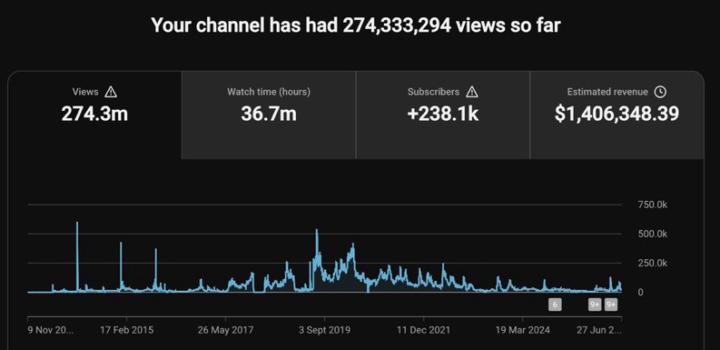
💰 274M+ Views. 238K+ Subscribers. $1.4M+ Revenue.
This isn’t luck. It’s the power of the right YouTube strategy, consistency, and systems that work. Imagine turning your channel into a real digital asset that attracts views, subscribers, and income around the clock. 🚀 Whether you’re just starting out or struggling to grow, we can help you build and scale a profitable YouTube channel. 📩 Ready to see what’s possible for your channel? Send me a message today. 🔗 Check the comments for our Telegram link!

Sep '24 •
Favor Modes
- Favor Moves keys toward the previous/next keys. When multiple keys are selected, keys further from the next/previous key move more slowly. - Blend Moves keys toward the previous/next keys, like Favor. When multiple keys are selected, all keys move at the same speed. - Shift Moves keys toward the previous/next keys by moving them all together, they don't change relative to each other. - Linear Moves keys toward being on a line between the next/previous keys. - Average (curve) Moves keys toward the average of the next/previous keys on the same curve. - Average (frame) Moves keys toward the average of other selected keys on the same frame. - Average (all) Moves keys toward the average of the next/previous keys for all curves with selected keys. - Default Moves keys toward the default values. Usually this is 0, but some properties use other values. For example, scale uses 1. - Setup Moves keys toward the setup pose value. - Store Moves keys toward the stored curves. Use store to set the stored curves.
5
0

Sep '24 •
Weight Tool And Bone Tool Selection Switch by Right Click
Brought up by Armanimation. http://fr.esotericsoftware.com/spine-weights#Testing-weights https://esotericsoftware.com/forum/d/26945-weights-view-switching-between-transform-and-weights-tools/4
4
0

1-9 of 9

skool.com/learnanimation
Master Spine animation with expert mentoring, hands-on training, and a supportive community, led by the creator of Anipalooza on YouTube!
Leaderboard (30-day)
1

+1
2

+1
Powered by