
Write something
Pinned

Aug 12 •
Say "open the user guide" and the whole library opens
Every install of GHL Command now carries the guide library inside the product. Free or paid, same library. Say this to Claude: open the user guide It opens in your browser as a single page that works offline. Searchable job cards, plain-English guides, and copy-paste prompts with a Copy button on each one. Three moves to try it: 1) Say "open the user guide." 2) Type count in the search box. 3) Hit Copy on the prompt, paste it to Claude, and check the answer against your own account. That is the same on the free tier. Nothing there is held back for paid. Not every card has its guide written yet, and I would rather tell you that than let you find it. The ones that are written carry a "Proven live" mark, and that mark means something specific: the prompt was executed against a real account before we published it. It is enforced by the build, not by good intentions. Change a prompt without proving it live again and the release fails. The rest read "Coming in an update" and arrive on a normal restart. Nothing to reinstall, nothing to download, and no date I am going to promise you and then miss. There is also a new lesson in Start Here: "Get a verified answer in 10 seconds." It walks the whole thing end to end, using a real question a member got a bad answer to, and the three prompt rules that would have prevented it. Already installed? Fully quit Claude once and reopen it. Mac: Cmd+Q. Windows: right-click the tray icon and quit. On Claude Code: /mcp reconnect. Not installed yet? Some of the guides are open to everyone at ghlcommand.com/skills/. Read those first and decide from there. Tell me which guide you opened first.

Pinned
Jul 11 •
Read/write vs. build: GHL Command and the official HighLevel MCP
HighLevel now ships an official MCP for Claude. It is free, it is genuinely good, and several of you asked where that leaves GHL Command. This post is the permanent answer. The one-line version: the official MCP reads and writes your CRM. GHL Command builds and fixes it. They stack fine together. The side-by-side, verified against HighLevel's own docs: • Build, edit, and publish workflows: official MCP, no. GHL Command, yes, the full builder. • Deep workflow cloning with every internal ID remapped: official, no. GHL Command, yes. • The silent-failure audit, catching actions that point at deleted stages and fields, which GHL skips with no error: official, no. GHL Command, yes. • Funnels and landing pages: official, no. GHL Command, yes, and recently proven live. • Forms: official reads them only. GHL Command builds them, fields, logic, auto-responder. • Pipelines: official lists them. GHL Command creates and edits them. • Whole-account provisioning: official, no. GHL Command, yes. Blueprint builds a client sub-account from one intake. • Setup: the official MCP wins here, one-click OAuth. Ours is a token plus a one-time Firebase step, and that extra setup is exactly what powers the builders. • Cost: the official MCP is included with your GHL plan. GHL Command is $97 a month for unlimited sub-accounts, with a free read-only tier that includes the audit. Why the difference exists: the public API has no write access to workflows, funnels, or forms, and never has. The official MCP is built on the public API, so it inherits that ceiling. GHL Command works the same internal routes GHL's own builders use, which is harder to maintain and worth it, because building is the part that eats your week. If you only need Claude to read and write your CRM, use the official MCP. It is excellent and free. If you want Claude to actually build and fix your automations, funnels, forms, and whole client accounts, that is GHL Command, and today it is the only thing that does it. And if you want to see what "we maintain the hard part" looks like in practice, the Green Doesn't Mean Working course in the classroom walks a real bug from customer email to shipped fix in one day.
Pinned
Jun 2 •
Start here — Welcome to GHL Command
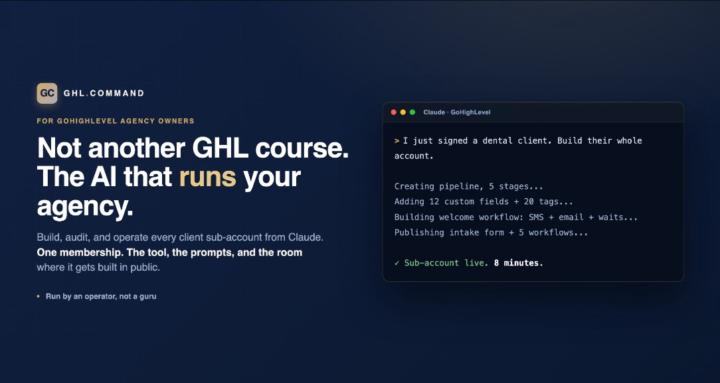
Welcome in. You're a founding member, and I don't take that lightly. Quick on what this is. GHL Command is the room for agency owners who use AI to actually run their operations, not just market with it. I run a healthcare agency on this exact stack every day: the GHL Command MCP, Claude, and a small team of named agents. This is where I build it in public, drop the prompts and templates I'm using, and answer your GoHighLevel questions directly. What your membership includes, plainly: - The GHL Command tool (your license) at the founding rate of $97/mo, locked as long as you stay subscribed. - This community: the build-in-public room, the prompts and templates, and me answering questions. - Every new tool we ship, automatically, at no extra cost while you're a member. Billing lives in your account, not here. You can manage or cancel anytime. If you cancel, the license and your spot here wind down together. Simple. Your first 20 minutes: 1. Open the Start Here course in the Classroom. It gets GHL Command installed and gives you a real win in about 10 minutes (point Claude at one of your sub-accounts and have it tell you what's silently broken). 2. Come back and introduce yourself below: who you are, how many sub-accounts you run, and the one GHL task you're most tired of doing by hand. 3. Read the first war story I pinned: "The $5,000 pipeline ID mistake every GHL agency owner makes." It's the bug that started all of this. That's it. Get the tool running, get your first win, then tell me what you want me to build next. This thing grows around what you actually need. — Jerry
22h •
Never Reuse the Same Test Contact
Command note: the automation passed every test and failed on the first real lead. The test was the problem. We checked a new intake sequence on the contact record we always use for testing. It ran clean. The first actual lead got nothing. That record was carrying things a new lead never has: • Tags left over from earlier tests, one of them an exit condition • A previous enrollment in the same workflow, so re-entry rules applied • DND switched on during a test months ago • Fields already filled, so a "field updated" trigger never fired • An assigned user, so the assignment step had nothing to do None of that surfaces as an error. The workflow quietly skips a step, exits early, or takes a different branch, and still reports success. Do this on the next test: 1) Create a brand new contact — never reuse an old one. 2) Give it a real address you can open (plus-addressing works fine). 3) Enter it through the actual door — submit the form, do not add the tag by hand. 4) Read the enrollment history, not just your inbox. Confirm which steps ran. 5) Delete it when you are done, so it never becomes next month's dirty test record. A contact that has been through your account is not a new lead. It is a veteran, and veterans get treated differently.
0
0

2d •
Teach the Client One Screen
Command note: a client who cannot find anything in the CRM goes back to their phone, and the record you built dies the week after handoff. Adoption is a design problem, not a training problem. Nobody learns a whole CRM. They learn one screen. Pick their one screen — the single view they open every morning: • A smart list of contacts waiting on them • The pipeline filtered to the stage they own • Today's calendar with the contact attached • The conversations inbox, and nothing else Do this in the first week: 1) Ask what they check now — the notebook, the phone, the inbox tab they never close. 2) Build the one view that replaces it, inside their sub-account. 3) Hide every menu item they do not need yet. Clutter reads as complexity. 4) Walk them through it once, in five minutes, on a live record. 5) Check at day 14 — if they have not opened it, the view is wrong, not the client. The test is not whether they were trained. It is whether they open it unprompted on a Tuesday. Train them on the whole CRM and they will use none of it. Give them one screen and they will keep the record alive.
0
0

1-30 of 133
Suggested communities
Powered by