
Write something

11h •
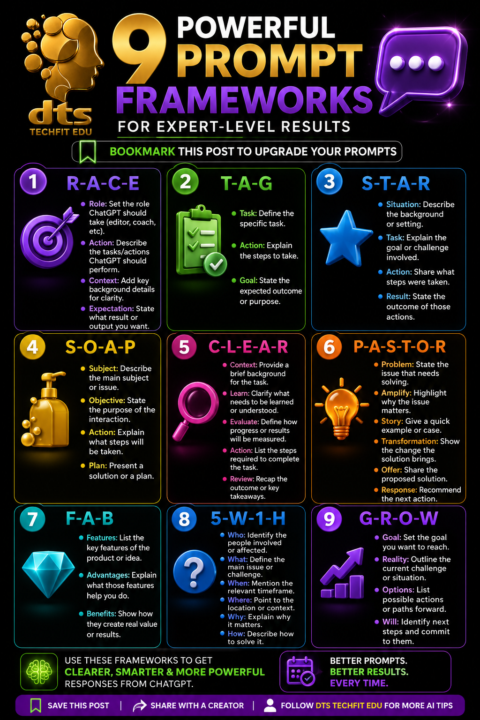
9 Prompt Frameworks That Will Transform the Way You Use ChatGPT
9 Prompt Frameworks That Will Transform the Way You Use ChatGPT Most people only scratch the surface of what AI can do because they ask vague questions and expect detailed answers. The quality of your results depends on the quality of your prompt. A clear prompt gives ChatGPT the context it needs to produce more accurate, useful and personalised responses. Inside our Skool community, we focus on practical AI skills that save time, improve productivity and help you create better content. Learning a few proven prompt frameworks can completely change the way you work with AI. 1. RACE RACE helps you give ChatGPT a clear role and objective. Role tells ChatGPT who it should be. Action explains what it needs to do. Context provides important background information. Expectation describes the result you want. This framework works well for lesson planning, blog writing, social media content and business documents. 2. TAG TAG keeps prompts short and focused. Task explains what needs to be completed. Action outlines how it should be done. Goal defines the final outcome. This is perfect for quick daily tasks and productivity. 3. STAR STAR is ideal for analysing situations and solving problems. Situation explains the background. Task identifies the challenge. Action describes what was done. Result shows the final outcome. It is especially useful for interview preparation, case studies and reflective writing. 4. SOAP SOAP provides structure for planning. Subject introduces the topic. Objective explains the purpose. Action lists the required steps. Plan outlines the solution. This framework is excellent for project planning and teaching resources. 5. CLEAR CLEAR helps organise learning and development. Context explains the background. Learn identifies what needs to be understood. Evaluate measures progress. Action lists the required tasks. Review reflects on the outcome. Teachers, trainers and coaches often use this framework to build learning activities.
6d •
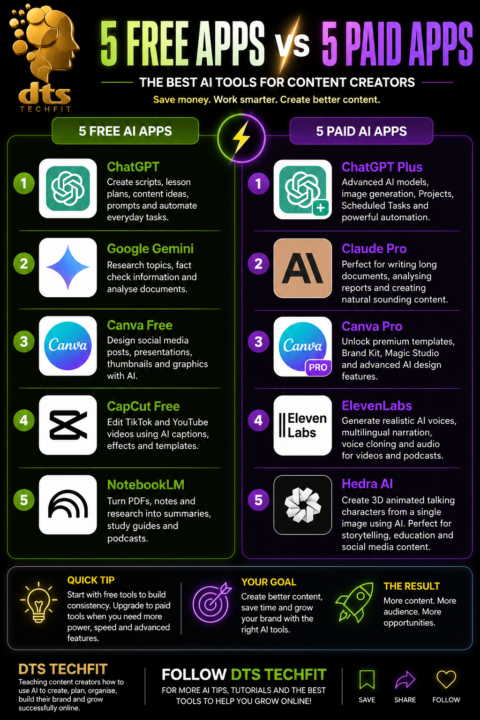
5 Free AI Apps VS 5 Paid AI Apps
5 Free AI Apps • ChatGPTCreate scripts, lesson plans, content ideas, prompts and automate everyday tasks. • Google GeminiResearch topics, fact check information and analyse documents. • Canva FreeDesign social media posts, presentations, thumbnails and graphics with AI. • CapCut FreeEdit TikTok and YouTube videos using AI captions, effects and templates. • NotebookLMTurn PDFs, notes and research into summaries, study guides and podcasts. 5 Paid AI Apps • ChatGPT PlusAdvanced AI models, image generation, Projects, Scheduled Tasks and powerful automation. • Claude ProPerfect for writing long documents, analysing reports and creating natural sounding content. • Canva ProUnlock premium templates, Brand Kit, Magic Studio and advanced AI design features. • ElevenLabsGenerate realistic AI voices, multilingual narration, voice cloning and audio for videos and podcasts. • Hedra AICreate 3D animated talking characters from a single image using AI, ideal for storytelling, educational videos and social media content.
9d •
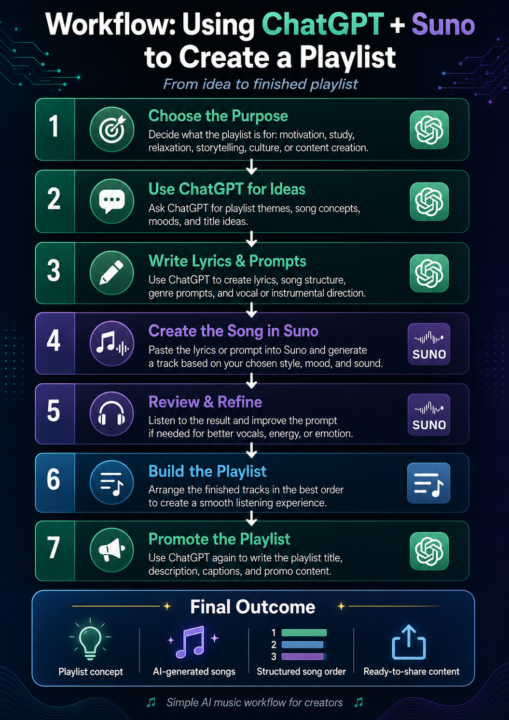
How I Use ChatGPT and Suno to Create a Playlist
Creating music used to feel like something only producers, singers and studio engineers could do. Now, with the right AI tools, content creators can turn ideas into full songs and build a playlist with a clear theme, mood and purpose. For my workflow, I use ChatGPT and Suno together. ChatGPT helps me plan the creative direction, write song ideas, shape lyrics and organise the playlist. Suno then helps me turn those ideas into finished AI generated tracks. I start with the purpose of the playlist. Before I create anything, I ask myself what the playlist is for. Is it for motivation, study music, relaxation, storytelling, faith, culture, business content or background music for videos? Once I know the purpose, I use ChatGPT to help me build a clear theme. For example, I might ask ChatGPT to create a soulful Afro Caribbean playlist concept about gratitude, healing and becoming stronger through life’s struggles. From there, ChatGPT gives me song titles, moods, short descriptions and lyrical themes. Next, I use ChatGPT to write the lyrics. I ask for a song structure with verses, chorus and bridge, so the track feels complete. I can also guide the tone by asking for something emotional, uplifting, cinematic, spiritual, relaxed or energetic. This saves time because I am not starting from a blank page. Once the lyrics are ready, I move into Suno. Suno allows me to turn a text prompt or lyrics into a full song. I paste in the lyrics, then add the style of music I want. This might be R&B soul, reggae fusion, Afrobeat, gospel, chill study music, cinematic instrumental or smooth Caribbean lounge music. The prompt is very important. I do not just type “make a song”. I describe the genre, mood, instruments, voice style and energy. A stronger prompt gives Suno a better creative direction. For example, I might ask for a soulful R&B track with warm keys, soft drums, Afro Caribbean female humming and an emotional chorus. After Suno creates the song, I listen carefully. I check the vocals, rhythm, emotion, intro, chorus and ending. If the track does not match the feeling I want, I go back to ChatGPT and improve the prompt. Sometimes a small change in wording can completely change the sound.
8d •
ChatGPT New Scheduling
https://vm.tiktok.com/ZNRw1RfQ5/ ChatGPT has introduced a powerful feature called Scheduled Tasks, and it is a brilliant tool for creators, teachers and business owners who want to stay consistent. Instead of opening ChatGPT every day and starting from scratch, you can now ask it to carry out automated prompts at a future time. OpenAI explains that Tasks can be used for reminders, recurring work and proactive updates, which makes it useful for anyone who wants a more organised content workflow. The feature can be managed from the Tasks area in ChatGPT, and some users may see it shown as Scheduled in the menu bar. For content creators, this feature can save time and reduce the pressure of thinking of new ideas every day. At DTS Techfit, I teach creators how to use AI to create engaging content, plan smarter, stay organised, build their brand and grow successfully online. With Scheduled Tasks, I can ask ChatGPT to research a topic each morning, create a content idea, write a short script and even remind me when it is time to record or post. This turns content creation from a rushed daily task into a planned system. One way I would use this is for my Jamaican Term of the Day series. I can schedule ChatGPT to research one Jamaican phrase each day, explain the meaning, give the cultural context and write a short script with a call to action. This means the idea, research and script can be ready before I start recording. For creators who want to be consistent without feeling overwhelmed, ChatGPT Scheduled Tasks is more than a reminder tool. It is a content planning assistant that helps you work smarter and stay ahead.
Poll
2 members have voted
8d •
Using AI to Generate Your Own Avatar: Building Your Personal Brand in Fitness and Education
Why You Should Use AI to Create Your Own Avatar Your personal brand is one of your greatest assets, and AI is making it easier than ever to build a recognisable online presence. One of the most effective ways to do that is by creating your own AI avatar. Whether you work in fitness, education or any other industry, an AI avatar allows you to present a professional and consistent image across your videos, social media and digital products. For fitness professionals, an AI avatar can become the face of your workouts, nutrition tips and motivational content. Instead of worrying about setting up cameras and lighting every day, you can use your avatar to explain exercises, introduce training programmes or promote products while keeping your branding consistent. This makes it easier to create regular content and stay visible online. For educators, AI avatars can transform the learning experience. Imagine delivering lessons, explaining difficult concepts or welcoming students to an online course with a digital version of yourself. An avatar creates familiarity, helps strengthen your personal brand and allows you to produce engaging educational content much faster. It is especially useful for creating bite sized lessons, explainer videos and online courses. Creating an AI avatar is now simpler than ever. Start by taking several high quality photographs of yourself with different expressions and angles. Upload these to an AI image generation tool and describe the style you want, whether that is photorealistic, cartoon, Pixar inspired or professional studio quality. Once you have an avatar you like, you can use it in AI video tools to generate talking videos, product demonstrations and educational content. The biggest advantage of an AI avatar is consistency. Your audience begins to recognise your face and your brand, even when you are producing content at scale. Combined with tools such as ChatGPT for scripting and AI video generators for production, your avatar becomes part of a complete content creation workflow that saves time while maintaining quality.
1
0

1-30 of 36
powered by
skool.com/dts-techfit-9994
IT Lecturer and AI specialist teaching 3D animation and how to monetise digital creations with practical, future focused strategies.
Suggested communities
Powered by