
Write something
9d •
Create premium UGC content
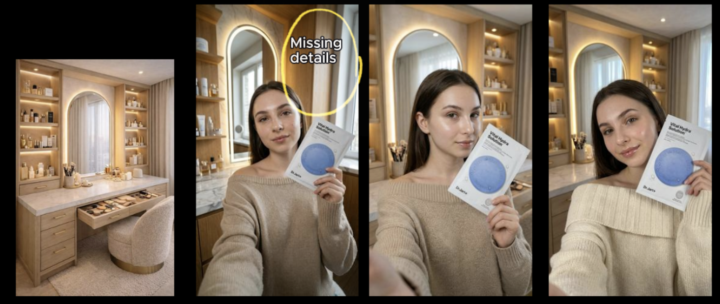
Image 1's Prompt (You upload your AI avatar + product image): Image 1 character, now she's sitting in front of her make up desk with a mirror, holding the product as image 2 (The product) Image 2's Prompt: Close-up beauty shot: a woman seated near the camera, framed from shoulders up, with a calm and focused expression. Small, evenly placed dabs of white cream are visible on her cheeks, forehead, and chin. She is gently lifting her hands toward her face, preparing to massage the cream into her skin, with soft, controlled movement. Her posture is relaxed and composed, conveying a sense of care and intention. Lighting: soft, diffused studio lighting that enhances skin texture and creates a clean, natural glow. No harsh shadows. Mood: clean, minimal, and professional — emphasizing skincare routine and self-care. Style: high-end skincare advertisement, natural skin detail, smooth but realistic finish, neutral background. Full workflow (Premium member only): https://www.skool.com/create-ai-videos-people-love-3057/classroom/dc062ce9?md=6e09a91339f8469abad1a09802002947
2
0

9d •
5 mins to clone a simple fashion UGC
Step 1. Take a screenshot of a fashion UGC that you are looking for. Step 2. Attached that screenshot and adding your Master Seed Images/ Contact Sheet of your AI avatar Step 3. Attached the newly created image and generate the video with the prompt. Details prompt and step by step: https://www.skool.com/create-ai-videos-people-love-3057/classroom/dc062ce9?md=0740c0ef5447470fb4dbf437a97c66ed

11d •
Seedance 2.0: Bypass Seedance’s human face detection
Step 1. Create an avatar image by Google Nano Banana Pro / Upload real human face Step 2. ✡️ To bypass Seedance’s human face detection, here’s a simple trick: ✡️ Add a subtle grid overlay to your image using the following prompt in Google Nano Banana Pro. "Add a subtle very thin semi-transparent 9x9 white grid overlay." Using this method, the video can be generated successfully. You’ll just need to edit out the first frame, which still contains the 9×9 white grid overlay. Seedance 2.0 free trial: https://lumiying.com/ https://www.capcut.com/ Course in premium class: https://www.skool.com/create-ai-videos-people-love-3057/classroom/f85d8387?md=c2286534c4014ad78a2ee0fbb2de90f5
0
0

24d •
Prompt for Fashion UGC
Just upload the workflow and prompt for creating fashion UGC. Premium member only: https://www.skool.com/create-ai-videos-people-love-3057/classroom/dc062ce9?md=18e8c3cebd164435873284ef2e4f503d

Apr 11 •
New video explaining advanced background creation techniques.
I’ve just uploaded a video explaining different ways to create backgrounds for your AI avatar, with a full explanation of each approach and the results. Including the way to hold the perfect product without defects. The link: https://www.skool.com/create-ai-videos-people-love-3057/classroom/fe769daa?md=17b5a2a45edb40538104eb23ff88a208
1-7 of 7
powered by
Suggested communities
Powered by