
Write something

Mar 20 •
New! Two-part platform walkthrough from our ambassador Jay
Morning all! @Jay Johnson , one of our awesome ambassadors, has recorded a two-part walkthrough of CaptureFlow. He's done a great job breaking it all down. Whether you're just getting started or want to see what's new, definitely worth a watch. Part 1: [CaptureFlow 1] Part 2: [CaptureFlow 2] One small ask. If you can show @Jay Johnson some love on the posts with a like, comment or repost, that goes a long way in helping us reach more people. We really appreciate it. Hope you all have a lovely day!

Mar 9 •
Happy birthday to the Dong king 👑
Happy birthday @Sean Delaney ❤️🎂🎉 I wish you all the best brother! https://youtu.be/J_wUrZVSqWg

Feb 19 •
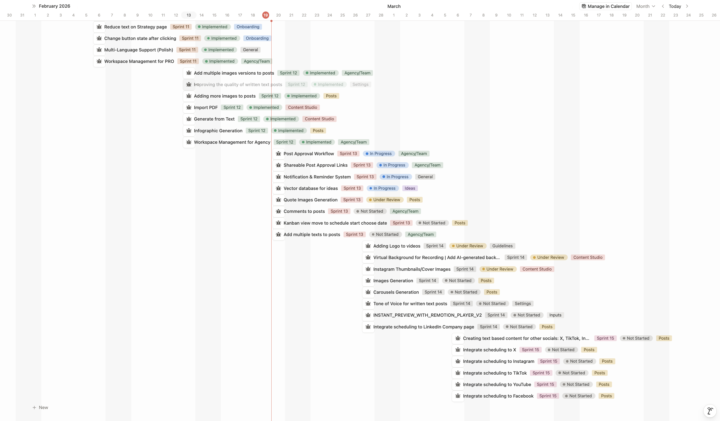
What We're Building Next | 3-Week Roadmap | Updated Feb 19
You asked for transparency on the launch call. Here's exactly what we're building over the next 3 weeks. This is a real roadmap. Not a marketing page. Things might shift. If they do, you will see them updated here: https://doersgrowth.notion.site/captureflow-roadmap?v=2a72297467a280368675000c6abae91a JUST SHIPPED: - Multiple image versions for every post -- pick the one you like best - Better written text quality -- we rebuilt how the AI writes your posts - More image options per post - Import PDF as a capture source -- upload a doc and turn it into content - Generate from Text -- paste an article, notes, or transcript and create content - Infographic generation -- auto-create visual infographics from your captures - Workspace management for PRO and Agency plans - Multi-Language Support (French) --- Sprint 13: - Post Approval Workflow -- teams can review and approve content before publishing - Shareable Approval Links -- send a link to anyone for post review (no login needed) - Notification & Reminder System -- get nudged when it's time to capture, review, or publish - AI-powered Idea Engine -- vector database that suggests content ideas based on previous data - Multi-Language Support (German) - Kanban View with Drag-to-Schedule -- visually plan your content calendar by dragging posts to dates --- Sprint 14: - Quote Images -- auto-generate branded quote graphics from your inputs - Comments on Posts -- add notes and feedback directly on content - Scheduling to LinkedIn Company Pages -- publish to your business page, not just personal - Multiple Text Versions per Post -- get several copy options and pick your favourite --- Sprint 15: - Logo on Videos -- your branding automatically added to all generated videos - Virtual Backgrounds for Recording -- AI-generated backgrounds so you can record anywhere - Thumbnail Images for Video Shorts -- custom thumbnails for short-form video content
1-3 of 3
skool.com/captureflow
Where busy professionals turn expertise into content, without spending hours creating. Community, accountability, and a system that actually works.
Powered by