2d • Live Sound & Touring
🚀 Part 1 is LIVE: BERA A1 FOH Tour — Mixing Console Architecture
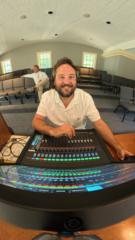
The A1 Walkthrough series is officially underway! We are starting at the heart of the system: the Soundcraft Vi3000.
In this video, I’m pulling back the curtain on how I organize a pro-level fader layout to handle high-stakes shows without breaking a sweat. If you’ve ever felt "lost" in your own mix during a festival patch, this is for you.
📺 Watch Part 1 Below
🛠 How to Use This Lesson:
- Follow Along: Open the BERA A1 Showfile I emailed you (it’s also in the Classroom under 'Resources').
- Reference the I/O: Pay close attention to the mark where I explain the matrix routing—this is the "brain" of the rig.
- Take Notes: Look for the specific naming conventions I use for speed.
📈 Level Up Your Status
Remember, every time you comment and interact, you earn points toward Leveling Up on our community leaderboard. Higher levels unlock exclusive deep-dives and direct coaching opportunities!
💬 COMMENT BELOW: What is the most frustrating part of your current console layout? Is it the I/O patch, the fader banks, or something else?
I’ll be jumping in to answer your specific questions about this Vi3000 setup!
0
0 comments
🚀 Part 1 is LIVE: BERA A1 FOH Tour — Mixing Console Architecture
powered by
skool.com/b-robertson-holdings-llc-6541
Your hub for professional audio. Get exclusive show files, advanced mixing & production techniques, and direct coaching to elevate your sound.
Suggested communities
Powered by