

🔥
2h •
Midjourney Moodboards
Do you use them? If so, what's your take on them? Personally, I love them. I think they're super-handy for cranking out batches of images (say, for stock image collections) where you need that style consistency. I also love to use them for exploring new styles by using them in various combinations with srefs and render styles in the prompt. I spent a lot of time creating moodboards when the feature was in beta. Here are some of my favorites: Moodboard: Moodboard #1 - Scifi & Fantasy Characters - I built this one 100% from Leonardo AI images (I wish I could trace the fabric references for those back to the source - those in turn were created using Leonardo's Style Reference feature in the AlbedoBase XL model.) Moodboard: Moodboard #17 - Liminal Spaces - not a lot of images, but I quite like how this one adds to environments. If you don't know what "Liminal Spaces" are, look up the Backrooms or Pool Rooms "found footage" on YouTube - fun stuff, and I'm obsessed. Moodboard: Moodboard #5 Textures 1 - in this one I used some abstract images I generated in Midjourney. It adds unique texture to any image. Try these out in your next project and see what kind of fun results you can get. And if you're a Moodboard creator, feel free to share yours here!
2
0

🔥
8d •
Free Sci-fi Creature Builder
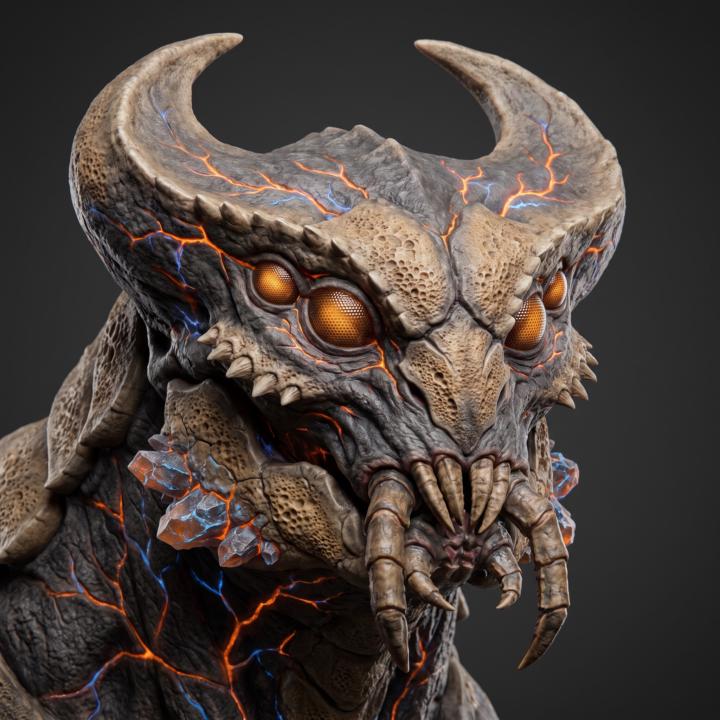
You can use this whenever you need a prompt for some alien creatures. It's a bit limited at the moment, but I plan to add more variation and creature types, including androids and human-like characters. Currently builds headshot prompts only, but you can of course easily modify the generated prompt for a full-body version. Or, use the headshots in HeroSheet if you have Google Flow (the full-body mantis-like creature below was done in HS). Sci-Fi Character & Creature Prompt Builder Have fun!
🔥
10d •
Turnaround Slicer Updates - Custom Grids & more
I made an update this evening to the Turnaround Slicer tool. You can now go beyond character sheets and slice any grid you want. Updates: New - 4-way split preset for character sheets with 4 views New - preset grids: 2x2 & 3x3 New - option to specify a custom number of rows and columns - see screenshot below (thanks @Manda Jackson for the awesome bookmark prompt that inspired this update!) New - Slices can now be locked individually or globally. Improved - smoother manual resizing and dragging of slices. New - selected Slices remain color-coded until deselected - easier when dragging or resizing Have fun and make cool stuff!

🔥
10d •
Relight Fixes
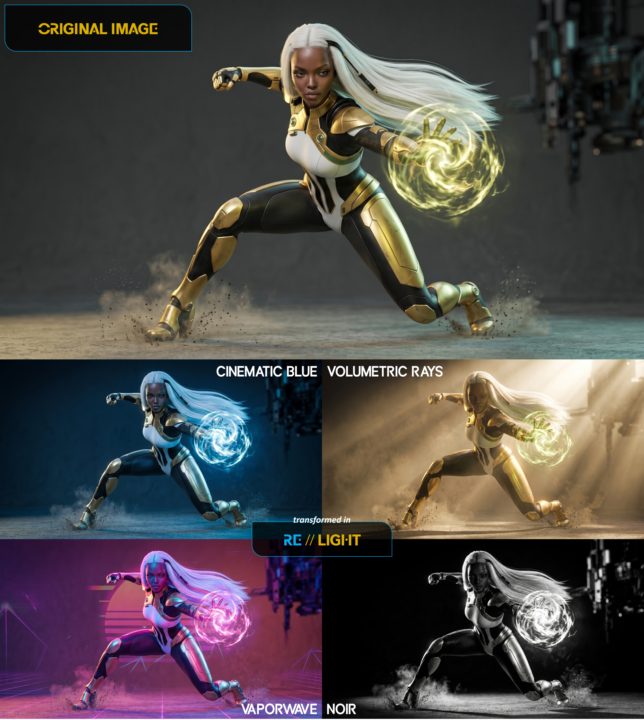
Fixed some UI issues in both Relight and Stylify today - overlapping dropdowns are now fixed. I also added a couple new one-click presets to Relight. Have you tried it? Link to the Classroom: Relight - NEW! - Flow Tools for Character Design · AI Character Academy
3
0
🔥
12d •
Introducing Relight, Prompt Alchemist, & Face Mixer
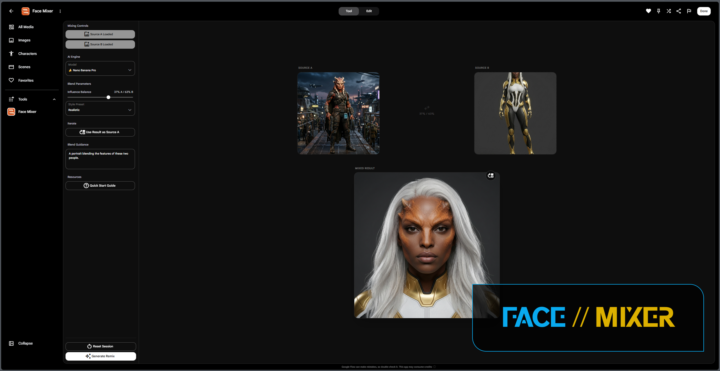
Three new Google Flow Tools in 2 days - I'm 100% loving that Google opened up this access. Because of this technology, over the last month I've been able to replace all but ONE function I used to have to do in Photoshop, and that's Content-Aware Fill. And I can kind of get around 90% of that need by sketching directly on a generation inside Google Flow. Powerful. Yesterday I wrote Relight. Today, Prompt Alchemist, & just a few hours ago started Face Mixer. Now, my job is to communicate just how useful these tools can be to a character or avatar designer's workflow. Relight: lets you relight any image. It works wonders with a character on a plain background. Prompt Alchemist: upload or add an image and generate a prompt from it. Then, create additional images based on that prompt and image combo. I'm not entirely happy with the iteration feature so I'm still working on it. (Please use Prompt Alchemist responsibly and respect others' work). Face Mixer: blend features from two images together. Render in several art styles. I'm still enhancing this one too, but so far, it's really neat. And sometimes scary, lol. They are all FREE. So why don't I sell access to these? Well, first, my 'thing' is making useful stuff for creators to use. I'm not hung up on the $$$. I'm more concerned with advancing the technology and helping folks use them to create - the idea is to use these free tools to create assets you can monetize (yes, you can sell the prompts and images you generate - no restrictions). Second, it doesn't make sense to try and paywall these - Google Tools can be used and remixed by anyone with a Google AI account. The infrastructure isn't there for monetizing them. They are all accessible in the Flow Tools classroom - if you need to level up to access these, drop some GIFs in the Level Up thread! Or, post & interact, ask questions, and engage with the group. I hope you all enjoy these and that they are useful.
1-12 of 12
powered by
skool.com/ai-character-academy-2817
Your hub for character & avatar design. Workflows, tutorials, digital clothing and more to enhance your characters and avatars.
Suggested communities
Powered by