
Write something

27d •
Spent the last month deep in the AI voice agent rabbit hole.
What started as a simple experiment has turned into 7 different AI call assistants, with another one currently in development. Some of the capabilities I've implemented so far: • Inbound call handling• Outbound calling workflows • Lead qualification• Appointment scheduling • Rescheduling and cancellations • SMS confirmations and follow-ups • Reminder calls before meetings • CRM updates and record management • Call transfers when needed • Multi-step business workflows The most interesting challenge wasn't getting the AI to talk. It was getting it to remember. One of the assistants can remember previous conversations across multiple calls, retrieve historical context, and continue the conversation naturally instead of treating every call like it's the first interaction. Building these systems taught me that the hard part isn't the voice model itself—it's the orchestration behind the scenes. Memory, workflows, CRM integration, scheduling logic, error handling, and all the small edge cases end up being where most of the work happens. Still a lot to improve, but it's been fascinating seeing how far AI voice technology has come in such a short time. Curious what everyone else is building in the voice AI space right now.

May 15 •
Built a lead scraping site builder
Hi I built this app that scrapes Google Maps for leads with no site and then builds a mockup in one click. I've been using this to quickly make mockups to show to potential clients. I've used this tool the last few months to grown my agency to 70 subscribers. Looking for testers, any feedback is appreciated, thanks. https://lead2site.com/
Apr 20 •
Built a session-limited AI system to control usage (and it worked better than expected)
Recently worked on an AI system for a music industry website redesign. There were two parts to it: 1. A public-facing AI chat widget for general queries + lead capture 2. A private, full-screen AI assistant inside the client portal. The second one was more interesting. The client didn’t just want “AI support” — they were concerned about users overusing it and burning unnecessary tokens. So instead of a typical chatbot, I designed a session-based interaction system: - Each user gets a 5-minute active window - At minute 4 → a warning is triggered (“1 minute left”) - At minute 5 → session ends + redirects to an external GPT - Then a 5-minute cooldown kicks in - After cooldown → user can start again It basically runs in a loop. What’s interesting is how this changes behavior: Users become more intentional with their questions instead of treating it like an endless chat. Also ended up optimizing one of their internal workflows in the process: A task that used to take ~6 hours manually is now done in under 10 minutes. No fancy theory here—just structuring AI usage in a way that actually makes sense operationally. Still experimenting with how far this “controlled AI interaction” approach can go.
1
0
Jan 29 •
Here is the Full Demo Video of TalkPilot
Hey everyone 👋 A few days ago, I shared a quick walkthrough of a system I built called TalkPilot. After that post, I started getting a lot of messages asking for a proper demo — how it actually behaves in real time and how it handles different scenarios. So I recorded a full working demo showing the complete flow. You can watch it here: https://www.linkedin.com/posts/yash-maheshwari5_youre-losing-leads-even-though-people-activity-7422560191121944576-JUGF In this demo, I walk through how the system handles conversations from start to end. Some of the key things it covers: • identifies new vs existing leads using email • avoids duplicate entries in the CRM • remembers previous conversations and shows them with dates • allows notes to be added at any point and maintains a history of past notes • supports human approval for sensitive cases like discounts • allows users to update incorrect details (like email) • answers only business-related questions and ignores irrelevant ones • handles meeting booking, rescheduling, and cancellation • manages time zones correctly for both user and admin • sends automated reminders before meetings (24h and 30min) • tracks show and no-show scenarios • sends feedback or reschedule follow-ups automatically • maintains structured chat history and summarized conversation records This post is mainly to share the working demo and the overall thinking behind the system. In the upcoming videos, I’ll be breaking down how this system is developed — the logic, automation flow, and structure behind it. Would love to hear thoughts or suggestions from people building similar systems.
1
0

Jan 1 •
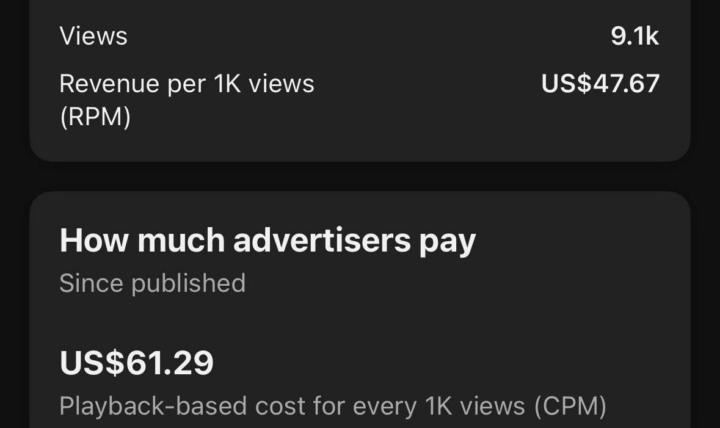
🔥 $47 RPM & $61 CPM… from just 9K views.
🔥 $47 RPM & $61 CPM… from just 9K views. This is what happens when you pick the right niche, use the right strategy, and let YouTube automation work for you. If a small video can earn like this, imagine what a full optimized channel could do. 👉 Ready to build a channel that actually pays? Comment “READY” and I’ll show you the blueprint.
1
0
1-30 of 36
powered by

skool.com/ai-academy-1937
Everyone’s talking about AI tools. We’re talking about how they actually make money. Less “look what AI can do,” more “look what AI paid me.”
Suggested communities
Powered by