Activity
Mon
Wed
Fri
Sun
Aug
Sep
Oct
Nov
Dec
Jan
Feb
Mar
Apr
May
Jun
What is this?
Less
More
Owned by Yu-Tzu
Learn Chinese with Zhuyin (Bopomofo). Build clear pronunciation, practice Mandarin conversations, and join fun challenges. Perfect for beginners.
Memberships
LinguaBLOX Language Learning
3.1k members • Free
Regenerative Gardening
233 members • Free
Photography Community
4k members • Free
Focused Founders™ (Forum)
617 members • $27/year
Free Skool Course
71.6k members • $1
Educational Creators
509 members • Free
The Calligraphy Zen
348 members • Free
Janet VanEerden Watercolor
92 members • Free
Mandarin Blueprint
35.6k members • Free
29 contributions to Learn Mandarin by Speaking It!

May 24 •
Mandarin Challenge Continues...
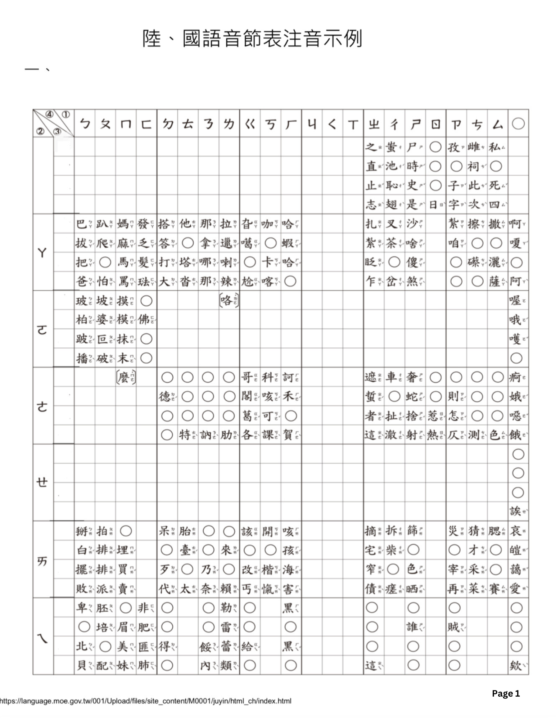
Have you seen this chart before? This chart is published by the Ministry of Education, R.O.C. (Taiwan), it's a master combinations grid for Chinese sounds, it shows how consonants and vowels blend together. Here is how to use it in 3 simple steps: 1. Find the Base Sound - Top Row: Consonants (like ㄅ, ㄆ, ㄇ, ㄈ). - Left Column: Vowels (like ㄚ, ㄛ, ㄜ, ㄝ). - Follow them to where they meet in the middle to make a syllable. 2. Check the 4 Tones Every block is split into 4 small squares, representing Chinese tones: - Top-Left: 1st Tone (High, flat)— - Bottom-Left: 2nd Tone (Rising)↗ - Top-Right: 3rd Tone (Dipping)↘_ - Bottom-Right: 4th Tone (Falling)↘ 3. See the Examples - Each square gives you one common Chinese character as a real-life example of that sound and tone. - The circle symbol (〇) means that specific sound and tone combination does not exist in Chinese. You will find every single one of the roughly 400 basic syllables that exist in Mandarin Chinese.
1 like • May 25
@Mary Nunaley I'm glad it helps. 😊
0 likes • May 25
@Alex Lee A good cheat sheet. 😄
Jan 20 •
How do you learn Mandarin?
Hi everyone! 😊 I’d love to get to know you a bit better. How do you usually learn Mandarin? Please vote in the poll below and feel free to share more in the comments.
Poll
3 members have voted
0 likes • May 1
@Alex Lee Nice, which one would you recommend for other Mandarin learners?
1 like • May 20
@Rey Rodriguez 你真棒!
May 1 •
Learn Chinese Through Songs
In a world that never slows down, let’s take a moment to breathe. I’ll be sharing songs with unique vibes—so you can relax, reset, and naturally pick up Chinese along the way. 🎧✨ I really like this song —「就是喜歡你 (Just a Man in Love)」by 張震嶽 (A-Yue). It’s catchy, lively, and uplifting. Maybe one day, you’ll sing it for someone special. 😄 👀Which word or phrase did you catch? Can you hear how many times ♥️喜歡 ❣️ZHUYIN:「ㄒㄧˇ ㄏㄨㄢ 」 ❣️PINYIN: (xǐ huān) appears in this song? (it means “like”)
1 like • May 1
@Mary Nunaley Great! I'm excited to hear your feedback! 😁
0 likes • May 2
@Alex Lee looking forward to your feedback!😊

May 1 •
你好
大家好我是Alex (李 祥 安)I am from califronia united states and also taiwan and we go back and forth countries. Something you might not know about me is that I went to both China and Taiwan. I studied at a Chinese school from elementary to high school, and I’ve started learning Mandarin agaiI joined this group to learn Mandarin, and I hope to improve my speaking and communication skills.
0 likes • May 2
你好 Alex, welcome to the community. Do you read 繁體字( traditional characters) or 簡體字(simplified characters)?
Mar 27 •
Next Phase (Day 13–30)
Hi everyone! 👋 We’ve officially completed all 37 Zhuyin sounds — amazing work for you!! For the next phase of the challenge (Day 13–30),we’re going to try something a little different 👀 Instead of only listening and voting, we’ll start practicing together live. 🎥 Live Practice Sessions (Skool Calls) I’ll be hosting live sessions on Skool, where we can: • practice pronunciation together • adjust mouth and tongue positions in real time • help each other improve • and make learning more fun ! In a live session, I’ll also give live feedback on your pronunciation during the session. Feel free to comment below if you’re interested, and vote for the time that works best for you! YuTzu
Poll
1 member has voted

0 likes • Mar 28
@Sladana Madar Thank you so much, Sladana! 😊 I forgot to mention that the time is in Eastern Time, so it might be different from your time zone. Feel free to vote for the time works for you better ☺️
1-10 of 29

@yu-tzu-huang-2153
I'm here to help to improve your Mandarin Pronunciation and help you to practice speaking it. Welcome!
Active 4d ago
Joined Dec 5, 2025
Ontario Canada