Activity
Mon
Wed
Fri
Sun
Jan
Feb
Mar
Apr
May
Jun
Jul
Aug
Sep
Oct
Nov
Dec
What is this?
Less
More
Memberships
Automation Learners
305 members • Free
Golden Ratio
96 members • Free
The Entrepreneur Hub 🐐 (Free)
5.8k members • Free
Naftali Moses Coaching
2.5k members • Free
Closers.io - Remote Sales Reps
12.5k members • Free
The RoboNuggets Network (free)
26k members • Free
The Founders Club
60.6k members • Free
Social Affiliates Network
2.4k members • Free
Evolve Now Social
631 members • Free
3 contributions to Voice AI Academy

20d •
Retell for Outbound
So.. I'm tryinng to connect retell to twilio for the Outbound calls. When i'm doing it works great, but idk why when I try to do the outbound from retell to twilio, it is not working here's the problem: telephony provider permission denied When I do the call FROM twilio it does work fine, to any number (acc is verified) so I guess the problem is w the connection, i did the elastic SIP trunking, hopefully some of you guys can help, thanks!!

0 likes • 19d
@Arnold Gg The issue isn’t with your Twilio account or verification it's with the outbound permissions on the Elastic SIP Trunk. Retell can receive calls from Twilio, but Twilio is currently rejecting outbound attempts because the trunk doesn’t recognize Retell as an authorized originator. Why this happens Twilio requires explicit authorization before it lets any third-party provider Retell send outbound traffic through a SIP trunk. If the SIP URI, authentication, or caller ID isn’t configured exactly as Twilio expects, the trunk returns telephony provider permission denied. if you need any assistance let me know
1 like • 19d
@Arnold Gg Twilio doesn’t allow you to place outbound calls using arbitrary phone numbers for security, fraud prevention, and carrier compliance. That’s why you can’t spoof or call from numbers that aren’t verified. Use a Twilio owned phone number as your outbound caller ID (your business number). Set that Twilio number as your default From number in your Retell → SIP → Twilio configuration. You can call any client number worldwide (as long as you’ve enabled the destination country in Twilio’s Geo Permissions).No verification of client numbers is required. This works for appointments, confirmations, follow ups, etc. Enter my DM

20d •
Very new
Hi all, I am very new to all this, but have been learning over the past week, and it has taken my interest profusely. I am trying to build an n8n workflow that works alongside Vapi AI and the scheduling program Cliniko for a clinic, as I have warm leads. It appears that when I try to test-run the workflow, it is assuming the patient is new and goes to create a new patient node almost instantly. I have tried on VAPI to add in tools/ functions that tell the AI not to call the workflow before gathering all the required info, but it didn't seem to work. I was just wondering if anyone can see a simple mistake or can provide me with any constructive criticism, as any help on this would be greatly appreciated. If any additional information of how it is currently set up is required in order to help. Let me know and I will see what I can do. Super excited to progress in this journey.
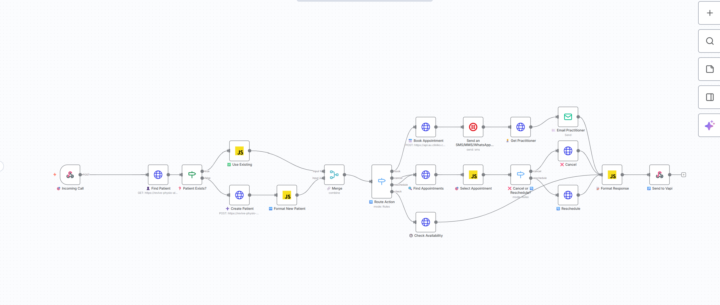
0 likes • 19d
@Lachie Prid I’ve been building an n8n workflow that integrates Vapi AI with Cliniko for appointment scheduling. During test runs, the workflow immediately assumes every caller is a new patient and jumps to the Create Patient node. I’ve attempted to control this by adding Vapi tools functions to ensure the AI collects all required information before triggering the workflow, but it hasn’t resolved the issue. I’d really appreciate a second set of eyes on the setup or any guidance on what I may be overlooking. If you need more details about my nodes, logic, or Vapi configuration, I’m happy to provide them. I’m excited to keep improving this system and would love your expertise. if you need any assistance let me know

Oct 31 •
Workflow stops automatically in the middle of execution without any error
Hey everyone, I’m facing a strange issue — my workflow stops automatically in the middle of execution, without showing any error or warning. It just stops running halfway through for no clear reason. I’ve checked for logs, exceptions, and timeouts, but there’s nothing. Everything looks fine, yet it doesn’t complete the full process. Has anyone experienced this kind of issue before? Any ideas on what could cause a silent stop like this — maybe memory limits, timeout, or API rate limits? Any help or suggestions would be really appreciated. Thanks in advance!
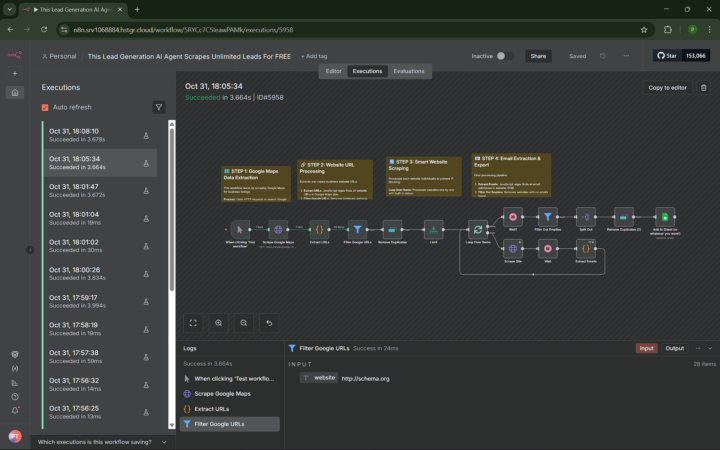
0 likes • Nov 4
@Purvesh Tandel It could be hitting a hidden execution or memory limit. Try adding checkpoints or debug logs between each step to see where it stops, and check if your platform has silent runtime caps or background process limits.
1-3 of 3

@victoria-morenikeji-9570
Automation expert in GoHighLevel, n8n, Make.com, Clay.io & Klaviyo streamlining workflows with precision. (Whatsapp: +2349112774338)
Active 11h ago
Joined Oct 30, 2025