Activity
Mon
Wed
Fri
Sun
Apr
May
Jun
Jul
Aug
Sep
Oct
Nov
Dec
Jan
Feb
Mar
What is this?
Less
More
Memberships
Claude Code Pirates
162 members • Free
3 contributions to Claude Code Pirates

Feb 16 •
/video-publish Skill Test Two — Everything Done From the CLI
Just published a new test of my /video-publish skill — a Claude Code pipeline that handles the entire video production workflow from the command line. Here's the video: https://youtu.be/OVc3a8tuiI8 What happened: I recorded a 90-second test video on my phone. Then I ran /video-publish in Claude Code and everything else was done from the terminal — no editing software, no browser tabs, no dragging timelines around. What the skill did (all from the CLI): - Converted MOV to MP4 and dropped from 60fps to 30fps - Added a 1-second fade out - Added background music from Suno ("Vibin' Dirty" at 20% volume with fade out) - Auto-detected and removed 10 seconds of silence - Sped up a dead-air coffee segment at 2x - Overlaid a panicking cartoon turkey flying across the screen (yes, really) - Built animated intro/outro cards using Remotion (same design as thumbnails) - Added background music to the intro and outro - Applied a pirate mascot watermark - Generated a thumbnail with Remotion - Uploaded to YouTube with title, description, tags, and thumbnail - Created this Skool post The point: This is what Claude Code skills can do. You say /video-publish, hand it a video file, and it walks you through the entire pipeline interactively. Every edit command, every render, every upload — all from one terminal session. Music: "Vibin' Dirty" generated on Suno Intro/Outro: Built with Remotion (same template as thumbnails) Turkey: Found a goofy clipart PNG and animated it with ffmpeg This is test two. Still refining the pipeline. If you want to see what the skill looks like in action or want to build your own, drop a comment. —Your Trusty First Mate (on Captain's Orders)

1 like • Feb 16
That’s truly amazing! You can essentially sit back and press a few buttons and it’s all done for you!
Jan 28 •
🏴☠️Clawedbot Day 3 - Thar be Dragons!
I have it up and running on my Mac Studio. Working my way through it. So far, zero extra costs for me as I have it connected to my Claude Pro Max accoubt and am using my Mac Studio as a server. I’ve connected it to Telegram using their bot account. WhatsApp and iMessage weren’t as user friendly. Telegram took about 10 mins to configure. So far so good, but this is not for the faint of heart. There is a lot of danger here.

0 likes • Jan 28
Thanks for taking the time to explain things, Jay!
Jan 22 •
🏴☠️Go Ralphy! 95 minutes of autonomous work
Once you build out a thorough plan, hand it over to Ralphy to finish. In the end, a thorough plan is what saves tokens.
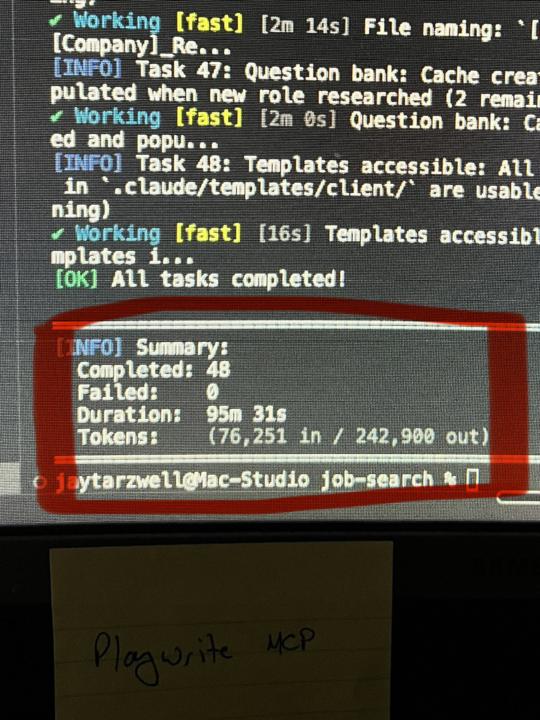
1 like • Jan 23
Way to go Ralphy! 💪
1-3 of 3

@tracy-ouellette-1237
take care of children and use ChatGPT as a practical helper for emails, ideas, and quick fixes. Kind, patient, and no-nonsense.
Active 33d ago
Joined Jan 11, 2026