Activity
Mon
Wed
Fri
Sun
Jul
Aug
Sep
Oct
Nov
Dec
Jan
Feb
Mar
Apr
May
What is this?
Less
More
Memberships
AI Automation Society
381.4k members • Free
Clief Notes
33.8k members • Free
28 contributions to Clief Notes

2h •
Scripts. Turbocharge your workflow, its easier than you think.
Discover the power of scripts. Add in a review process to the end of every session that identifies repeated processes and ask Claude to turn it into a script. A very simple process that gives enormous leverage on your time and credits.
0 likes • 52m
@Martin McCoy I will tomorrow, 2am her in Australia. Chatting on mobile here ATM. You can simply prompt "review session, identify repeated tasks that can be automated, list in order of impact, write a script for each." The next step is then figuring out how to get your model to apply them automaticallywhen needed.
0 likes • 35m
@Martin McCoy you can create a SESSION_END.md that pulls the TODOS from memory, runs a review of workflow and lists scripts that execute repeat tasks. Essentially, everytime you find yourself repeating a prompt, or getting the model to repeat an action, I think you can turn it into a script. Honestly, I'm new to all this so I'm sure many others will have better advice than me, I only used AI for the first time 2 months ago, I almost gave up when I started going round in circles and was burning through 5 hour limits on Max plan in 90 minutes and using up my weekly limit in 2 days...until I found this community. Now I can run 2 sessions of Claude Opus side by side and never hit limits. Think of it this way, you used to have to upload a program from floppy every time you wanted to use it, then they started to ship with preinstalled programs, then the hardrives got too full so they put programs in the cloud that you call whenever needed. Jake's folder infrastructure with md's and scripts is like have a clean desktop that mainly calls on programs from the cloud when needed. Scripts are mini software programs that free up your hardware to do what it's designed for,execution not memory.
4d •
Ubuntu changed my life
I was struggling for three months using Catalina, Claude Code V1.0.0, no Desktop integration and no VS CODE integration and very disconnected platforms. I tried installing Docker to run Ubuntu and even Docker was not working correctly on Catalina. Solution: I removed Catalina and installed Ubuntu for the first time. After using Windows and iOS for decades I can't believe I have never used Linux before, its incredible. In under half a day I had all of the latest builds of Claude Code, Openclaw, VS CODE and various agents up and running. What took me days to do now takes hours. I wasted days copy and pasting git diffs for review!
0 likes • 5h
@Mister P. Ap That makes sense, I think Omarchy is better for my needs, moving more towards keyboard ops than mouse and the dev apps with Omarchy seem to fit my needs.
0 likes • 1h
@Yucky Yuckyyyy lol the world is caught in a mouse trap 🤣
6h •
My simple implementation of ICM Methodology.
Just to test things out I loaded Jake's paper into claude/gemini and asked to guide me in implementing. What I finally came up with was a production-ready implementation of an Interpretable Context Methodology (ICM) workspace for processing multiple raw markdown drafts into publication-ready Hugo blog posts. A detailed project break-down and file contents at: https://rainmakers.pl/posts/172_extended_icm_for_hugo_posts/ Maybe someone struggling with implementation of the ICM will find it useful. Happy building! Wojtek
0 likes • 5h
Hi mate, I did the same thing, sent me backwards for two weeks and then it all came together like a band on opening night, Claude Code is now singing like a rockstar and the quality of the output has changed dramatically. I will check out rainmakers. Cheers.
0 likes • 3h
@Wojtek Gajewski Used a few of your pointers, had a few already in play. More icing on the cake - thanks for sharing.

14h •
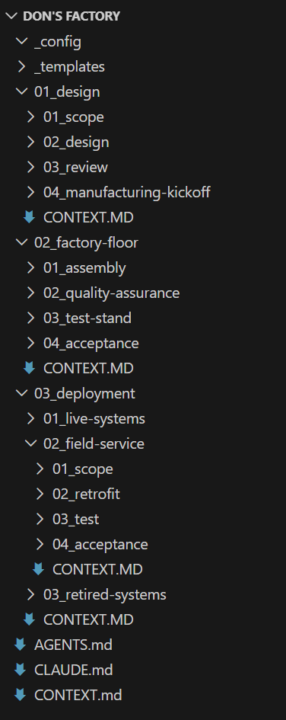
Don's Factory 🏭 - Using manufacturing principles to build an end-to-end AI pipeline
A folder structure based off 10 years of manufacturing experience. I've been overseeing delivery of systems from design through manufacturing and deployment in my professional work. Everyone has their own system for organizing and building their solutions; this is a natural extension of the environment I work in every day and managing these projects the same way I would any other. The beauty is just like the lean practices inspiring this, this is a framework. All the specifics and magic in the workflow live in the context files, template details, and addition resources. Want to add in your specific quality guidelines? Throw it in config and reference it in the quality stage context file. Want to always build a specific component the same way? Add another file and reference it in design and assembly. This framework can be shaped any way to fit your workflow but the principals remain the same. Here's a brief breakdown of the process flow as well as the files produced. The intention is that this is the flow of objects created called "systems". A system can be anything inside a folder: an artifact, and ICM workflow, a collection of files. As long as it can fit in a folder, it’s applicable. The system folder template is: - References - inspiration or applicable documents relevant to that specific system build - Work Instructions - Where all the documents named below are stored and read from during the workflow. Documents are moved from active to processed subfolders as they are used in the sequence. - System - Where the actual output of the build is placed. This is the resulting files, or workspace produced. - travel-sheet.md - a document recording progress and a summary of every step executed on the project as it progresses. The workflow is as follows: 01 Design: 1. Scope - Define the goal of the project. The outcome written in one statement. What success looks like. Produces scope.md 2. Design - Define a full breakdown of the intent of the system/artifact/solution to be built. What it is, what it isn't. What success looks like with a wider explanation as well as what failure looks like. The gritty details. Produces design-brief.md 3. Review - A sanity check of design-brief.md that all pieces are in place. Was anything missed? Will the build team need more information? Produces design-review.md 4. Manufacturing Kickoff - Converts design-brief.md into a condensed format for handoff to the build agents. Removes reasoning and intent for build and only provides instructions for build for context tightening. Also provides instruction for quality check and testing down the road. Produces blueprint.md, qa-brief.md, test-plan.md
0 likes • 4h
Legend, thanks for sharing.
0 likes • 4h
@Don Roy I just put your post into Claude Code to review against my current workflow and folders/mds Its the icing on the cake, many thanks.
5h •
SKILLS KIlLS BILLS
I have spent over 100 hours going backwards with skills, the more I tried to fix folder structures and update Skills and add context and memory, the more shit started to break, I almost gave up, particularly with Opus, who is very literal. I was so used to brainstorming in Claude.ai chat that my verbose approach became my biggest enemy. Finally it clicked, i stripped it all back to a basic structure and clear instructions with a heavy focus on learning and iteration, within a couple of sessions code has transformed itself into the most amazing work partner. If anyone is struggling to get AI under control, stick at it, the end result is worth the pain and effort.
1-10 of 28
@thomas-cunliffe-3213
Post-digital governance, live on Bundjalung Country: $4 members, ASX voice, in-ground value. Cleanroom AI + blockchain. Need your hands.
Active 29m ago
Joined May 3, 2026
Powered by