Activity
Mon
Wed
Fri
Sun
Aug
Sep
Oct
Nov
Dec
Jan
Feb
Mar
Apr
May
Jun
What is this?
Less
More
Memberships
AI Automation First Client
1.8k members • Free
Automatable
406 members • $70/month
AI Automation Society Plus
3.8k members • $99/month
AI Automation Society
417.7k members • Free
Rebel Economist (Free)
1.4k members • Free
Easy Creator
10.8k members • Free
Focus Revolution (FREE)
833 members • Free
Ai Automation Vault
15.1k members • Free
AI Automation Agency Hub
327.7k members • Free
4 contributions to The Productive Professional

Jul '25 •
Prioritizing / Dealing with overwhelm
One of my biggest ADHD-related struggles is prioritizing tasks and dealing with overwhelm. So much seems equally important/urgent all the time, it's exhausting. What has helped you with this?

2 likes • Jul '25
PS I just noticed your other comment. You mentioned that you send a WhatsApp to your friend on what task you're currently working on. I think that's a great way for somebody to keep you accountable with body doubling. That's really smart. However, the WhatsApp message obviously can get lost, and you don't have WhatsApp open on your screen the whole time. It's really helpful to have your current task that you're working on in a big headline at the top of one page and nothing else, which is why I mentioned the center view or the MinimaList. There are many other ways, I mean, heck, you could even put a task in the middle of a Word document and have it blown up on your screen. But the point is that you only want one item, just one, and have it be very large and visible so that when you do get sidetracked, you always get back to that and you remember, "Oh yes, that's right." It may feel like an obstruction at first, but yes, it's an obstruction to being distracted! And make sure that you make it a rule that you do not close that task or that page until you get that one task done. (Personally, I feel like when I'm looking at a list of tasks and not just one blown up task, my brain subconsciously gives me permission to procrastinate or get distracted because I have so many. But if I just have one that's blown up, I feel like I have less of an excuse to be distracted, because why am I not doing that one thing? Versus when you see three or four, then you could technically say that you're in between them). at least for me, that's what has worked!
1 like • Aug '25
@Anne-Laure Sw Just off the top of my head, maybe one thing that you could do or consider is to get one of those really cheap Post-it notepads from the dollar store (so that you're not spending too much on Post-its). Just basically put one task per Post-it and put them on a wall or on a whiteboard or whatever so you can organize them. Have that be like your task room or task board. Then every time there's time to do the next task, you just grab that Post-it from the board, and put it on your refrigerator or wherever it is that you're working.

Jun '25 •
The "Engine Warm-Up" Hack That Changed My ADHD Productivity
Working on Lamborghini projects taught me something crucial: You never go from 0 to peak performance instantly. Even the most sophisticated V12 engine needs a proper warm-up sequence. Skip it, and you risk damage. Rush it, and you get suboptimal performance. Your ADHD brain works exactly the same way. The Problem with "Just Start" Traditional productivity advice says: "Just start! Dive right in!" But here's what happens when I try that approach: - Stare at the screen for 20 minutes - Check my phone 47 times - Reorganize my desk instead of working - Feel like a failure before I even begin Sound familiar? The Automotive Solution: The 5-Minute Warm-Up Protocol In automotive engineering, we have specific warm-up sequences. Your brain needs the same systematic approach. Here's my ADHD Engine Warm-Up (takes exactly 5 minutes): Minute 1: System Check - Clear your workspace (like checking fluid levels) - Close unnecessary browser tabs (remove performance drains) - Put phone in another room (eliminate interference) Minute 2: Prime the System - Write down your ONE main task for this session - Set a timer for your work session (25-45 minutes) - Take 3 deep breaths (oxygenate the system) Minute 3-4: Gentle Activation - Open the document/tool you need - Write one sentence or take one small action - Don't aim for perfection—just get the engine turning Minute 5: Full Engagement - Start your timer for 5 minutes (warm-up your brain) - Put on the headphones with white noise - Begin working on your main task - After 5 minutes start your 25-45 minute timer - Trust that momentum will build Why This Works for ADHD Brains 1. Predictable Routine Like a car's startup sequence, your brain learns the pattern and prepares automatically. 2. Removes Decision Fatigue No more wondering "where do I start?" The sequence is always the same. 3. Builds Momentum Gradually Instead of demanding instant focus, you're warming up your attention system.
1 like • Jul '25
I really love this. I copied this down and look forward to trying it.
Jul '25 •
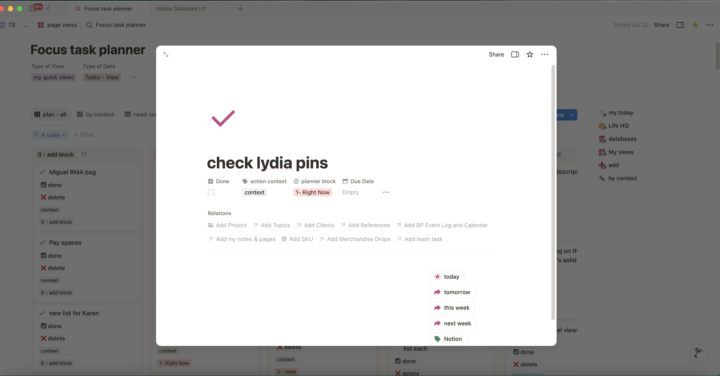
Notion: Center view is your friend?
How many are you are as stubborn as I am, and use Center View to leave open the current task until you actually get the darned thing done? Any other Notion hacks? I can share with you a few of mine, too
2 likes • Jul '25
I wanted to add that one of the things that kept me from leaving Notion was the ability to cross-ref across different types of content. For example, there is task content. Then there is reference content, let's call it Notes. So let's pretend I need to fix a leaking pipe or something in the kitchen. I gather information on how to do this daunting task, and I dump it all into Notion, along with pictures and links to videos etc. Kind of like scrapbooking. Then I can just link/attach to that the tasks I need to do - 1) buy these tools. 2) call this person 3) find out this other thing. All within that same notes page. And when I get to that task from a task list, I can see the link to the scrap page I just built. And then from there adjust the urgency, etc. With TDI, there is that thing where you can add to the description inside the task, but it just feels so temporary. I don't know anyone who saves the Description info to their tasks and then references back to it long after you finished the task, you know. So that is one example. But yes, esp if you have ADHD, you have to be VERY DISCIPLINED in not spending time tweaking. I have a separate "notion" task list - so anything I want to do to fix something, my rule is to add it there, not go and do it! And then, I add it to my Dopamine menu, as a reward.
2 likes • Jul '25
@Thomas Pfeiffer mine are probably the ugliest, but yes, the goal is to save time! 🙌
Mar '25 •
Introduce yourself (new members)
Write a short post, introduce yourself, and share a picture of your workspace to complete the action and earn points!
1 like • Jul '25
@Thomas Pfeiffer thank you for the tips! Can you share some of your rituals for starting work, as much as you’re comfortable sharing? I’ve never heard of this before
1 like • Jul '25
@Thomas Pfeiffer thanks for sharing this! I am so interested in learning about these focus funnels and I will doi a search later on to learn more. Re: The white noise, is it important that you use headphones, or can it be like open ear (like is it important to seal out the outside sound)
1-4 of 4

@theresa-shin-1084
living in Southern California. An ultimate consumer of sorts. Will try anything once.
Active 77d ago
Joined Jul 26, 2025