Activity
Mon
Wed
Fri
Sun
Oct
Nov
Dec
Jan
Feb
Mar
Apr
May
Jun
Jul
Aug
Sep
What is this?
Less
More
Intentional Dream Makers
78
Free
Empowered AI Collective™
3.6k
Free
Yay for Business!
1.5k
Free
Hero Academy - Solopreneurs
176
Free
54 contributions to Hero Academy - Solopreneurs

8d •
Social Media Coworking Sprint
Hey Yaaaa’ll!! Happy FrYaY! MsConnect Global (MsCG) and friends are holding a Social Media Coworking Sprint today at 1p est for the 2k members. Lmk who wants in. Let’s knock this out together! 💪🏽 We’ll hold your tail 🤭 Stay tuned for future sprints that will be open to the public.
0
0


20d •
Random, but not really.
Okay, I'm officially a champion of adaptive traditional frameworks. The fundamentals just work. I've been fine-tuning for weeks: my offers, B2B content, messaging, direction, CRM, targeting, and all the things. And now I'm ready-ready to move to the next stage. I've done the research, gathered the evidence, and revised my product to fit the market. I'm very pleased with my recent SWOT analysis, as well. I've been using the prompts and picking up what @Nicole Perpillant is putting down. The result is this beautiful Q4 Commercial Validation Plan I made with ChatGPT. I'm so excited to execute this plan. AI collaboration for the win! 😎

1 like • 17d
First of all, congratulations! 👏🏽 Second, this is just beautiful. So organized. So detailed. So structured. I love it!

25d •
Sale #2 And Day 5 content posted😆
This little engine is coulding. Phone storage is being a hater but we gonna get er done💪🏾 https://www.instagram.com/reel/DcxCDNmNQci/?igsi=bWsyOXA3YmM5ajJi
2 likes • 25d
Wow woman. Congratulations!! Your hard work is paying off real fast. 🎉
28d •
Got my first challenge sale!
I am behind on my things but working the first 10 convo reach outs. Thanks @Nicole Perpillant for the suggestion to get the link setup. I even learned a new tech trick to show that the price is discounted for now. #0to2K
2 likes • 27d
[attachment]

Oct '25 •
Post Your SCRUBBED Offer
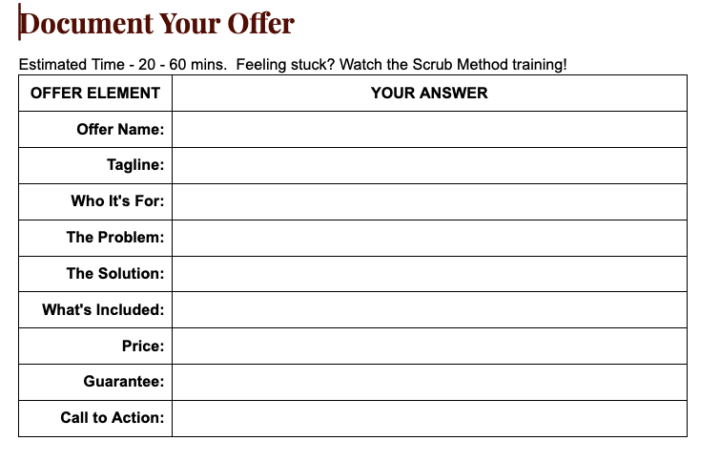
**This post is for the Zero to 2K Challenge. HERO Academy members - feel free to provide feedback or ask questions** You've completed your offer worksheet using the SCRUB Method. Now it's time to get feedback from the community. Your assignment: Copy and paste your completed offer from your workbook into the comments below. Include these fields: Why we're doing this: Fresh eyes catch what you can't see. Someone in this group will spot exactly what's missing or what needs to be stronger. Plus, seeing other offers will spark ideas for your own. The first 10 people to post get direct feedback from me. Ground rules: - Post YOUR offer - Be specific about what's included (no vague "and more!") - If your offer feels "not ready," post it anyway—that's the point - Give feedback to at least one other person's offer I'll drop an example in the comments to show you the format. Your turn. Drop your offer below.
1 like • Aug 25
I used my brain on this one to test it out. If I still assistance, I'll use AI.
1 like • 27d
@Corey Nery-Guity Appreciate it! 🙏🏽 😁
1-10 of 54

@tanya-vazquez-3380
Hi! I’m Tanya! A digital nomad that helps MoMpreneurs and Solopreneurs get support to grow in life and business.
Active 4d ago
Joined Feb 10, 2025
Lakeland | Tampa, Florida
Powered by