Activity
Mon
Wed
Fri
Sun
Aug
Sep
Oct
Nov
Dec
Jan
Feb
Mar
Apr
May
Jun
What is this?
Less
More
Memberships
AI Automation Agency Hub
327.6k members • Free
AI Automation Society Plus
3.8k members • $99/month
AI Automation Society
417.1k members • Free
AI Money Hub
3k members • $49/month
The Virtual Bookkeeping Series
84.7k members • Free
The DM Edge
728 members • Free
Content Cartel (FREE)
4.1k members • Free
Tax Industry Success Lab
1k members • Free
Threads Quote Vault™
114 members • Free
10 contributions to AI Automation Society

3d •
7-Day AIS Challenge - Professional Landing Page Done!
My to-be new website for my tax preparation business: https://tag-tax-prep-website-fxgroisvh-tag-media.vercel.app/# About 7-8 years ago I trained and got into creating Wordpress websites for myself and other businesses. Later platform updates made the whole exercise more frustrating. Going through this process is TEN TIMES EASIER, I assure you! (I will save the boring rant about Wordpress for another day.) I used my latest updated headshot as a base for the hero section, took more notes from Nate's video on creating websites, registered for a new Vercel account, and set Claude to work. The fiddly part was getting Nano Banana to remove the background from my headshot. I tried doing it myself in Affinity (Canva's purchased answer to Adobe's software), but I didn't want to take the time. My graphic design skills are rusty. First pass through Gemini gave back a mess of a photo, but switching to Nano Banana gave a much better result - or so I thought. NB had cleared the background, but exported it as a JPEG, a file format that doesn't support true transparencies. Claude caught that and fixed the file for me! But ultimately the transparent photo didn't work for my cloned layout. Since website design is in my wheelhouse, I felt comfortable prompting Claude Code to fix what went sideways in its iteration attempts. I do plan on going back and updating the website and creating companion pages until I'm satisfied with the set-up. When I get it done, I'll post the completed website at its official domain (with permission, with the full intent on showcasing the website only, not for actual promotion!). I learned a LOT on this project!

1 like • 2d
@David Kairos I’m working my way through the 7-Day AI Challenge, which uses Claude code, and I’m using it through Visual Studio Code. It’s great so far.
0 likes • 14h
@Yogi Wb The website is still a concept for now, but I intend to build the rest of the site and make it official. Once I do, I'll post an update.
15h •
7-Day AIS Challenge - Day 6 Done!
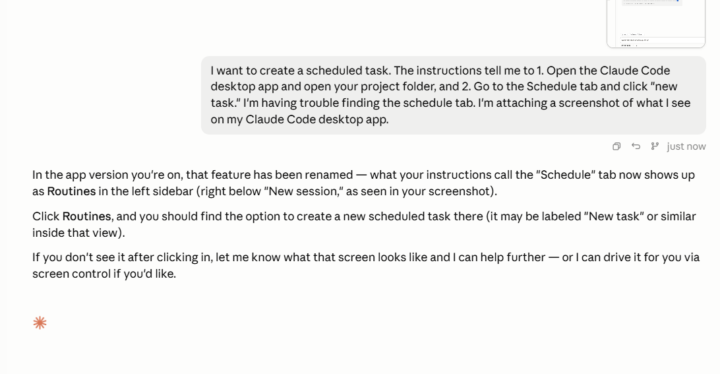
This challenge was a real challenge. Mainly because the Claude desktop layout changed from what the original instructions described for creating scheduled tasks. The original instructions were to use Claude Desktop, go to Claude Code, open a project folder and go to the "Schedule" tab. What I discovered was that the layout and labels had changed completely! So I took a screenshot and asked Claude Code to help me with the directions. What changed was the "Schedule" category is now "Routines," and to start one I had to choose "New Routine." Most of the rest of the instructions were the same. I ended up creating a scheduled task that had Claude reading my emails from Indeed, finding the Executive Assistant or Administrative Assistant job postings in those emails, and creating a draft email with a summary of those jobs. First run through was inconclusive - no results appeared, and the skill seemed to keep running. Asked Claude Code again, and we went through a few iterations where it pointed out my directions weren't clear enough. (I'm wondering if "Fable" would have done a better job parsing my instructions?) Lesson learned: be more precise in my instructions, and ensure that I have the right connectors in place. For the Loop experiment, I had Claude Code track how many emails I was receiving from this one address that was spamming me in real time. It was a Patreon content creator, and they were uploading several videos at a time, which caused an update email to be sent each time. My instructions were "Every 5 minutes, check my Gmail for any new emails labelled [Patreon creator]." First time, it came back that it couldn't find any emails with the "label" I specified. Again, I learned to be more precise, so I updated the loop command to search for emails from [specfic Patreon email address] instead of "Labels," which is a different category in Gmail. This time the loop performed correctly, and I adjusted the parameters with each execution. What I learned overall from this exercise is to persevere through my frustrations. In the past, when I got stuck on a problem or elements of a task are missing or not matching the directions I was following, I would get anxiou and go into procrastination mode. That's derailed me several times with other business skills in the past. This time, I caught myself and said "If you're not finding the answer on how to find the Schedule tab, ask Claude." Before, there wasn't a lot of recourse to get coaching or follow up if I got stuck, but AI agents are looking like that coach I've been looking for if I get into a sticking place.
1 like • 14h
@SuppBert Bert Not specifically for this Routine. I was going through the motions with this exercise because I was frustrated (at first) with not being able to follow the directions. I'll go back at a later time and play some more with Routines and how they can interact, because I want to be able to build these for other professionals. But for the specific routine I built, I'm not likely to keep this one running in its current form. I had to manufacture a workaround for what I had intended - forwarding the emails I wanted read and summarized from my Outlook email to Gmail. There's no connector in Claude that works with Microsoft (outside of enterprise solutions - probably because of Copilot!), so I had to forward the emails to Gmail to get the Routine to work. It's a clunky routine as it stands now, so I'd like to refine it later on.

15h •
Huge Win - My First AI Contract! 🔥
On June 01st I decided to go all in on AI Consulting and building. A month later I just got a 50% deposit for a $8k AI install 😎 Very thankful to AIS and what I learned here that got me the foundational knowledge to be able to pitch AI Automations for businesses. Plus I have another meeting tomorrow for a similar install. Lets go! 🎉

2 likes • 15h
YES! Congratulations!!
5d •
7-Day AIS Challenge - Day 4 Done! (a day or so late)
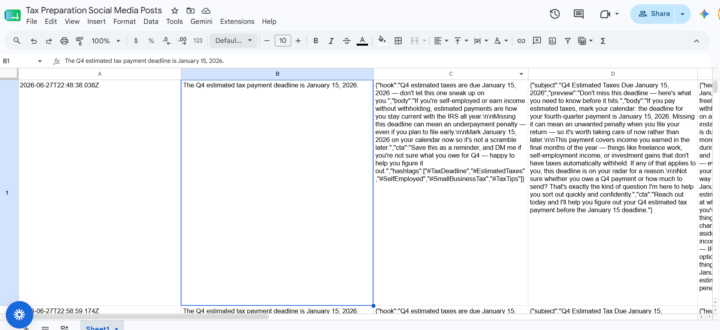
I had to skip a day or so because of exhaustion (outside of the challenge). Back at it now! Today I completed the automation challenge! Again, for me, the thing that challenged me was to think of what to build. So this time, I used Claude.AI for assistance. From the results of the chat session, I pasted the conversation into Claude Code and took it from there. A couple of things I will upgrade on the second pass: - I discussed a Canva integration step for the project. I'll look into that next time. - Actually pushing the project to Github - D'oh! I forgot that step. It lives directly on Trigger.dev, but in its basic form, so it's okay for now. - I really liked that I could brainstorm with Claude.AI and then copy/paste the resulting conversation to Claude Code to pick up the thread. I had to compress the session later on, but that was cool. What I learned: - How to use the dashboard in Google Cloud to have results print directly to a dedicated Google Sheet. - That Claude Code also can apologize - It gave me instructions on where to copy/paste a Google secret, but then when it failed, it said "My bad - I told you to copy the entire code, including the parentheses, for Trigger.dev. That was a mistake." I appreciated that it saw the error. - My version of this test costs some cents for Claude API calls, so I had to put a nominal amount in the account. Onward to the next project! I'm hoping that, with further iterations, this automation can become a content creator automation that I can offer for other content creators.
1 like • 4d
@Jason Elam Thank you! I'll keep your advice in mind when I go back to this project.
1 like • 4d
@J T I like that part, too. It's why I've been taking screenshots of parts of my project work and conversations in Claude Code, in case it can be of help to anyone.
8d •
7-Day AIS Challenge - Day 3 Done!
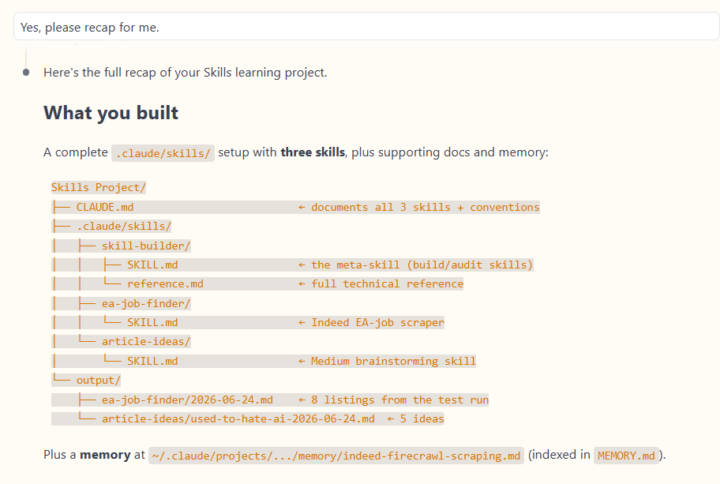
Today was "Skills" day! And the "hardest" part about this exercise was when I had to decide what skill I wanted to build. When it finally clicked that skills can do just about anything, I was stumped for a minute (or 10!). I finally decided on building a limited job-scraping skill - "Build a list of the most recent Executive Assistant job openings posted on Indeed, limited to San Francisco and Oakland." Took a handful of passes and corrections, but Claude came up with a job scraper that didn't piss off Indeed's bot detectors. It successfully brought back a limited list of Executive Assistant jobs specifically in San Francisco and Oakland. I frequently have to battle Indeed trying to send me jobs all the way in Livermore! I built a second skill that will help me brainstorm article ideas for Medium. Claude helped me to make it flexible and able to do online research with Firecrawl if requested. Other than me being temporarily frozen at the infinite ideas for skills building, this exercise went easier than I expected. I'm becoming more comfortable with Claude Code specifically, and Claude in general.
0 likes • 7d
@Frank van Bokhorst For now, my immediate goal is to finish the 7-day challenge and get more familiar with Claude Code. I’m not ready yet to try and present a “solution” to a business owner, but I’m getting there.
0 likes • 7d
@Aditya Chauhan Thank you!
1-10 of 10

Active 14h ago
Joined Jun 18, 2026
Powered by