Activity
Mon
Wed
Fri
Sun
Aug
Sep
Oct
Nov
Dec
Jan
Feb
Mar
Apr
May
Jun
Jul
What is this?
Less
More
Memberships
DP
Digital Product Creators Club
766 members • Free
The Shirtheads
250 members • $17/month
WeScale Accelerator
973 members • $199/month
WeScale Free Course
33.4k members • Free
RTMB Inner Circle
264 members • Free
9 contributions to Digital Product Creators Club

13d •
Big one just went live: you can now write full SERIES 🎉
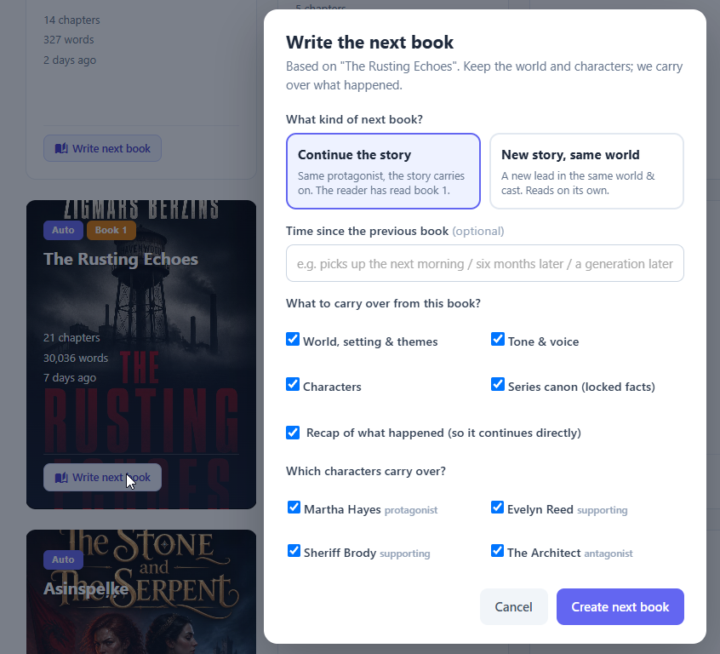
I'm really excited about this one. Up to now, every book you made was its own island. Starting today, you can take any finished book and build a whole series from it — and BookNova carries your world and characters forward for you. There are two ways to do it, and they match how real authors actually build series: 🔗 Continue the story — same protagonist, the plot carries on (think trilogies, sagas, a returning detective). Book 2 picks up from where Book 1 ended, remembers what happened, and keeps everyone consistent. 🌍 New story, same world — a fresh lead and a fresh plot in the same world and cast, but each book reads on its own. This is the romance/cozy-mystery model — "same town, new couple (or new case) every book" — and it's fantastic for letting new readers jump in anywhere. Here's how to do it 👇 — Open your library and find any finished book — Click "Write next book" on the book's card — Pick the type: Continue the story or New story, same world — Choose what carries over — world, tone, characters, series canon, and (for continuations) a recap of what happened — Choose which characters carry over — this is my favourite part: for a "same world" mystery you can carry just your detective and leave the one-book victim and culprit behind 🕵️ — Set how much time has passed, and (for a new-world book) pick your new lead — Hit generate — you'll land in a Story Bible that already knows your world, with your returning cast already on the Characters step A couple of things I care a lot about that are baked in: ✅ Your characters remember and evolve. If someone died or got married or moved away in Book 1, that carries forward — no one gets accidentally resurrected, and you can edit each character's state before you generate. ✅ Continuity is handled for you. Names, places, world rules and established facts stay locked across the whole series, right down to the finished prose — so you're not maintaining a series bible by hand. ✅ You're in control. You decide what carries and what doesn't. Everything you carry is shown to you clearly before you generate.

1 like • 12d
wow! this is amazing, you're a rock star!
14d •
🎉 Big news — I just shipped a new feature: Forewords & Introductions!
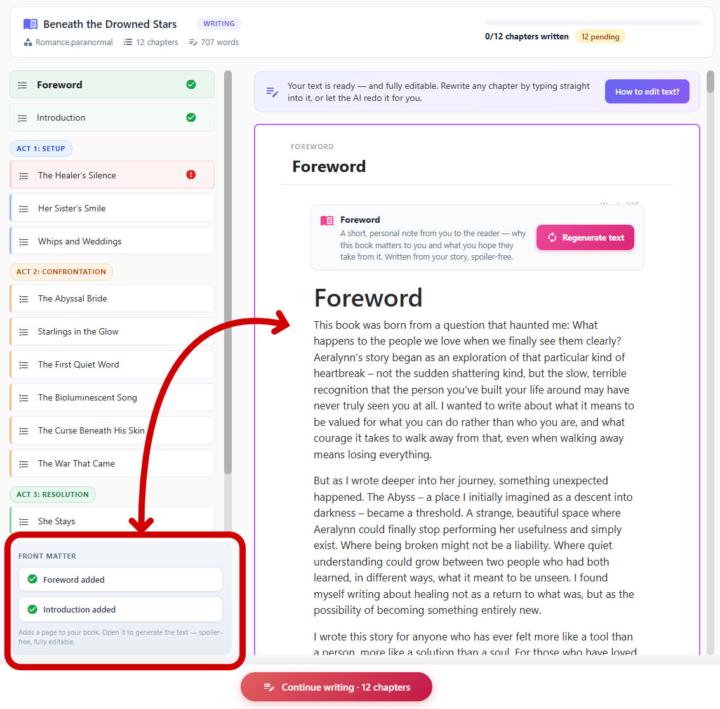
You asked, I built it. You can now add a Foreword or an Introduction to any book you write in BookNova — in one click. Here's why this matters more than it sounds: A foreword or introduction is the first thing a reader meets. It's where you set the tone, share why this story matters, and pull the reader in before chapter one even begins. Great books have them for a reason — they turn "a book" into your book. Until now, if you wanted one, you had to write it by hand or awkwardly wedge it into chapter 1. Not anymore. 👇 How it works: In the Generate step, look for the new Front matter panel in the sidebar. Click Add Foreword or Add Introduction — it drops a new page into your book. Hit Generate text, and BookNova writes it from your actual story — matching your themes, your tone, your voice. Not happy? Hit Regenerate. Want to tweak it? Every word is fully editable. Don't want it? Delete it in one click. And here's the part I'm genuinely proud of: it's completely spoiler-free. BookNova is smart enough to write a warm, inviting foreword that captures the heart of your book — without ever giving away the twists, the ending, or the surprises your readers are meant to discover. It reads like you wrote it after finishing the whole thing. ✨ It works in every language BookNova supports, and it flows straight into your PDF, EPUB and Word exports as a proper front-matter section — TOC and all. This is one of those small touches that makes a self-published book feel truly professional. Go try it on your next book and tell me what you think — I read every reply. 💛 Happy writing! :)
1 like • 13d
This rocks!! Thank you.
18d •
✨ New: Rewrite any part of your book with a single instruction
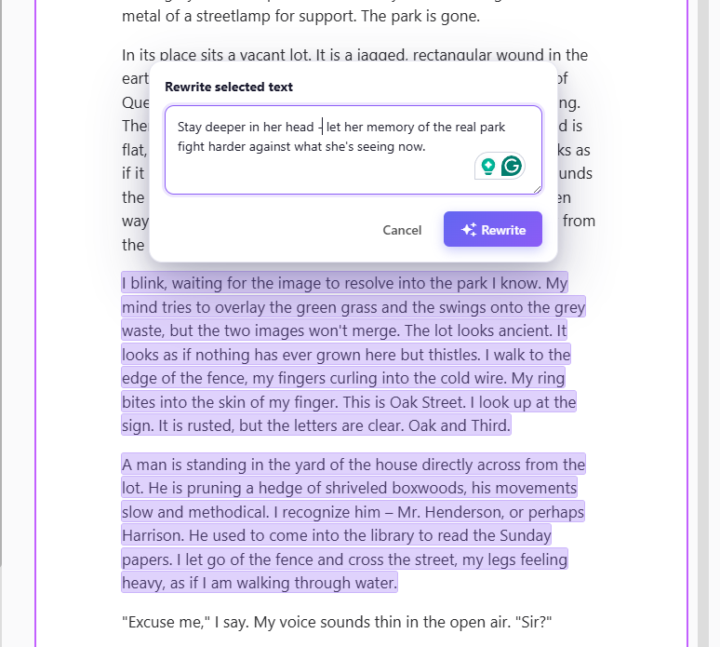
Hey everyone, I just shipped something I'm genuinely excited about, and I think it's going to change how you polish your books inside BookNova. Up until now, if you wanted to change a sentence or a scene, you either edited it by hand or regenerated the whole chapter. Today I'm giving you something far more surgical: you can now rewrite any specific piece of text just by selecting it and telling the AI what you want. Here's how it works: Highlight any sentence, line of dialogue, or paragraph in your chapter (just drag your mouse over it). A small Rewrite button pops up right above your selection. Click it, and a box slides open. The text you picked stays highlighted, so you always know exactly what's about to change. Type an instruction for how you want it rewritten — or leave it empty for a standard rewrite — and hit Rewrite. That's it. The AI rewrites only the part you selected, in your book's language, using the same model that wrote the chapter — so it blends right in with the prose around it. The real power is in the instruction box — this is where you direct the scene like a showrunner. A few examples of what you can actually type: "Give her dialogue a sharper, more sarcastic edge — she's hiding how scared she is." "Rewrite this fight so it's chaotic and close-quarters instead of clean and choreographed." "Add a beat of physical tension between them before he answers." "Make the villain's threat quieter and more menacing — no shouting." "Switch this from telling us he's grieving to showing it through small actions." "Slow this moment down and stretch the suspense right before the door opens." "Layer in sensory detail — what the tavern smells and sounds like." "Plant a subtle hint here that she's lying, without giving it away." "Deepen the POV so we're fully inside his head during the betrayal." You can get as specific as you like — name the character, the emotion, the stakes. The more precise your direction, the closer the result lands to the scene in your head.
3 likes • 18d
This is fantastic! Thank you 😊
19d •
🎨 New: You're now in control of your book's fonts & sizes!
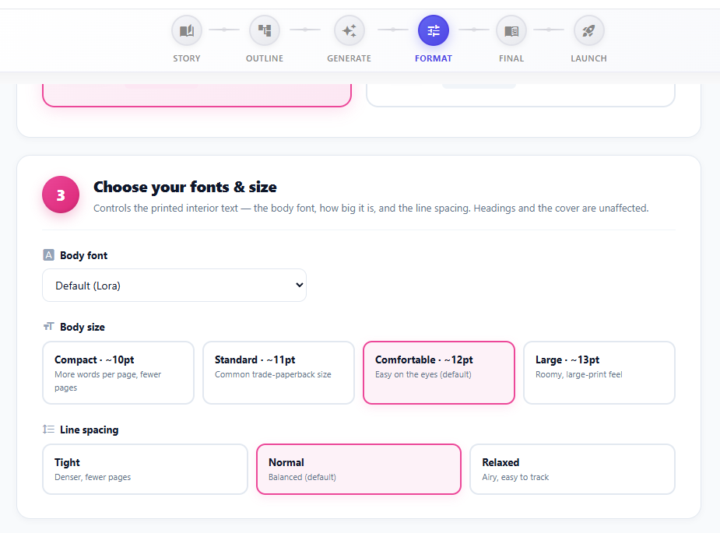
One of the most-requested things from this community just went live — and it came straight from your feedback. 🙌 Until now, every book exported with the same interior typography. Some of you found the text a little larger than you'd like, especially when printing. Now you decide. Head to the Format step of any book and you'll find a brand-new "Choose your fonts & size" panel: ✍️ Body font — choose the typeface for your interior 🔠 Body size — Compact · Standard · Comfortable · Large 📏 Line spacing — Tight · Normal · Relaxed Want a denser, more "real paperback" feel with more words per page? Go Compact + Tight. Prefer a roomy, easy-on-the-eyes large-print look? Go Large + Relaxed. It's your call. 📚 💡 Publishing on Amazon KDP? We keep your body text at 11pt or larger so your printed proof matches the page count Amazon expects. Just making a PDF for yourself or readers? Switch the publishing target to Personal Use and unlock the most compact size too. No reformatting headaches — pick your settings, re-download, done. ✅ Go give it a try on your current book and drop a screenshot below — we'd love to see the styles you land on! 👇 Keep the feedback coming — this one was 100% built because you asked for it. ❤️
3 likes • 19d
Thank you!
24d •
Should I ban em-dashes "—"?
A lot (like A LOT) of clients are complaining that they don't want to see these AI em-dashes. Should I ban them 👉 "—"? And just keep the occasional regular, small "-" ?
1 like • 23d
I remove them as they indicate AI generated content. Maybe you can have an option to include or not in the prompt section?
1-9 of 9

Active 1h ago
Joined May 30, 2026
INFP
Foley, AL