Activity
Mon
Wed
Fri
Sun
Jun
Jul
Aug
Sep
Oct
Nov
Dec
Jan
Feb
Mar
Apr
May
What is this?
Less
More
Memberships
Manychat Masterclass (Free)
2.1k members • Free
AI Automation Society
358.5k members • Free
Content Academy
14k members • Free
The 10k Club
9.2k members • Free
Kourse (Free)
112.8k members • Free
Community Builders
8.2k members • Free
GrowthOperator.com
48.4k members • Free
[CLOSED] ItsKeaton Group
1.8k members • Free
DM SLIDDERS
511 members • $5/m
6 contributions to Community Builders

Jun '24 •
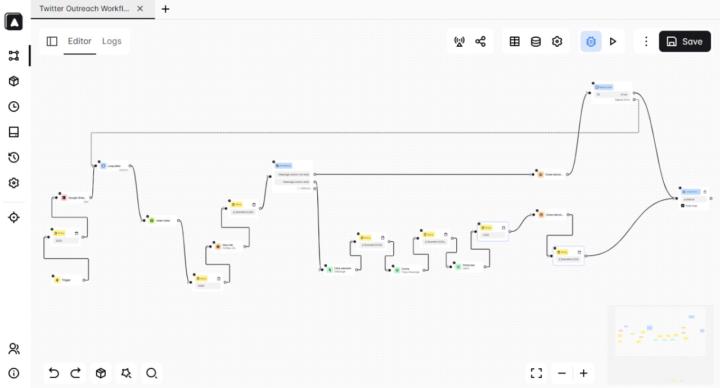
Built a Custom Free Workflow For Twitter Outreach
You can send 500, 1000, or 2000 DMs per day (no limit) for almost free. It's completely automated, will run in the cloud 24/7, and will not get your accounts banned! Made a quick 5-minute demo. Interested?
2
0
Jun '24 •
Send 500+ Cold IG DMs per day for FREE!!!
So, here's how you set up your IG outreach system: 1. Download my free workflow - https://drive.google.com/file/d/14-K9NSW_K1-gDNlMenb0cSlnEu-x2EmF/view?usp=sharing 2. Download and Install NST Browser - https://www.nstbrowser.io/ 3. Buy IG accounts from high-quality seller ($1 per account). 4. Buy static residential proxies (1 proxy per 1 account) ($1.75 per proxy). 5. Create a duplicate of my Google Sheet - https://docs.google.com/spreadsheets/d/1-MC7wltu75btIDhjdTSctyuHbQux3RUPtfGIlulKxM8/edit?usp=sharing 6. Share your google sheet with this email "[email protected]", and give editor access. 7. Copy your google sheet code ID from the link, it starts after "/d/" and ends before "/edit/". It would look something like this "18APQ8lPwEcePyEWp5nxqEeIqOCcnK58gs28neh8Mvzk/". 8. Create profiles in the NST browser for the number of accounts you've bought. Make sure each profile has a unique fingerprint and agent. (I recommend to use Windows agent) 9. Assign a separate proxy to each of the profiles. (Do not use same proxy for more than 1 account) 8. Go to Extensions in the NST browser -> Paste this link, and select import info - https://chromewebstore.google.com/detail/automa/infppggnoaenmfagbfknfkancpbljcca 9. Open each profile -> go to the Automa extension, and import my workflow. 10. Open the workflow -> go to google sheets block -> Paste your google sheet code ID in the "sheets ID" section. 11. In the google sheets block -> modify the "range section" according to your accounts. If it's account 1 ->change the range section to "Account 1!A:E", if it's account 2 -> change it to "Account 2!A:E", and so on...
2
0

May '24 •
I'll Bring You New Skool Members by Sending 500 DM's a Day!
Hey everyone, As you may all know, cold outreach is the best method to grow any online business. That's why I created my own IG outbound system that lets me send 500-600 DM's a day easily. I'll use it to grow your skool group within 1-2 months. Anyone interested?
0
0
Mar '24 •
Custom Built Content System (Free)
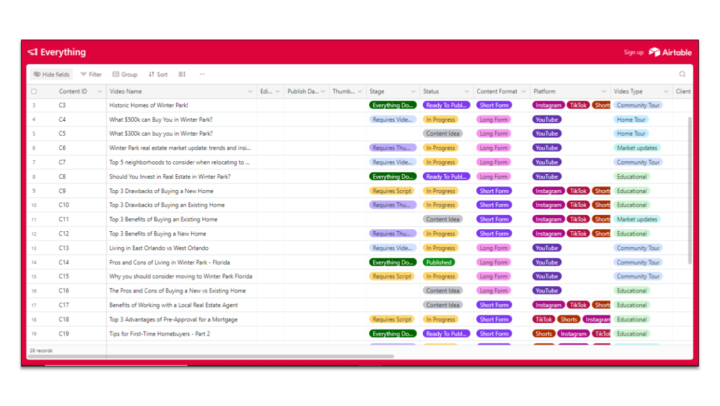
I know you all are trying to grow your Skool community, and one of the best ways is through organic video content across all socials...However, it is hard to stay consistent without a proper content system in place. So, I made a custom content machine via "Airtable" and "Softr". It took me a whole month, It is very complex on the backend but it is extremely easy to use on the front end! (I'll attach some screenshots of it). It contains a lot of automation so the whole content creation process is super efficient. It's also integrated with Slack, so, you'll get notifications for each step of every single piece of content...And there's just so much more about it!! but I can't cover everything here. If you're a solo creator, you have a team, or you run a content creation agency, it's really useful for you... Let me know if anyone wants it :)))
1 like • Mar '24
@Harish Marnad nvm, I just sent you a dm
0 likes • Mar '24
@Riley Anderson Sent

Feb '24 •
Appointment Setter
I am looking to Hire an appointment setter. If you know anyone with prior experience do let me know. Other answers I am looking for: - How much they charge? - Do you get positive leads? - Will IG DM Outreach be effective? - How many appointments I should expect in a month?
1 like • Mar '24
I've 2 years of experience in appointment setting, let me know if you need help!
0 likes • Mar '24
@Aman Rawat Unfortunately, I cannot dm you, I'm not at level 2 yet. Would you dm me please?
1-6 of 6

@talha-tanzeem-3971
Helping software & community owners generate more revenue with my DFY Cold outreach system. (100% DFY - Revenue share model)
Active 111d ago
Joined Feb 29, 2024
Powered by