Activity
Mon
Wed
Fri
Sun
Aug
Sep
Oct
Nov
Dec
Jan
Feb
Mar
Apr
May
Jun
Jul
What is this?
Less
More
Memberships
Chase AI+
1.3k members • $98/month
n8n KI Agenten
10.9k members • Free
AI Era
510 members • $29/month
Clief Notes
42.1k members • Free
3D Character Workshop
562 members • $997
34 contributions to Prodigies University

Mar 23 •
We're moving on to the next chapter...
I finally feel ready to share it. Some of you have been with me since the early PU days. I still remember celebrating when someone's first project actually worked, or when some of you made some mad bread! So far, PU has helped over 1,500+ web developers worldwide! Thats insane to think about... PU shaped everything I do today and I genuinely mean that. But unfortunately the world has changed... AI flipped this entire industry on its head and the way we were doing things inside PU just doesn't match where we're all headed. The concepts remain the same, but the methods / vehicle have changed. And with that being said...PU is officially closing. We had to end this chapter so that we could evolve into something greater. Something that can help you learn the most valuable skill in the years to come... A community that will build the next BEST set of Ai entrepreneurs. Introducing... AI Era! In this community you can expect to learn things like: - How to automate your business with AI - Ai agents, - Vibecoding and build Production grade saas applications - Different ways to make money with AI. - Build a system with AI agents that works while you sleep - Build with claude code - Openclaw / Nemoclaw And more... This is proof of concept but I need your support to bring this to reality. i'm committed to building the BEST AI community on the internet! And I'd like to extend an invite to have you as part of this community. Im looking to build this community with you all so I can get feedback from you and build exactly what you want to see in there. Lifetime members: Please DM me for an upgrade. Thank you for taking the leap and investing in the long term, I hope this gift makes you happy. Monthly Subscribers of PU -> I also have something special for you. Id like to reduce your current subscription rate from $97 a month down to only $37/mo (Lower than our early launch price). Im excited for where the worlds heading... Thank you once again for making PU a banger, and I hope to see you in this next chapter. ❤️

1 like • Mar 27
Looking forward to it. Did dm you already :) @Perrin Joseph
1 like • Mar 24
@Perrin Joseph 😂 lmao "complete distruction" yeah, that's what I was thinking, when I first read about openclaw
0 likes • Mar 24
@Perrin Joseph that's why I like the concept of having a sandbox first approach, but it doesn't work in all scenarios

Mar '25 •
Learn or advance your coding skills with Code Agent
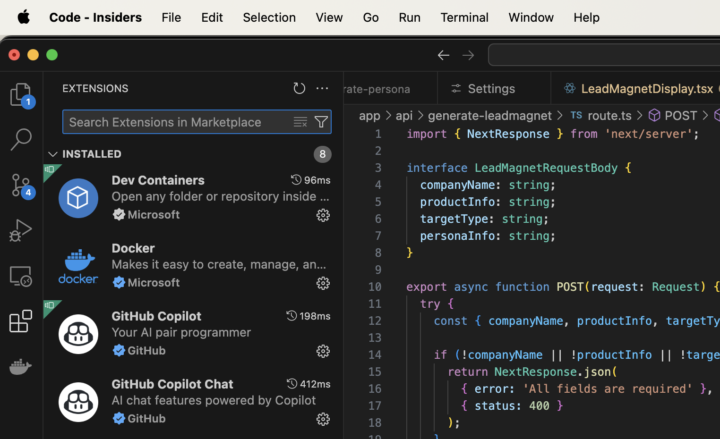
If you have basic coding skills, you can start building full-stack apps locally using Code Agents. What is the difference between a coding assistant and an agent? A coding assistant helps you edit files, create, or correct small code fragments, while an agent allows you to build an entire app using English. While it's always helpful to know which framework or APIs you'd like to use, the agent can even recommend API services for specific features or suggest how you should design your database. A coding agent is also a great way to learn a new framework. For example, you can instruct it to create an app using Next.js for the frontend and Supabase as the BaaS, or FastAPI to manage all API requests. The most affordable way to start using an AI agent is with the Visual Studio Code Insiders version paired with GitHub Copilot. GitHub Copilot recently launched a free plan, and its Pro version offers a one-month free trial. After that, it costs just $10 a month. n Copilot, you can choose how much control you want over the coding process. If you prefer to be more involved, you can use Chat Mode or Edit Mode, where you receive step-by-step instructions and approve each code addition. Alternatively, you can work in a half-autonomous mode with the agent, allowing it to handle more of the development process. Copilot supports Claude Sonnet 3.7, 3.5, and GPT-4o, but I don’t recommend using GPT-4o for coding.
1 like • Mar '25
I found here on the official blog a taste of what Copilot Agent can do: https://code.visualstudio.com/blogs/2025/02/24/introducing-copilot-agent-mode
0 likes • Mar '25
Here’s you can find the Copilot Pro plan @Damian Dąbrowski was referring to: https://github.com/features/copilot/plans. If you search for Copilot Plan in Google, you get two links from Microsoft and GitHub. Do not use the one from Microsoft, there they ask for $20 per month, on GitHub the Pro costs like Damian mentioned $10. It is free for verified students, teachers, etc. Check the linked instructions on the page below the pricing how to get it for free, if you are a student.
Dec '24 •
Have to cancel todays flash call 🥲
It’s New years! Which means family time! Thought we could do the flash call but unfortunately fam time calls. Wishing the PU family a happy new year. Hope everyone here starts their SAAS in 2025 ❤️
0 likes • Jan '25
Happy new year 🎆❣️
Dec '24 •
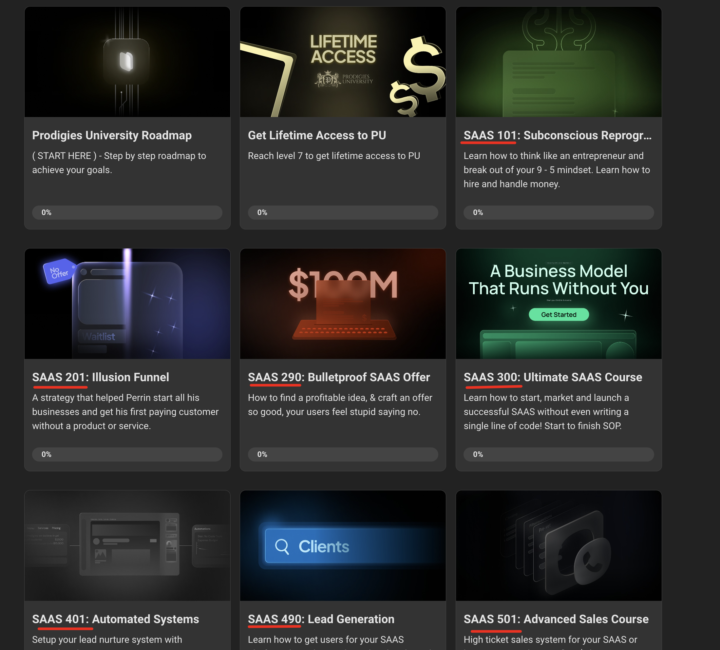
New Naming System!
Mocking the education system feels nice lol 😂 Thought about creating a system to better navigate the courses let me know if this helps.
1 like • Dec '24
🤣❣️❣️❣️
1-10 of 34

@sunny-muthreja-9693
PLM consultant & trainer (15y), ex-product developer. Now technical consulting. 3D artist & web designer/dev.
Active 7h ago
Joined May 20, 2024
Germany