Activity
Mon
Wed
Fri
Sun
Mar
Apr
May
Jun
Jul
Aug
Sep
Oct
Nov
Dec
Jan
Feb
What is this?
Less
More
Memberships
The AI Advantage
73.5k members • Free
AgentVoice
575 members • Free
Early AI-Starters
176 members • Free
Voice AI Accelerator
7.3k members • Free
OS Architect
11k members • Free
Vertical AI Builders
9.9k members • Free
Brendan's AI Community
23.5k members • Free
AI Automation Agency Hub
292.7k members • Free
8 contributions to Brendan's AI Community

4h •
Why 40% of my AI agent calls were getting hung up on
Last week I figured out why our AI receptionist had a 58% connection rate even though it was working perfectly. People were hanging up before it even said hello. Here's what was happening: Call comes in → Initialize AI session → Load customer data → Connect voice → Generate greeting → Finally speak Total time? 2.8 seconds of dead silence. Turns out people hang up after 2-3 seconds if nobody answers. And if they say "Hello?" twice into the void, they're gone. I was so focused on making the AI smart that I forgot about the first 3 seconds. The fix was stupid simple: Instead of doing everything AFTER the call connects, I started doing it BEFORE: - Keep AI sessions pre-warmed in a pool (ready to go) - Pre-generate common greetings as audio files - Play greeting immediately, load customer context in background __________________________________________________________________ // Old way: 2800ms await initAI() → await loadContext() → await speak() // New way: 150ms playPrerecordedGreeting() + loadContextInBackground() __________________________________________________________________ Answer time went from 2.8 seconds to 0.2 seconds. Connection rate jumped from 58% to 94%. Same AI. Same quality. Just answered faster. One client was losing $47k/month from people hanging up on silence. Fixed it with this and saved them $38k monthly. Lesson: Your AI can be perfect but if it doesn't pick up fast, nobody will ever know. If you're building voice AI and seeing high abandonment rates, check your answer time first. Most people are optimizing the wrong thing.
0
0

15d •
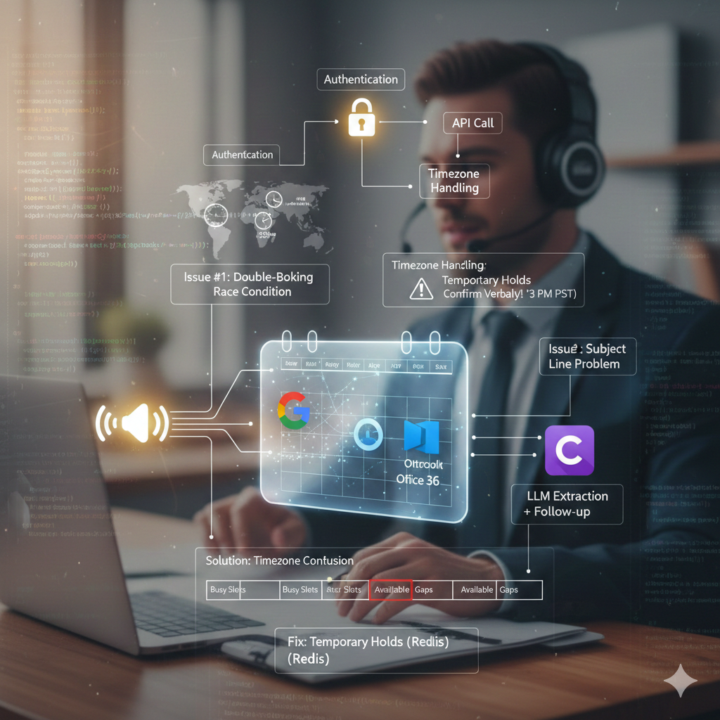
Calendar integration almost killed our product launch
Three weeks before launch, we're demoing our voice AI to a dental clinic. Perfect demo. AI sounds natural, understands everything, books the appointment. Dentist watches, nods along. Then says: "So your receptionist still has to put this in Google Calendar?" Me: "Uh, yeah, for now." Dentist: "Then what's the point? You've just added a step." Ouch. But he was right. We had built this amazing conversational AI that could understand context, handle interruptions, sound completely human. But it couldn't actually DO anything. The receptionist still had to manually enter every appointment. Spent the next month fixing it. Turns out calendar integration is way harder than I thought. The problems nobody warns you about, Timezones are evil User in California says "book me for 3 PM." Our server in Virginia creates appointment at 3 PM Eastern. User shows up at 3 PM Pacific, appointment was 3 hours ago. Now we explicitly confirm: "Just to confirm, that's Tuesday at 3 PM Pacific time, correct?" Double booking race conditions Two people call at the same time, both get offered 2 PM, both say yes. Now you have two people scheduled for the same slot. Had to build a slot holding system. When AI offers you a time, it holds it for 5 minutes. Nobody else sees it as available during that window. The "next Tuesday" problem There are 52 Tuesdays in a year. Which one did you mean? Started always including the full date: "Tuesday, February 4th" so there's no confusion. What actually works now We support Google Calendar, Outlook, and Calendly. Each has different APIs and different quirks but we built an abstraction layer so the AI doesn't care which one you use. The flow: 1. User asks to book 2. AI checks actual availability in real-time 3. Offers specific times 4. Holds the slot 5. Gets confirmation 6. Creates the event with all details 7. Sends invites to everyone Whole thing takes about 45 seconds. Real results That same dental clinic is now a paying customer. Their receptionist went from handling 50+ booking calls a day to maybe 10. The AI handles the rest.
20d •
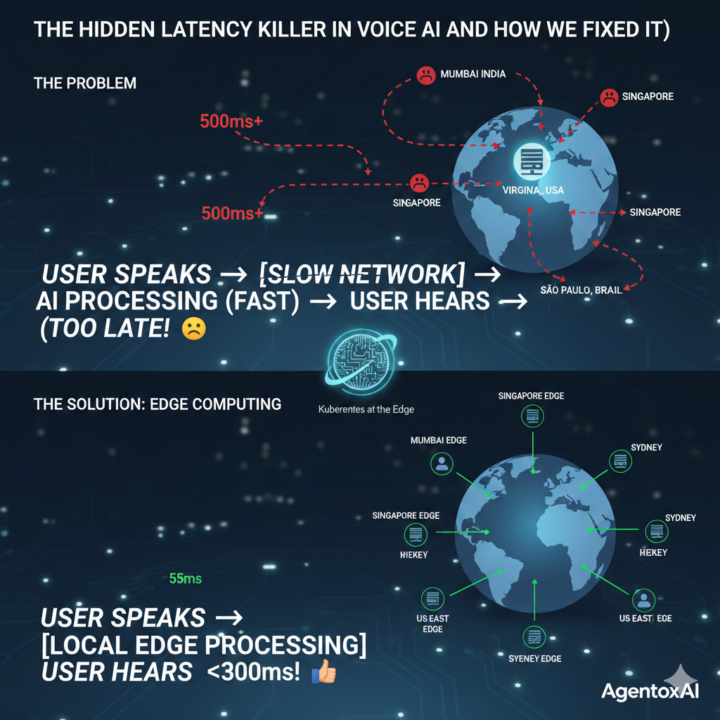
We fixed our AI processing but calls still felt slow. Turned out we were solving the wrong problem.
So last month we had this weird situation. Our voice AI was responding in like 300ms, super fast. LLM streaming, TTS optimized, everything running in parallel. We were pretty happy with ourselves. Then we get feedback from users in India and Australia saying the system feels laggy and unresponsive. I'm like, what? Our metrics show 300ms. That's fast. Spent a week debugging the AI stack. Nothing wrong there. Finally someone suggested we check actual end to end latency from the user's perspective, not just our server logs. Turns out: - Mumbai to our Virginia server: 900ms - Sydney: 1200ms - Even São Paulo: 800ms Our 300ms processing time was getting buried under 500-600ms of just network travel time. The actual problem When someone in Mumbai makes a call, the audio goes: Mumbai → local ISP → regional backbone → submarine cables → Europe → Atlantic → US → our server Then the response does the same journey back. That's like 15+ hops through routers, firewalls, ISPs. Each one adding 20-50ms. Physics problem, not a code problem. What we did Moved our servers closer to users. Sounds obvious now but we initially thought "cloud is cloud, location doesn't matter." Deployed smaller Kubernetes clusters in: - Mumbai - Singapore - São Paulo - Sydney - Plus our existing US and Europe ones Each location runs the full stack. Not a cache, actual processing. When someone in Mumbai calls now, they hit the Mumbai server. Processing happens 40ms away instead of 200ms away. Used GeoDNS so users automatically connect to nearest location. Plus some smart routing in case the nearest one is overloaded. Results Mumbai: 900ms → 300ms Sydney: 1200ms → 340ms São Paulo: 800ms → 310ms Basically went from "unusable in some regions" to "works everywhere." The funny part? Our AI didn't change at all. Same models, same code. We just moved the servers closer. The kubernetes part This would've been a nightmare to manage without k8s. We'd need to manually deploy and maintain like 10+ separate systems.
2
0
27d •
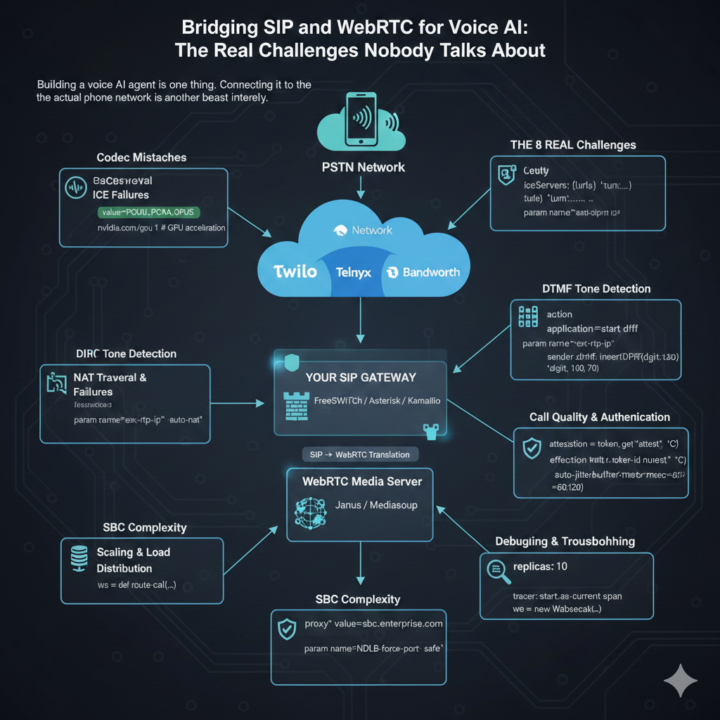
Honestly, bridging SIP trunks with WebRTC has been a nightmare
So we've been building this voice AI agent that needs to work with regular phone calls, right? I thought the hard part would be making the AI sound natural. Wrong. The actual headache? Getting SIP trunks to play nice with WebRTC. Let me vent a bit and maybe save someone else the pain. The basic problem Your AI speaks WebRTC (modern browser stuff). Phone networks speak SIP (old telecom protocol from like the 90s). You need both because: - WebRTC = how you handle audio in web apps - SIP trunks = how you get actual phone numbers and connect to regular phones Someone has to translate between them. That someone is you. What's been killing us Codec mismatches SIP trunk sends G.711. WebRTC wants Opus. Now you're transcoding in real-time which adds 20-50ms latency AND eats CPU like crazy. We were hitting 80% CPU per call before we figured out better codec negotiation. NAT traversal issues One-way audio. The absolute worst. You hear them, they don't hear you. Or neither of you hear anything. Works perfectly in dev, completely broken in production. Spent a whole week on this before realizing our firewall was blocking the RTP port range. DTMF is a mess When someone presses a phone key, SIP and WebRTC handle it completely differently. SIP uses RFC 2833, WebRTC doesn't support it directly. Had to build detection on the media server side and relay it through a data channel. Call quality monitoring You can't fix quality issues if you don't know they're happening. Started monitoring packet loss, jitter, and RTT every second. Found out 15% of our calls had one-way audio because of NAT issues we didn't even know about. What actually worked Got it down to about 1% failure rate now. Here's what helped: 1. TURN servers - forced relay mode. Costs more bandwidth but eliminates NAT problems 2. Smart codec selection - prioritize PCMU/PCMA (less transcoding = less latency) 3. Multiple trunk providers - when one has issues, auto-failover to backup 4. Real-time monitoring - catching issues before users complain 5. Pre-warmed connection pools - avoid setup delays during high traffic
2
0

Jan 9 •
FREE AI Agency Webinar Next Week! 🥳
Join my FREE AI Agency webinar next week! Only 120 slots available 👇 For the first time in 3 years... I’m running a free live workshop for 120 people where I’ll show you exactly how to build an AI agency and become a no-code/low-code pro in 2026. You will learn: ✅ The best offers you can sell in 2026 ✅ How to deliver production-ready agents that make money ✅ Where to find high-paying clients ✅ The exact systems and tools we’re using right now 🎁 BONUS! I’m also launching my AI Launchpad, a premium version of my Skool community. Every person who shows up to my workshop live will receive the early-bird price that will never be available again. To get access: Comment "Webinar" I will send you the invitation link for the event in the Skool DMs (please, check them) ❗️VERY IMPORTANT❗️ CHECK YOUR DMS (MIGHT TAKE 3-5 MINUTES)

0 likes • Jan 9
Webinar
1-8 of 8

Active 4h ago
Joined Nov 27, 2025
Powered by