Activity
Mon
Wed
Fri
Sun
Aug
Sep
Oct
Nov
Dec
Jan
Feb
Mar
Apr
May
Jun
What is this?
Less
More
Memberships
AI Marketing Hub, SEO & Search
4.4k members • Free
Untech AI
61 members • Free
AI Automation Society
416.1k members • Free
LearnToday™
28.3k members • Free
AI SEO Operators
3.8k members • Free
2 contributions to Untech AI

Dec '25 •
Week 3 Assignment (Problem Decomposition) - Reddit
Hi team Please find the Week 3 Problem Decomposition Assignment. I worked on a Reddit Reply Assistant use case. Apologies for the late submission. Link: https://docs.google.com/document/d/1aOfobSbNBuOsRIOCnd2kxBXh14fYMgX4IIXM7QuCWFE/edit?usp=sharing @Eila Qureshi Would appreciate a review when you have time. Thanks! Happy holidays, everyone!💥
0
0

Dec '25 •
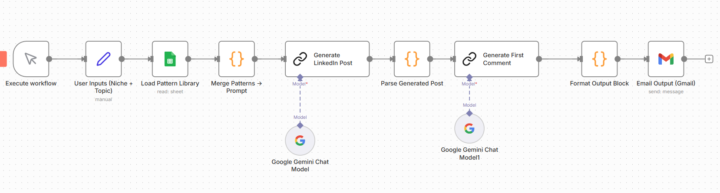
🔥 Week 2 Bonus Build — Mini LinkedIn RAG System (Pattern → Post → Email)
I spent this Sunday building something interesting outside of the official assignment; a Mini RAG system for LinkedIn content using n8n + Google Sheets + Gemini. The goal: 👉 Scrape high-performing posts from top AI creators 👉 Extract structural patterns automatically 👉 Generate fresh LinkedIn posts in my voice, based on proven formats Here’s how it works: 🧩 Workflow A : Pattern Builder 1. Fetches raw posts from a Google Sheet (just post URL + content pasted manually 2. Loops through each post 3. Sends the content to an LLM and returns structured data: ✔️Hook type ✔️Hook example ✔️Post type ✔️Tone style ✔️CTA style ✔️Writing tricks ✔️Key ideas 4. Saves everything into a Pattern Library Sheet This turns long unstructured posts into a database of writing patterns. 🧩 Workflow B : Post Generator 1. I enter simple inputs: ✔️Niche ✔️Target audience ✔️Post type ✔️Topic hint 2. The system: Reads multiple patterns from the library Summarizes them into one master pattern prompt Generates: ✔️ LinkedIn post ✔️ First comment ✔️ One-line summary Then emails the output to me automatically. 🧪 Status & Screenshots ✔️ The system works end-to-end ✔️ I received my own AI-generated LinkedIn post + comment by email ⚠️ Hit a Gemini API quota after processing several posts (classic 🤣) No paid tools. No external scraper APIs. Just n8n, Google Sheets, and manual LinkedIn/X copy/paste. 🧠 What I learned today: - Studying real posts beats “write a LinkedIn post like a human” prompts. - Data beats creativity. I can replicate viral positioning based on structure and data, not luck. - Workflow chaining in n8n finally clicked today. 📅 Next steps: - Add batching + retry logic to avoid API limits - Auto-scrape LinkedIn comments for CTAs and hook variants - Export pattern library to Airtable or Notion
1 like • Dec '25
Awesome stuff @Pankaj Vashist !
1-2 of 2

Active 30d ago
Joined Nov 21, 2025
Toronto, Canada