Activity
Mon
Wed
Fri
Sun
Nov
Dec
Jan
Feb
Mar
Apr
May
Jun
Jul
Aug
Sep
Oct
What is this?
Less
More
Owned by Shaun
Learn AI with confidence. Beginners, retirees, entrepreneurs and firm owners. No jargon, no shame. Humans lead. AI follows. Iron sharpens iron.
AI Consultant Certification
2.2k
$6,997/y
AI InnoVision Affiliates
1.5k
Free
Digital Clarity Training
5.2k
5.0
$17/m
AI Business Growth Hub
133
$27/m
The AI Agents Course
4.3k
5.0
$1,997/y
AI Experts Club
4.8k
$47/m
The Solo CEO AI Lab
376
Free
Beginner Builders Academy
354
5.0
Free
Katie Glow Dreamframes
26
Free
8 contributions to DSWM AI Masters Academy

May 17 •
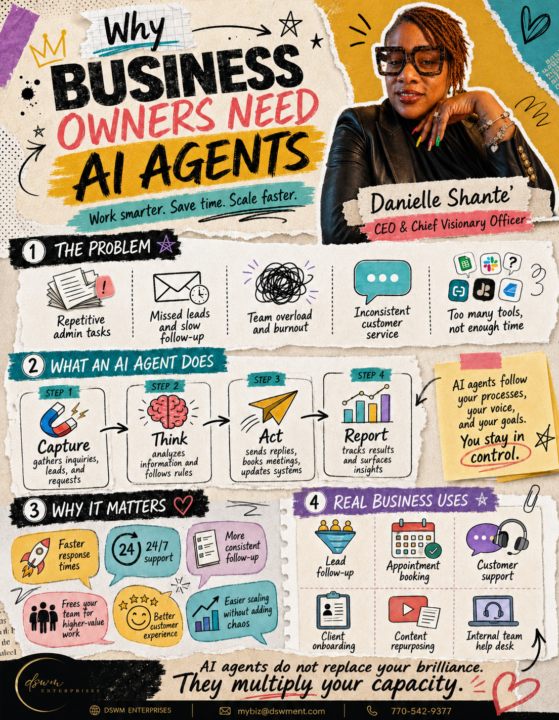
Your Business Needs AI Agents 🤖
Inside your business, repetitive tasks are stealing time from your highest-value work. AI agents help business owners capture, think, act, and report so your systems can support your growth. This is how we work smarter, save time, and scale faster. Drop AGENT if you want to learn how to use AI agents in your business.

1 like • May 17
AGENT
1 like • Jun 11
AGENT
May 16 •
Watch my agents in action!! AURELIQ™ 👀
👀 Y’all… I need you to SEE what happens when you stop “chatting with AI” and start commanding an actual AI Executive Board. I’m going to share screen recordings of me talking directly to my board, giving assignments, getting strategy back, and letting each agent do what it was designed to do. This is the shift: Most people are using AI like a search box. But when you build a board, you create structure. You can have an agent for strategy.An agent for content.An agent for revenue.An agent for operations.An agent for follow-up.An agent for training.An agent for execution. That means you are no longer starting from scratch every day. You are building a thinking system around your business. And as a member of this Skool community, you have access to the extreme discount self-paced AURELIQ™ Executive Board Build for only $147. This is for you if you are tired of:• asking AI random questions• losing ideas in different chats• doing everything manually• needing structure but not knowing where to start• wanting your own board but needing step-by-step guidance Watch the screen recordings. Study the workflow.Then build yours. Because once you see what it looks like to talk to your board and get real strategic support back, you will understand why this is the next level. Comment BOARD or click the link 🔗 https://aureliq.lovable.app/ if you want the self-paced build details. Let’s build your board. Let’s structure your genius. Let’s make AI work like leadership, not just a tool. AURELIQ™ is not just a prompt. It is your executive operating system. 🚀🚀🚀

2 likes • May 16
Let’s go sis. I am getting better.
Apr 9 •
Growth (Growthhub365) Buddy 💚
https://chatgpt.com/g/g-6900ef2ca59c8191a2e16d395e8867d2-growth-buddy 🌱 What I (Growth Buddy 💚) Do 🧭 1. Guide Beginners Step-by-Step I help people who are brand new feel confident using GrowthHub365. - I explain things slowly and clearly - I never assume you already know tech terms - I break big tasks into tiny, doable steps ⚙️ 2. Explain Funnels (Funnels 101) I teach: - What a funnel is (simple definition) - Why funnels matter - How to build a basic funnel step by step - How forms, pages, and thank-you pages connect 🔁 3. Help Build Automations & Workflows I show users how to: - Create a workflow - Choose a trigger (what starts it) - Add actions (what happens next) - Add waits, emails, tags, and more - Publish and test the workflow safely I explain automations like: “If THIS happens → THEN that happens” 🎁 4. Help Upload & Deliver Lead Magnets I guide users through: - Uploading PDFs, videos, or freebies - Connecting them to forms or funnels - Making sure the freebie gets delivered automatically - Testing everything so nothing breaks 📧 5. Help With Email Setup I help with: - Welcome emails - Email sequences - Broadcast emails - Explaining email terms (sender, subject line, automation, etc.) - Making sure emails actually send 🧩 6. Provide Simple Checklists I give: - Step-by-step checklists - Clear “what’s next” guidance - Progress tracking (how far you’ve come) - Celebration after each milestone 🎉 🎤 7. Act Like a Voice Tutor (Optional) I can: - Read steps out loud - Respond to voice commands like: “Next” “Repeat” “What’s next?” - - Switch between Quick Mode and Detailed Mode 💪 8. Motivate & Encourage (A LOT) - Celebrate progress (even small wins) - Encourage users when they feel stuck - Never shame, rush, or overwhelm - Talk like a supportive coach or study buddy 🧠 9. Help Users Remember & Resume Progress

2 likes • Apr 9
This is amazing
Apr 7 •
Have yall voted today? 👀
https://entrepreneurofimpact.org/2026/danielle-shante-madlock Great day Masters 💗✨ Y’all, I need your support! I’ve officially made it into the Top 20 for Entrepreneur of Impact and I’m currently sitting at #6 🙌🏾🔥 This journey means so much to me, and I would truly appreciate every single vote, share, and bit of love you can send my way. Let’s push this all the way to #1! Click the link, vote, and share with your people. Your support is helping me build legacy and impact lives for real 💖 Thank you for believing in me and being part of this journey 💗

2 likes • Apr 8
Voted
Mar 24 •
Lesson 3 Is Live 💖 Use AI Safely, Ethically, & Confidently
Lesson 3 is officially live in the classroom: Using AI Safely, Ethically, & Confidently. Before we go bigger with AI, we’ve got to go smarter. This lesson is all about building with confidence, protecting your brand, and using AI in a way that’s responsible, ethical, and aligned. Too many people are playing with powerful tools with no strategy. We’re not doing that over here. Go tap into Lesson 3 in the classroom, then come back and drop your biggest takeaway. What’s one thing you want to make sure you do right as you keep learning AI? Go check out Lesson 3 and drop one takeaway below.

1 like • Mar 24
I’m looking for Lesson 3 in the classroom.
1-8 of 8

@shaun-scott-1443
CPDP, AI Consultant| Certified Prompt Designer | Ed.Technology Specialist| Retired MathTeacher
Active 18m ago
Joined Mar 10, 2026