Activity
Mon
Wed
Fri
Sun
Jan
Feb
Mar
Apr
May
Jun
Jul
Aug
Sep
Oct
Nov
Dec
What is this?
Less
More
Memberships
SaaS University (GoHighlevel)
6.8k members • Free
SAAS SKOOL (GoHighLevel SaaS)
589 members • Free
insider.marketing
3.1k members • Free
Viral Coach Training Material
19k members • Free
🎙️ Voice AI Bootcamp
7.8k members • Free
Brendan's AI Community
22.1k members • Free
AI Automation Agency Hub
276.2k members • Free
AI Automation Society
213.6k members • Free
5 contributions to Brendan's AI Community

Jul 18 •
Prompting voice agents
Quick question! Can anybody please direct me to a resource where I can find a good guide on single prompt agents on vapi? I am trying to build one it’s annoyingly confusing.
0
0

Jul 9 •
Voiceflow : How to pick models and minimize costs 💡
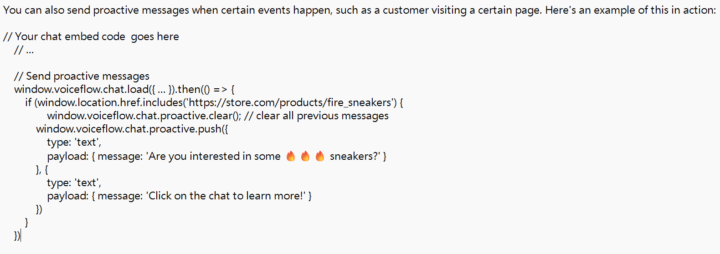
Hey everyone! If you are a beginner and want to be efficient as possible with your credit when it comes to using voiceflow agents according to their credit system, Here are voiceflow's guides and suggestions: > What uses credits? - Messages - LLM usage - Voice call minutes - Text-to-speech > What doesn’t? - Functions (no credit drain!) - Knowledge base queries > Monitor usage with Analytics: - Use the credit usage chart to track what's eating your credits. - Check the prompt usage chart to see which prompts get triggered most. 🧠 Choosing the Right AI Model: It's all about balancing cost, capability and latency when it comes to picking the right model for the task. It can be tricky — especially for voice-based agents. Here’s a general breakdown of LLM types: 1. Lightweight & Cheap (e.g., GPT-4o mini, Claude Haiku) : Great for basic tasks, fast and low-cost. 2. Balanced & Smart - More capable (e.g., GPT-4o, Claude Sonnet) : Ideal for reasoning, KB-heavy workflows, and accurate step-by-step instructions. 3. Most Powerful - Heavy (e.g., GPT-4, Claude Opus) : Best for tough questions or deep reasoning — but expensive! ❗Voiceflow recommends not using legacy models such as GPT-3.5 Turbo for building agents. 🧪 Test & Experiment When switching models: - Test thoroughly - Monitor transcripts - Iterate & scale what works Go to the project -> analytics when it comes to monitoring your agent. Cheaper ≠ better. Choose intentionally. Some steps are worth the higher cost for better quality. 🎁 Bonus: Free Proactive Messages Ever wonder how to make your webchat widget pop with a proactive message (like “Hi there! Need help?”)? Good news — proactive messages are free and don’t cost credits, since they exist outside your project logic. I attached the code for the proactive messages provided by voiceflow.Make sure to wrap it with setTimeout(function() { your chat widget code}, 350). Otherwise it won’t display due to widget loading delay.
1
0

Jul 9 •
How To Build AI Agents: Ultimate 2025 Guide
Just dropped my biggest video ever 🔥 🎬 4 Hours Long (Filmed over 3 months) ✅ 6 Hands-On Tutorials 🎁 9 Free Templates 🤖 Deep Dive into AI Agent Concepts 👥 For Beginners and Advanced Users Check it out now! 👇
1 like • Jul 9
That’s awesome brendon. Definitely will watch it and give you feedback.
Jul '24 •
How can I challenge myself?
I have gone past the basics of voiceflow to make basic chatbots which serve functionality such as contact management, lead generation…what should I look into next so I can up my game??
0 likes • Jul '24
Thats something I want to learn.. how to customise the chatbot using code..is there something you can point me to …much appreciated

Jun '24 •
Gmail integration issue on Make
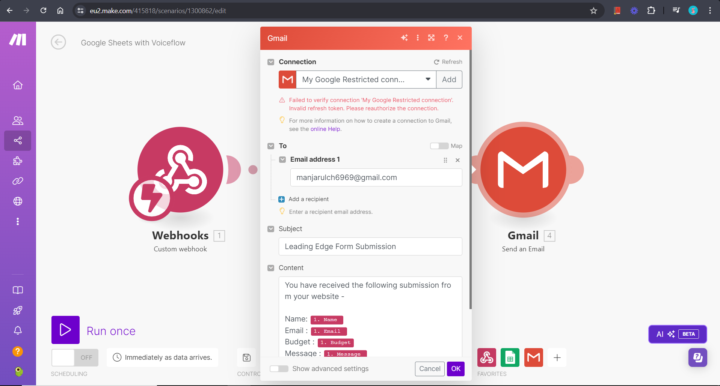
"Failed to verify connection 'My Google Restricted connection'. Invalid refresh token. Please reauthorize the connection." Been facing this error on Make on the Gmail Module. Connected my gmail with make and opened a 0Auth account for it a week ago. Was working fine but now im having this reauthorization issue, has anyone stumbled upon this before? Any help will be highly appreciated.
2 likes • Jun '24
I also had the same problem…https://youtu.be/d0u7IYQJXDM?si=EzQw3C-hscnNZWmO this video explains how to resolve this issue. Give it a go. Goodluck mate
1-5 of 5

@senath-pussawela-5662
19years old. Automation enthusiast. Open to help, to learn and do cool stuff with cool people
Active 4m ago
Joined Jun 9, 2024
Powered by