Activity
Mon
Wed
Fri
Sun
Aug
Sep
Oct
Nov
Dec
Jan
Feb
Mar
Apr
May
Jun
What is this?
Less
More
Memberships
AI Automation Club
7.5k members • Free
AI Operators Community
1.3k members • Free
Data and Ai Automations
2k members • Free
AI Automation Society
415k members • Free
DataLinkk AI Skool
118 members • Free
21 contributions to DataLinkk AI Skool

Dec '25 •
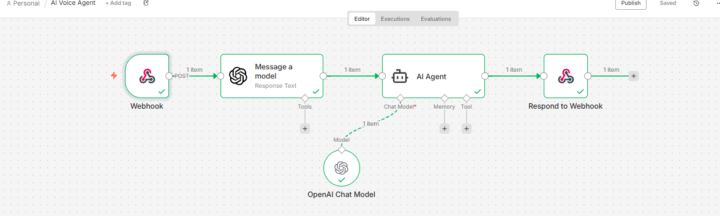
𝗕𝘂𝗶𝗹𝘁 𝗮 𝗥𝗲𝗮𝗹-𝗧𝗶𝗺𝗲 𝗩𝗼𝗶𝗰𝗲 𝗔𝗜 𝗥𝗲𝘀𝗲𝗮𝗿𝗰𝗵 𝗔𝗴𝗲𝗻𝘁 𝘂𝘀𝗶𝗻𝗴 𝗻𝟴𝗻 + 𝗢𝗽𝗲𝗻𝗔𝗜 🎙️🧠
𝗕𝘂𝗶𝗹𝘁 𝗮 𝗥𝗲𝗮𝗹-𝗧𝗶𝗺𝗲 𝗩𝗼𝗶𝗰𝗲 𝗔𝗜 𝗥𝗲𝘀𝗲𝗮𝗿𝗰𝗵 𝗔𝗴𝗲𝗻𝘁 𝘂𝘀𝗶𝗻𝗴 𝗻𝟴𝗻 + 𝗢𝗽𝗲𝗻𝗔𝗜 🎙️🧠 I recently built a real-time voice-enabled AI agent that can research any question you ask and respond back in voice, almost instantly. The goal was to move beyond text-only chatbots and build an AI system that feels natural, conversational, and research-driven. 🔹 𝗪𝗵𝗮𝘁 𝘁𝗵𝗶𝘀 𝘃𝗼𝗶𝗰𝗲 𝗔𝗜 𝗮𝗴𝗲𝗻𝘁 𝗱𝗼𝗲𝘀 🎙️ Accepts real-time voice or text input from the frontend 🌐 Sends queries to an n8n Webhook for processing 🤖 Uses an AI Agent to research and understand the question 🧠 Generates a concise, high-quality summary 🔊 Converts the response into voice output ⚡ Returns the answer back to the user in real time 🔹 𝗪𝗼𝗿𝗸𝗳𝗹𝗼𝘄 𝗔𝗿𝗰𝗵𝗶𝘁𝗲𝗰𝘁𝘂𝗿𝗲 Frontend sends user input → n8n Webhook OpenAI model processes the research query AI Agent refines the output into a short, clear explanation Response is sent back instantly via webhook Voice layer delivers the final answer audibly 🔹 𝗪𝗵𝘆 𝘁𝗵𝗶𝘀 𝗺𝗮𝘁𝘁𝗲𝗿𝘀 Most AI assistants still rely heavily on text. This workflow shows how: Voice-first AI experiences can be built with automation Research-based answers can be delivered instantly AI agents can feel more human, accessible, and interactive Real-time AI systems don’t need heavy backend infrastructure 🔹 𝗧𝗲𝗰𝗵 𝗦𝘁𝗮𝗰𝗸 n8n (Webhooks & Workflow Automation) OpenAI (LLM for research & reasoning) LangChain AI Agent Voice Input & Voice Output Layer This project helped me learn more about: Real-time AI workflows Voice-based AI interactions AI agent prompting & summarization Building practical AI assistants with n8n Still learning. Still building. Sharing the journey 🚀 If you’re interested in: ✅ Voice AI Agents ✅ AI Research Assistants ✅ n8n Automation ✅ Real-time AI Systems Let’s connect and learn together 👋 Hire Me:[email protected] watsnumber 03112817660
2
0
Dec '25 •
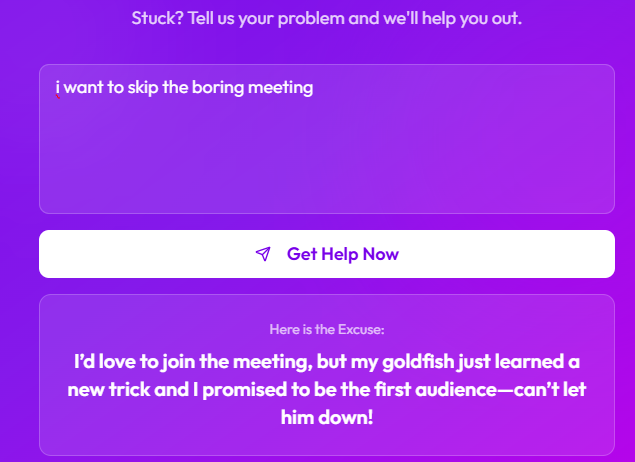
🚀 𝗕𝘂𝗶𝗹𝘁 𝗮 𝗥𝗲𝗮𝗹-𝗧𝗶𝗺𝗲 𝗔𝗜 𝗪𝗼𝗿𝗸𝗳𝗹𝗼𝘄 𝘂𝘀𝗶𝗻𝗴 𝗟𝗼𝘃𝗮𝗯𝗹𝗲 + 𝗻𝟴𝗻
🚀 𝗕𝘂𝗶𝗹𝘁 𝗮 𝗥𝗲𝗮𝗹-𝗧𝗶𝗺𝗲 𝗔𝗜 𝗪𝗼𝗿𝗸𝗳𝗹𝗼𝘄 𝘂𝘀𝗶𝗻𝗴 𝗟𝗼𝘃𝗮𝗯𝗹𝗲 + 𝗻𝟴𝗻 Today I built a simple but powerful real-time AI workflow that connects frontend user input directly to an AI agent and returns responses instantly. 🔹 𝗪𝗵𝗮𝘁 𝘁𝗵𝗶𝘀 𝘄𝗼𝗿𝗸𝗳𝗹𝗼𝘄 𝗱𝗼𝗲𝘀: 🌐 Accepts real-time data from the frontend via Webhooks 🤖 Sends user input to an AI Agent for processing ⚡ Generates instant AI-powered responses 🔁 Returns the response back to the frontend in real time 🔹 𝗪𝗵𝘆 𝘁𝗵𝗶𝘀 𝗺𝗮𝘁𝘁𝗲𝗿𝘀 Many applications need fast, live interactions — not delayed responses. This workflow shows how AI + automation can work together seamlessly to power real-time user experiences with minimal backend complexity. 🔹 𝗧𝗲𝗰𝗵 𝘀𝘁𝗮𝗰𝗸 • Lovable (Frontend integration) • n8n (Webhook + AI Agent workflow) • OpenAI (LLM via LangChain) This project helped me understand how accessible AI-driven systems have become — even small experiments can turn into real, usable products. Still learning. Still building. Sharing the journey 🚀 If you’re exploring: ✅ AI agents ✅ Real-time automation ✅ n8n workflows ✅ Building AI-powered products Let’s connect and learn together 👋 hashtag#AI hashtag#n8n hashtag#Automation hashtag#AIWorkflows hashtag#NoCode hashtag#LowCode hashtag#Lovable hashtag#BuildInPublic hashtag#TechJourney
3
0
Dec '25 •
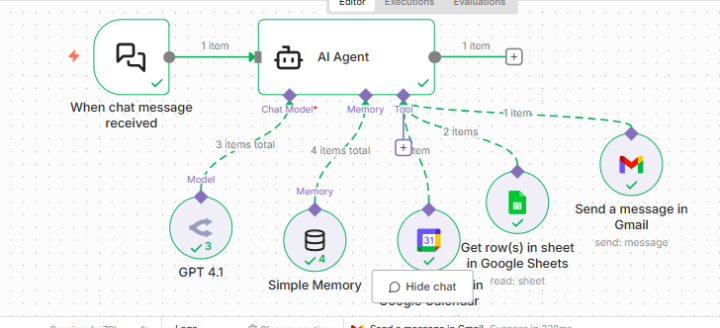
🚀 𝗕𝘂𝗶𝗹𝘁 𝗮 𝗦𝗺𝗮𝗿𝘁 𝗔𝗜 𝗔𝗴𝗲𝗻𝘁 𝘂𝘀𝗶𝗻𝗴 𝗻𝟴𝗻 + 𝗢𝗽𝗲𝗻𝗥𝗼𝘂𝘁𝗲𝗿 + 𝗚𝗼𝗼𝗴𝗹𝗲 𝗪𝗼𝗿𝗸𝘀𝗽𝗮𝗰𝗲
🚀 𝗕𝘂𝗶𝗹𝘁 𝗮 𝗦𝗺𝗮𝗿𝘁 𝗔𝗜 𝗔𝗴𝗲𝗻𝘁 𝘂𝘀𝗶𝗻𝗴 𝗻𝟴𝗻 + 𝗢𝗽𝗲𝗻𝗥𝗼𝘂𝘁𝗲𝗿 + 𝗚𝗼𝗼𝗴𝗹𝗲 𝗪𝗼𝗿𝗸𝘀𝗽𝗮𝗰𝗲 I recently built an AI-powered automation workflow in n8n that acts like a real assistant — not just a chatbot. 🔹 𝗪𝗵𝗮𝘁 𝘁𝗵𝗶𝘀 𝗔𝗜 𝗮𝗴𝗲𝗻𝘁 𝗰𝗮𝗻 𝗱𝗼: 💬 Respond to chat messages intelligently 📇 Check a Google Sheets contact database before taking any action ✉️ Send emails via Gmail only if a valid contact exists 📅 Create Google Calendar events with proper validation 🧠 Maintain short-term context using memory buffering 🤖 Powered by OpenRouter (GPT-4o-mini) via LangChain 🔹 𝗪𝗵𝘆 𝘁𝗵𝗶𝘀 𝗺𝗮𝘁𝘁𝗲𝗿𝘀 Most automations fail because they don’t follow real-world rules. This agent is context-aware, permission-aware, and data-driven — it won’t email or schedule anything unless the contact is verified first. 🔹 𝗧𝗲𝗰𝗵 𝘀𝘁𝗮𝗰𝗸 • n8n (AI Agent + LangChain nodes) • OpenRouter (LLM) • Google Sheets (Contact DB) • Gmail API • Google Calendar API This is a great example of how AI agents can safely automate real business workflows — not just generate text. If you’re exploring: ✅ AI agents ✅ Workflow automation ✅ n8n + LangChain ✅ Business-ready AI systems Let’s connect and share ideas 👋 hashtag#AI hashtag#n8n hashtag#Automation hashtag#LangChain hashtag#OpenRouter hashtag#NoCode hashtag#WorkflowAutomation hashtag#AIEngineering
0 likes • Dec '25
@Sarfaraz Ahmed nope borother - can you plz share me those links.
Dec '25 •
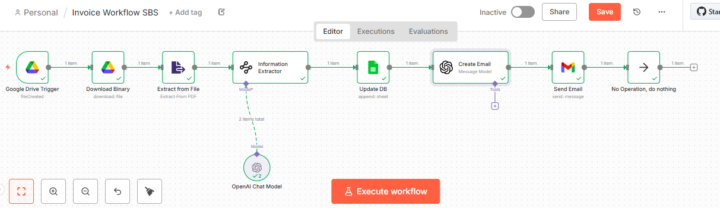
𝗔𝗜-𝗣𝗼𝘄𝗲𝗿𝗲𝗱 𝗜𝗻𝘃𝗼𝗶𝗰𝗲 𝗣𝗿𝗼𝗰𝗲𝘀𝘀𝗶𝗻𝗴 𝗔𝘂𝘁𝗼𝗺𝗮𝘁𝗶𝗼𝗻 𝘂𝘀𝗶𝗻𝗴 𝗻8𝗻
🚀 𝗔𝘂𝘁𝗼𝗺𝗮𝘁𝗶𝗻𝗴 𝗜𝗻𝘃𝗼𝗶𝗰𝗲 𝗣𝗿𝗼𝗰𝗲𝘀𝘀𝗶𝗻𝗴 𝘄𝗶𝘁𝗵 𝗔𝗜 & 𝗻8𝗻 🤖📄 I recently built an end-to-end AI-powered invoice processing workflow using n8n, designed to eliminate manual data entry and significantly improve operational efficiency. 🔹 𝗛𝗼𝘄 𝘁𝗵𝗲 𝗮𝘂𝘁𝗼𝗺𝗮𝘁𝗶𝗼𝗻 𝘄𝗼𝗿𝗸𝘀: 📂 A new invoice PDF is uploaded to Google Drive ⚡ n8n automatically detects the file 📄 Invoice data is extracted from the PDF 🧠 AI intelligently captures key invoice details, including: • Invoice Number • Client Details • Invoice Amount • Invoice Date & Due Date 📊 All extracted data is automatically updated in Google Sheets, creating a centralized invoice database 📧 A smart, AI-generated email with complete invoice details is sent to the billing team ✅ Fully automated. Zero manual intervention. 💡 𝗕𝘂𝘀𝗶𝗻𝗲𝘀𝘀 𝗜𝗺𝗽𝗮𝗰𝘁: ✔️ Faster invoice processing ✔️ Reduced human errors ✔️ Real-time visibility for finance teams ✔️ Scalable, AI-driven back-office operations This project demonstrates how AI + workflow automation can streamline finance and document-heavy processes with speed and accuracy. If you’re exploring n8n, AI automation, or intelligent document processing, let’s connect and exchange ideas 🚀 #Automation #AI #n8n #WorkflowAutomation #InvoiceProcessing #NoCode #LowCode #FinanceAutomation #Productivity
1
0
Dec '25 •
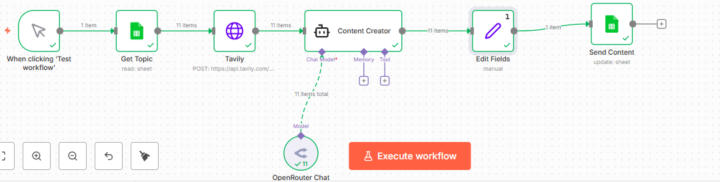
End-to-End LinkedIn Content Automation with AI
I’ve built an automated LinkedIn content creation workflow that takes an idea all the way to a post-ready draft—seamlessly. ⚙️✨ Using n8n, Google Sheets, AI, and real-time web research, the system now: 🔹 Pulls content ideas automatically 🔹 Researches topics from multiple sources 🔹 Synthesizes insights into a concise LinkedIn post 🔹 Updates content status without manual effort The result? Less time on research and formatting. More time on strategy and building. 🚀 This is what happens when automation meets AI—content creation becomes scalable, consistent, and intentional. If you’re an entrepreneur focused on building systems that work for you, not because of you, this approach is worth exploring. #Automation #AIWorkflows #ContentCreation #n8n #Entrepreneurship
1
0
1-10 of 21