Activity
Mon
Wed
Fri
Sun
Jul
Aug
Sep
Oct
Nov
Dec
Jan
Feb
Mar
Apr
May
What is this?
Less
More
Memberships
AI Automation Society
389.4k members • Free
useful AI
15.8k members • Free
Copy Skool
2.3k members • Free
Imperium Academy™
65.6k members • Free
Kreator Notes
1.7k members • Free
Copy Elite (Lite)
77 members • Free
7 contributions to useful AI

7d •
What is going on here?
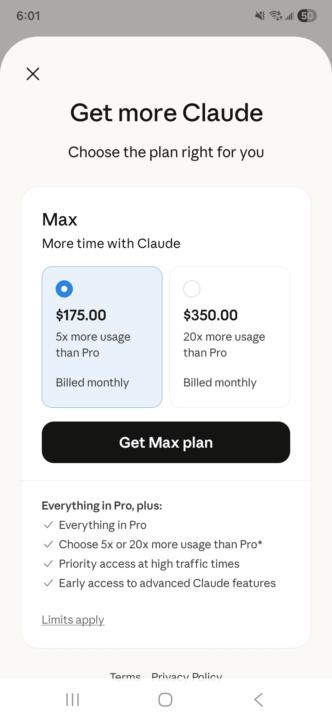
Does anyone know why the prices are much more on the app over the web browser and why won't they let me upgrade on the web browser if I signed up on the app? This is probably a dumb question but im so confused 🤣 I will pay $140 for max but im not paying $175 for max. Im not a rich AI expert..... yet😏

3 likes • 7d
This is just an assumption of mine, but I believe that the one on the website is before taxes, while the other one is after taxes, so you should pay the same for both i believe. (This is just my theory since I noticed the same thing and just to be sure I always pay on the website just in case I get to pay less lol)
11d •
I have created my own superwhisper!
So, for some reason superwhisper doesn't work on my pc, and when I asked claude it said that it is a common problem for windows users(idk why tbh). So I decided to create my own super whisper, I tested it, and while it is not 100% accurate it is WAY faster then just writing. Here's how to do it(I called it ultrawhisper) UltraWhisper — Installation Guide What it does: Hold ALT+K, speak, release → text appears wherever your cursor is. Requirements Windows 10/11 Internet connection (needed for transcription) Step 1 — Install Python 3.11 Download from this direct link: 👉 https://www.python.org/ftp/python/3.11.9/python-3.11.9-amd64.exe During installation check "Add Python to PATH" then click "Install Now". Step 2 — Download the app files Download the zip I send you and extract it anywhere you want (e.g. Downloads folder). Step 3 — Install the libraries Press Windows + R, type cmd, press Enter. In the terminal paste: "C:\Users\YOUR_NAME\AppData\Local\Programs\Python\Python311\python.exe" -m pip install faster-whisper pyaudio keyboard pyperclip pyautogui torch SpeechRecognition ⚠️ Replace YOUR_NAME with your Windows username (the one you see in C:\Users\). Step 4 — Create a desktop shortcut Go to the extracted folder, right click on avvia.bat → Show more options → Send to → Desktop (create shortcut). How to use it Double click the shortcut on your desktop Minimize the black terminal window that opens Click wherever you want to type Hold ALT+K, speak, release Text appears automatically ✓ Below is the zip file with everything you need. ONCE AGAIN: If you can, please use superwhisper, it is much better, I've built this while I find a way to make superwhisper work. Lemme know what y'all think about this!
1 like • 8d
@Wesley Penner yeah that’s what I’ve been focusing on lately!
26d •
Should I create a skill in the cowork homebase or should I create a new folder
Hello, I want to create a skill for lead sourcing(since I honestly hate it), And I was wondering, should I put this skill in the cowork homebase second brain KJ gave us, or is it more efficient to create a whole new folder for each skill. which one wastes the least tokens?
1 like • 26d
@Kj Rainey okok, thanks for the help brotha!
1 like • 24d
@Wesley Penner oh thanks, this’ll help a lot.
May 3 •
I don't think I got it tbh
Hello guys, so, I've setup the claude cowork starter which KJ explains in his video on his main channel(the video that's 1h and 30 mins long to be precise) And I now wanted to setup the obsidian + claude second brain, and I'm learning how to do this from the skool module, but the instant setup module looks very similar to the one he explains in the other video. so, my question is. Are these 2 the same thing? do i need to setup both or just 1? And if they are the same thing, can I skip the part where KJ talks about how to put the second brain folder in cowork and jumo straight to how to connect obsidian? Thanks for your time and patience, have a good day!

Apr 29 •
Help with Mac OS
Sooo... looks like I need mac os 14 or higher to use Claude with cowork and found this out after paying for the claude upgrade.. this macbook doesnt support a higher version OS... I am NOT able to use the cowork starter pack and cannot add plugins... any suggestions?
0 likes • Apr 29
yo man, I had this same problem, but I had a HP computer. Which didn’t have windows 11 pro(required to use cowork) On windows you could buy the upgrade, but i still decided to buy a new pc since I had a bunch of coupons. So maybe check if you can buy the upgrade. otherwise the only solution I found was to change PC.
1-7 of 7

Active 7h ago
Joined Mar 4, 2026
Powered by