Activity
Mon
Wed
Fri
Sun
Feb
Mar
Apr
May
Jun
Jul
Aug
Sep
Oct
Nov
Dec
Jan
What is this?
Less
More
Memberships
AI Automation First Client
1k members • Free
Online Business Friends
84.1k members • Free
AI Automation Agency Hub
284.5k members • Free
InsightAI Academy
12.2k members • Free
AI Automation Agency Ninjas
19.3k members • Free
5minAI
2.9k members • Free
Ai Arabic Institute
2.1k members • $29
2 contributions to 5minAI

Feb '25 •
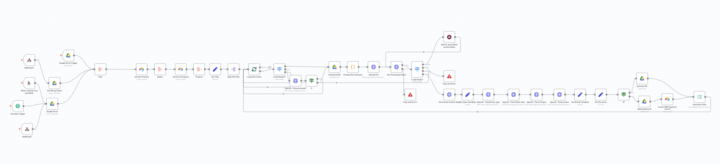
💼 Case study - Automating File Processing & Renaming with AI
Last time, I shared how we automated hiring 500+ candidates for a client without an HR team. If you missed that post, check it out here. Now, let’s talk about documents—because if you run a business, you know the struggle. This same client receives a constant flow of receipts and invoices via email and manually saves them to Google Drive. The problem? Finding and organizing these files later is a nightmare. They needed a way to automatically process, rename, and categorize them without spending hours sorting through folders. So we built an AI-powered automation that handles everything on autopilot. Here’s how it works: 🛠️ The Setup 1️⃣ Fetching New Files • Every time a new email arrives with an attachment, the system downloads the file and checks if it’s a receipt or invoice. • If it’s something else, we ignore it. 2️⃣ Smart AI Recognition • We process the file using LlamaParse, which allows us to: ✅ Extract tables (common in invoices) ✅ Recognize logos that contain company names ✅ Parse text even from image-based PDFs (which standard N8N nodes can’t handle) 3️⃣ Context-Aware Parsing • Instead of relying on generic AI recognition, we guide the AI with a predefined list of banks and companies the client frequently deals with. • This makes the results far more accurate and stable. 4️⃣ File Renaming & Metadata Tagging • AI extracts key details like date, amount, and entity name based on separate rule sets. • Each parameter is processed separately to increase precision—because main info and entities follow different logic. • Once identified, the file is renamed according to a structured pattern and saved in Google Drive. 5️⃣ Preventing Duplicates • To avoid reprocessing the same document, we add hidden metadata to each file. If a document comes through again, our system detects it and skips processing. 6️⃣ Structured Data Storage • Parsed information is saved in Airtable, where it links to related records—keeping everything structured for future reference.

1 like • Feb '25
Mark, U born Different
Jan '25 •
Seeking Expert n8n Developer for a Unique Opportunity in Saudi Market
Hello guys, We’re looking for a highly skilled n8n developer to join an innovative project targeting the untapped Saudi market. With no direct competition, this is a unique opportunity to make a significant impact. Compensation will be a percentage of monthly profits, ensuring a rewarding partnership for your expertise. If you’re ready to bring your skills to an exciting and high-potential project, let’s connect!
1-2 of 2

Active 116d ago
Joined Jan 20, 2025