Activity
Mon
Wed
Fri
Sun
Jul
Aug
Sep
Oct
Nov
Dec
Jan
Feb
Mar
Apr
May
What is this?
Less
More
Memberships
Jack Vs. AI Workflows
3k members • Free
AI Workshop Lite
24.2k members • Free
AI Automation Society
381.8k members • Free
AI Marketing Insiders
1k members • Free
Anime HQ
202 members • Free
AI App Coders
1k members • Free
aiOS App Builders
409 members • Free
Android Devs
1.4k members • Free
AI Automation Agency Hub
319.6k members • Free
5 contributions to AI Automation Society

💎
⭐
5h •
If you've ever felt "AI Overwhelm", please read this.
Every single person following AI right now is overwhelmed. Including me. I make videos about this stuff for a living and I still feel the pressure. New model drops. New framework. New feature update. It feels like every single day. But after hearing a ton of you guys bring up "AI overwhelm" week after week, I realized this: → There's a HUGE difference between knowing the "what" and knowing the "how." Staying aware does not mean testing everything. Most new tools and features only need the "what." You see the title. You understand what it does. You move on. The "how" is reserved for the stuff that solves a problem you actually have right now. So when something new drops, I ask myself one question: Does this solve a specific pain point I'm currently dealing with? If yes, I test it in a real scenario. I test it against something that actually matters to me. If no, I save the link. I mentally file it away. And I keep walking. Because here's the thing. Your north star is probably very different from mine. Part of my job is to experiment, form opinions, and share what I think is useful. So naturally I test a lot of stuff. But if your north star is building a business or getting better at your craft, then every shiny new tool might just be a distraction. The number one mistake I see people make is they try to learn everything. They watch every video. They test every tool. They jump to the next thing before the last thing even had a chance to work. And if I've contributed to your overwhelm with my daily uploads, I apologize. hehe. But a lot of people think that this ties directly into how you measure your day. Productivity is not how many hours you worked. It's how many meaningful outputs you created that actually moved the needle towards your north star. Someone can work 12 hours one day and feel insanely productive, but they were just watching tutorials and playing around with new tools. Meanwhile someone else sits down for 5 hours, ships the one thing that actually matters, and makes more progress.

2 likes • 3h
Love this take! Especially coming from you because you’re always putting out new information and going deep on emerging AI tools. What you said about experimentation really stuck with me too. The “what” becoming relevant enough to trigger the “how” behavior is such a grounded way to think about all of this. Honestly, I’ve caught myself wondering how you don’t get burned out keeping up with everything happening in AI right now. This post was grounding. Appreciate you sharing it.
11h •
Building AI Systems That Help People
Wanted to introduce myself a little more intentionally. I’m Ryan. I’ve been in marketing/operations for about 9 years, and AI has completely changed the way I think about workflows, systems, and automation these last couple years. I’m especially interested in helping nonprofits and human-centered businesses scale their impact through better organization, follow-up, outreach, and operational systems. A lot of what I care about comes down to: * reducing overwhelm * organizing chaos * building better systems * helping good people operate more effectively Also building almost entirely from my iPad right now which has been a fun challenge in itself. Would love to connect with more people thinking about AI in an ethical and people-centered way.
0 likes • 3h
@Hugo Alexander thanks Hugo!
0 likes • 3h
@Jacopo Antonucci Really appreciate that! That’s honestly a big part of why I’m exploring this direction. I think a lot of smaller nonprofits and mission-driven groups could benefit from AI and automation but don’t always have the time, money, or technical teams to implement it. The iPad thing has been fun because it’s forcing me to simplify and prove what’s actually possible with lightweight tools and systems. Excited to keep building and share what works.
11h •
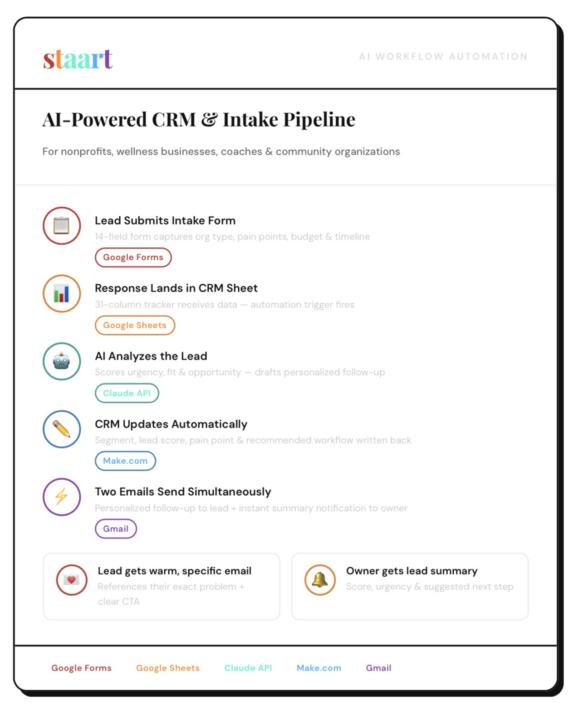
Built A CRM Workflow With Only an iPad
Big shoutout to this community. Seeing people consistently build and share wins is pushing me to stop overthinking and just execute. This morning I built an AI intake + CRM follow-up workflow this morning entirely from my iPad. A form submission now:→ scores the lead→ categorizes the organization→ drafts a personalized follow-up→ updates the CRM→ instantly sends notifications I’ve mainly used AI over the last 2 years for websites, web apps, and content systems. Now I’m starting to lean deeper into workflow automation for nonprofits, wellness brands, creators, and human-centered organizations.
1 like • 11h
@Dan Y Thank you! Loving this group ❤️💯

Mar 17 •
Wanted to share my automated business practices
Wanted to share what an actual automated business looks like in practice. Here's my current stack: 1. Market Research Bot — scans 50k+ real estate leads, pulls pain points and context 2. Email Personalizer — reads each agent's website, writes a unique outreach email 3. Email Sender — delivers 200/day, logs everything, self-heals if it crashes 4. Media Pipeline — YouTube URL in → smart clips out → uploaded to Shorts automatically 5. Nightly Review Bot — writes my business journal every night at 11:30 PM Each system does one job. Together they run the outreach and content side of my business without me. The pattern I follow: if I'm doing a task more than twice, I build a bot for it.
1 like • Mar 18
Very cool!
💎
⭐
Mar 17 •
🚀New Video: Claude Code + Blotato = Content Machine
In this video, you'll learn how to combine Claude Code and Blotato to automatically repurpose a single YouTube video into finished LinkedIn, Instagram, and X posts with custom visuals, all in a matter of minutes. Starting from a brand new setup, the full walkthrough covers installing Claude Code in VS Code, connecting to Blotato, and building a reusable skill that handles transcript extraction, platform-specific copy, and graphic creation. Every time you run it and give it feedback, it gets better, making this one of the highest-leverage content systems you can build right now.
4 likes • Mar 18
I’ve been looking into implementing this. Thanks for this timely and actionable resource!
1-5 of 5

@ryan-williams-2925
AI Product Manager building and looking to scale AI-driven content and tools.
Always experimenting, shipping fast, and exploring what’s next.
Active 3h ago
Joined Mar 17, 2026
Powered by