Activity
Mon
Wed
Fri
Sun
Sep
Oct
Nov
Dec
Jan
Feb
Mar
Apr
May
Jun
Jul
Aug
What is this?
Less
More
Owned by Rudolf
For AI builders, Electricians, and Tradies who want Real Support, live calls, open convos & chill w/ a cuppa — grow with action, not hype.
"Wearable light therapy that activates your own stem cells. Real health results and a real income opportunity. No drugs. No chemicals. No hype."
CELLTRUTH-START HERE 🇩🇪🇺🇸
43 members • Free
Google Ads Masterclass
15.1k members • Free
Synthesizer: Free Skool Growth
46.4k members • Free
This Is It Team Training
9.3k members • Free
Skoolers
161.7k members • Free
16 contributions to Oleg's AI Lab

Apr 7 •
🚀 New Video: How I Use Claude Code To Find Viral Topics First
I built a system that scans Twitter, news websites, and YouTube every morning — filters out the noise, clusters duplicate coverage into stories, and scores everything by relevance. No more doomscrolling 10 tabs to stay informed. In this video I show the full system live and walk you through building your own. Here's the quick setup guide: 1. Connect your data sources Claude Code supports external tools through MCP and API integrations. For this system you need: - Apify — scrapes Twitter/X accounts and YouTube channels. Get an API key at apify.com, add it to your .env as APIFY_API_KEY. Claude Code calls Apify actors via REST API to pull tweets and video metadata + transcripts. - Firecrawl — scrapes any website (blogs, news sites). Get an API key at firecrawl.dev, add it as FIRECRAWL_API_KEY. Claude Code uses it to grab article content from pages like techcrunch.com, openai.com/news, etc. - Kie AI — (optional) for generating visual assets from your trend data. Add as `KIE_AI_API_KEY`. 2. Define your sources Create a list of Twitter accounts and websites relevant to YOUR niche. Mine are 10 Twitter accounts (@OpenAI, @AnthropicAI, @karpathy, @sama, etc.) and 5 news sites. You can track any industry — crypto, biotech, marketing, whatever. 3. Write a Claude Code slash command Create a file at `.claude/commands/trends.md` that tells Claude to: - Fetch latest posts from your Twitter accounts (via Apify) - Scrape your news websites (via Firecrawl) - Filter to news only (drop opinions and commentary) - Cluster items about the same event into stories - Score each story 1-10 for relevance to your niche Then just run /trends in Claude Code and it does everything. 4. Generate a web interface Ask Claude Code to build you a simple Next.js page that displays your stories grouped by day, sorted by score. Mine has color-coded badges (green = high relevance, gray = low), expandable source lists, and voting buttons so the system learns what I care about over time.

0 likes • Apr 8
@Martha Su looks like its in the video

Feb 4 •
Healthcare IT Consultant Turned My Free Template Into $720/Month 🔥
Added 2 nodes to community template. Posted as free download. Healthcare IT consultant DM'd: "Can I deploy this to my clinic clients commercially?" He deployed to 6 clinics. I get paid for all of them. $720/month recurring. THE B2B2C DISCOVERY: Built patient intake form automation. Posted to n8n community forum. Expected: Maybe some GitHub stars and feedback. Got: Message from consultant serving 15 healthcare clinics. "This is exactly what my clients need. Can I use it commercially?" THE DEAL STRUCTURE: He becomes authorized reseller: - Deploys my template to his clinic clients - Handles all client customization (forms, fields, branding) - Manages client relationships and support - I provide template updates and technical escalation support THE ECONOMICS: My pricing to consultant: - $600 setup per clinic - $120/month per clinic His pricing to clinics: - $1,800 setup per clinic - $300/month per clinic His margin: - $1,200 per clinic setup - $180/month per clinic ongoing EVERYONE WINS: - Clinics: Get automation they desperately need - Consultant: New revenue stream from existing clients (no acquisition cost) - Me: Scale without sales effort or client management CURRENT NUMBERS: - Clinics deployed: 6 (3 more in pipeline) - My monthly recurring: $720 - Setup revenue collected: $3,600 - My time after initial template: 4 hours total - His total client base: 15 clinics THE MULTIPLIER MATH: If half his clinics deploy (7-8 clinics): - My monthly recurring: $960-$1,080 - From ONE consultant relationship And he's already referring other healthcare IT consultants in his network. HOW TO FIND MULTIPLIER PARTNERS: Look for consultants who: - Serve 10+ similar clients (healthcare IT, accounting tech, legal tech) - Have relationships but lack automation expertise - Want new revenue streams from existing clients You have automation. They have distribution. WHAT MAKES TEMPLATES REUSABLE: Good B2B2C templates: - Solve common problem across industry (patient intake, invoice processing)
1 like • Feb 5
this is such an underrated angle. most people try to sell direct and miss the leverage sitting right next to them. consultants already have trust + access, templates give them speed. feels obvious once you see it… but most never do. smart move
Jan 15 •
Building My AI SaaS In Public: $5400 Generated💰
Hey guys! Just dropped my new Build In Public vlog, sharing behind the scenes of building my AI startup Using n8n on the backend Scaling step-by-step, closed another sale today In the video I'm showing one of the sales calls that I failed spectacularly 😁 Going all-in on marketing soon Hope to inspire some of you to build your products as well 💪🏻 It's actually easier than many people think PS. Re-uploaded the video today, because yesterday I got banned by YouTube for using profanity 😂 🥲 So would really appreciate your support 🙏
1 like • Feb 3
@Oliva Bennett from NZ, electrician for 31 yrs and now putting my hand full time at AI and bio tech in medical
1 like • Feb 3
@Oliva Bennett excuse me
Dec '25 •
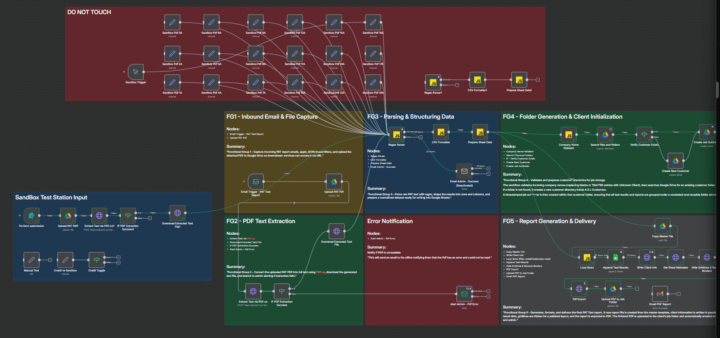
What do you call this
Its not a crows next I promise, thats how I test my customers workflow to try and break it before I do handover
3 likes • Jan 26
@Max Gibson as soon as I have the final version I will make a YT from that as well and you can watch that one too 😉
2 likes • Jan 27
@Alex Bodi whatever

Jan 16 •
🚀 Built a Chrome Extension Using Cursor AI (Vibe Coding) — Prompt Navigator for ChatGPT
Hey everyone 👋 I’ve been building in public and wanted to share something I recently built using Cursor AI with a Vibe Coding workflow. I created a Chrome extension called Prompt Navigator that focuses on solving a common issue I faced while using ChatGPT — managing and reusing AI prompts. In most AI tools today, prompt management is still manual. Prompts get buried in long conversations, and we often end up scrolling or rewriting them again. Prompt Navigator helps by: - Organizing AI prompts in one centralized place - Allowing users to mark frequently used prompts as favorites - Searching prompts instantly - Copying or inserting prompts with one click - Providing a clean, modern UI for daily AI workflows 🧠 What stood out for me during this build was how much Cursor AI accelerated development. Using a Vibe Coding approach helped me move faster from idea to a working Chrome extension, especially for UI logic and iteration. 🎥 I’ve created a short demo video showing how Prompt Navigator works in real scenarios: 👉 Watch the demo here: https://youtu.be/hZiL2wYTTsI?si=9-t2zi_RfiStoReL I’d love to hear feedback from this community — whether on the idea, the UX, or the build process using Cursor AI. Happy to answer questions or share learnings from the build 🙌
3 likes • Jan 21
thats pretty awesome, where did you learn to build a Chrome ext
1-10 of 16

@rudolf-van-loggerenberg-3547
Electrician | Business Owner | AI Automation lover, helping entrepreneurs to learn AI and Business Owners to take their time Back.
Active 2d ago
Joined Oct 22, 2025
New Zealand, Tauranga
Powered by