Activity
Mon
Wed
Fri
Sun
May
Jun
Jul
Aug
Sep
Oct
Nov
Dec
Jan
Feb
Mar
What is this?
Less
More
Memberships
Rekindle The Flame
33 members • Free
We Meet Wednesdays ☕️🔥💪❤️
911 members • Free
Influencer Strategy w/Nicole V
146 members • Free
Amazon Influencer Elites
873 members • Free
Affiliate Skool
348 members • Free
Elite Affiliation
124 members • Free
Zamboni Inner Circle
1.9k members • Free
Pinterest Marketing Community
342 members • Free
Pinterest Skool
3.4k members • Free
3 contributions to Zamboni Inner Circle

24d •
🎁🧧 Gift: 55 different ways people are making money with AI
A gift from Amanda Craven. Direct link; no opt-in: https://drive.google.com/file/d/1PgOJwLV2SDqje187CElHNkARVwQkjDft/view

1 like • 17d
Great info! Thank you!
21d •
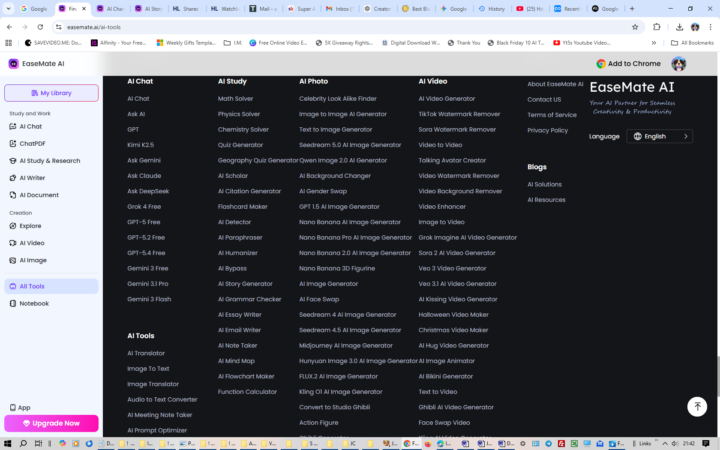
Every AI Tool You Could Ever Need In One Place🤖😺
I stumbled across this site while looking on Google, and it's packed with incredible tools https://www.easemate.ai/ai-tools
1 like • 17d
Nice thanks!

18d •
From Rundown on grok and scheduling tasks for free.
AI TRAINING 🔎 How to use Grok for free automated research The Rundown: In this guide, you will learn how to use Grok's Tasks feature. If you have a free X.comaccount, you get 2 automated tasks each day — use them to build automated daily research briefings pulled from live X data. Step-by-step: 1. Go to Grok and sign in with your X account. Click on your profile picture in the bottom left, then click Tasks in the pop-up 2. Click New Task, give it a name, set your schedule (daily, weekly, or specific days), and prompt: “Search X for the top trends in [your niche] from the last 24 hours. Summarize the top 3 and flag anything gaining traction” 3. Once you save the task, Grok will run the search on schedule and send you the results via email and as a push notification in the mobile app 4. To view run results on desktop, navigate back to grok.com/tasks and click on the task.
2 likes • 17d
Thank you!
1-3 of 3

Active 9d ago
Joined Feb 20, 2026
Raleigh, North Carolina