Activity
Mon
Wed
Fri
Sun
Feb
Mar
Apr
May
Jun
Jul
Aug
Sep
Oct
Nov
Dec
Jan
What is this?
Less
More
Owned by Rodney Thompson
A hands-on wilderness community built around judgment, real-world skills, and quiet outdoor confidence. No hype. Just what works.
Memberships
The Human Practice
237 members • Free
The Skoolyard 🧃
589 members • Free
Business Builders Club
1.7k members • Free
Evergreen Foundations
468 members • Free
Recalibrate Outdoors
32 members • Free
YouTube Revolution
277 members • Free
Skool Dogs 🐶🏆❤️🎉
101 members • Free
Trinity Code ⭐️
107 members • Free
The Cozy Chaos Rebellion
59 members • Free
52 contributions to Business Builders Club

🔥
7h •
Maintenance Night 🔧
Not every evening is for progress. Some are for tightening loose bolts. Answering one message you’ve been avoiding. Cleaning up a half-finished system. Closing a loop that’s been quietly pulling at you all week. Maintenance isn’t flashy, but it’s what keeps things from failing later. What’s one small piece of maintenance you’re handling tonight so it doesn’t become tomorrow’s problem? Where the Map Ends, The WILD begins!! Stay Rugged.
🔥
5 likes • 7h
@Hicham Char I need to do this exact thing, thanks for the reminder.

🔥
20h •
Moving Infographics INSANE COOL Idea to Stop the Scroll
*Note: I received permission to copy and share this post. I just copied and pasted the text. I also had to download the web browser extension NotebookLM. The attached moving infographics are different from the original. I used Grok (free) -> Imagine. ========== I am sharing - i did not come up with it-- but its too good not to share. Want to make an amazing moving infographic? This is an example using a YouTube Video (example of Evelyn Weiss sharing her Vision Board Video) I uploaded the link to NotebookLM and created an Infographic with a description of what type I wanted. 1. Paid version (Gemini pro) 2. Free (Grok) 3. Free Grok without prompt (animate image / Imagine option) Youtube -> Notebook LM -> Gemini or Grok 1-Choose your YouTube video as your info source 2-Click NotebookLM button (under video) to create a new notebook 3-Click Infographic and the pencil in corner: Type '"Dark Mode Neon" (or Cyber-Minimalism) designed for a social media post that will pop off viral 4-Take the output infographic image to Gemini or Grok 5-enter prompt below ===== CONTEXT: You are animating a short, visually appealing transformation from a blank white textured canvas into a completed infographic. The infographic is provided as a static image (uploaded). The animation must not generate, render, or simulate any intermediate graphics, text, or shapes not already present in the final image. This video will be used for professional marketing and educational presentations. ROLE: You are a Senior Motion Designer with 20+ years of experience in cinematic transitions for enterprise-level infographics and user interface intros. You are known for working with source images only — no AI-generated overlays, fake content, or inferred elements. ACTION: 1. Start with a white textured canvas background (subtle paper or linen texture). 2. Animate a **visual reveal of the uploaded infographic image**, using cinematic techniques such as:

🔥
4 likes • 20h
This is awesome will have to give it a try thanks.

⭐
🔥
3d •
Weekly Recap: The Best Threads You Might Have Missed
Today the BBC officially turned 40 DAYS OLD! 🎉 This week I want to focus on highlighting the WINS & incredible posts from the members of our growing family. We had so many incredible threads. Please dive in, get involved and let's keep the energy growing here. The BBC is special because of you all. 🫶🏾 🏆 Community Wins! 1. @Elmo Anticamara created a really fun 24 Hour Challenge! 2. @Max Gibson and his family celebrated the birth of a new baby boy! 3. @Christina Joy officially launched her community! Show her some love. 4. @Samuel Kern won 2026 Top 100 Innovators and Entrepreneurs Magazine! 5. @Rodney Thompson Outdoor Skills went on his very first camp trip of 2026! 6. Also @Tim Adam's the American Ninja + pinterest king hit 900 MEMBERS!!!! 😮💨 🎊 The Best Posts From Our Family 1. @Max Gibson: 7 Voice AIs and app For Free! 2. @Iris Ocariza asked "Does burnout = being less human?" 3. @Anything Ai made an Official Mixtape of our BBC Playlist! 4. @Mike Montgomery asked the Best book you read in 2025? 5. @Alex Armstrong asked "Is Consistency Really The Problem?" 6. @Duncan Rogoff asked What’s one big lesson you learned in 2025? 7. @Eric Michaud shared how he got his first win with a free blueprint! 8. @Nick Nebelsky shared a powerful testimony of his journey in the BBC. 9. @Theresa Elliott what’s your “Hype” song or playlist for when you need motivation?

🔥
16 likes • 3d
@David Iya Appreciate you pulling this together. It’s easy to miss just how much momentum and substance is building week to week until you see it laid out like this. Grateful to be part of a group where the wins feel earned and the conversations actually matter. Where the Map Ends, The WILD begins!! Stay Rugged.
🔥
2 likes • 1d
@Faderera Adesina Well said. That’s exactly what stood out to me too — real wins, real effort, and people actually showing up for each other. Grateful to be part of a community that celebrates progress without noise. Where the Map Ends, The WILD begins!! Stay Rugged.
⭐
🔥
4d •
Never Have I Ever: It's Time to Confess! 🤹🏾♂️🏂
Time to reveal your truths everyone!!! Friday night we played Never Have I Ever and I said the winner gets a 24 hr pinned post of their businesses or skool. This was the most fun yet. Such a wild group. First off: you all are SO FUNNY and interesting! 😂 I'm always amazed by everyone here. The stories in the comments had me laughing all night. Some of you have lived entire lifetimes. Some of you are genuine adrenaline junkies, and others have never even gotten a speeding ticket. The spectrum of chaos in here is unmatched. I love these games because I get to know all of you better every time. ♥️ ALSO plot twist: I played my own game wrong. (Sleep deprivation strikes again) My wife, and @Gareth Parkes reminded me that UP is a Pixar movie, and I absolutely cried during the opening scene. 🤧😪 So, I actually had 4 truths and only 1 lie: 1. ✅ Should've been LIE - I HAVE cried during Pixar 2. ✅ TRUE - I have been snowboarding in Aspen 3. ✅ TRUE - I have texted "omw" when I hadn't left 4. ❌ LIE - I have not pretended WiFi was bad (my only actual lie) 5. ✅ TRUE - I have definitely pretended to know songs when everyone was singing So, anyone that guessed 1 or 4 will get an extra point for my questions. 😂 NOW IT'S YOUR TURN - DROP YOUR REVEALS BELOW! 👇 ⚠️ Note: I also realized that some people played the game backwards. If you did then please type "BACKWARDS" so I can take that into account when I'm tallying up everyone's points for this. 🫶🏾

🔥
0 likes • 1d
@Elmo Anticamara 😂 Fair assessment. Chaos tends to be a good teacher — as long as you survive it. Where the Map Ends, The WILD begins!! Stay Rugged.
🔥
0 likes • 1d
@Iris Ocariza That’s really it — lessons earned, not borrowed. Those stick the longest. Where the Map Ends, The WILD begins!! Stay Rugged.

2d •
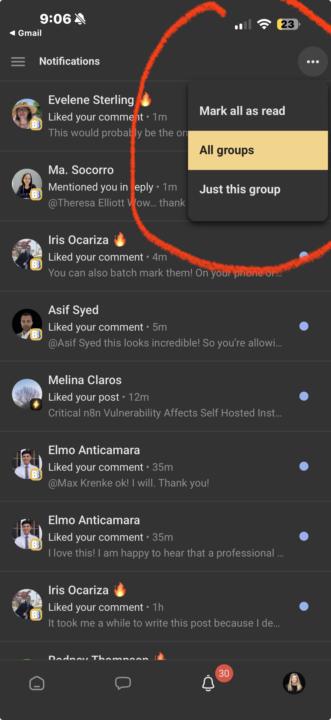
Drowning in Skool Notifications? I can help
This is a VERY active community and if you are participating a lot here, you are already very likely seeing dozens of notifications a day. If you haven’t already done so., and If you would like to reduce the noise in your inbox, here is how to streamline that and take back control, by following these steps.
🔥
4 likes • 1d
Very good information, I was overwhelmed until I figured this out, actually had some members that I know personally tell me that's why they my community.
1-10 of 52
🔥
@rodney-thompson-5051
Practical wilderness skills, canoe camping, navigation, and judgment-based outdoor confidence.
YouTube: Blackwater Outdoor Journeys
Active 5h ago
Joined Dec 12, 2025
Powered by